How to delete a printer from a command line or from Delphi

The command line for deleting a printer looks like this:

rundll32 printui.dll PrintUIEntry /dn /n\\machine\printer

I could not get that to work for my current situation. So I wrote a Delphi program that did the same.

You can down load it here.
PrinterManipulation.zip

You can use this next source code clip instead of downloading if you like. It assumes there are three buttons on the page and one listbox on a form named Form1. After creating those controls, select all of the pascal source text AFTER the “unit” line and paste this source code over top of it. After that, double click on all of the buttons, compile and you’ll have a peice of running code.

[delphi]
// ****************************************************************************
// u_PrinterManipulation.pas 12/Dec/2006
// Written by Brian Layman
// Visit him at http://www.TheCodeCave.com
//
// A quick program to demonstrate the deletion of a printer.
//
// Usage: PrinterManipulation.exe Just click on the button 1 to populate and
// select a printer off of the list. Use button2 or button3 for two
// different deletion methods. Double clicking the list is the same as
// clicking button3.
//
// History:
// 04/Dec/2006 – BL – Created
//
// ****************************************************************************
interface

uses
Windows, Messages, SysUtils, Classes, Graphics, Controls, Forms, Dialogs,
StdCtrls;

type
TForm1 = class(TForm)
Button1: TButton;
ListBox1: TListBox;
Button2: TButton;
Label1: TLabel;
Button3: TButton;
procedure Button1Click(Sender: TObject);
procedure Button2Click(Sender: TObject);
procedure ListBox1Click(Sender: TObject);
private
{ Private declarations }
public
{ Public declarations }
end; // TForm1

var
Form1: TForm1;

implementation

{$R *.DFM}
uses
WinSpool, Printers;

type
{******************************************************************************
TPrinterDevice
******************************************************************************}
TPrinterDevice = class
Driver, Device, Port: String;
constructor Create(ADriver, ADevice, APort: PChar);
function IsEqual(ADriver, ADevice, APort: PChar): Boolean;
end; // TPrinterDevice

{******************************************************************************
Create
******************************************************************************}
constructor TPrinterDevice.Create(ADriver, ADevice, APort: PChar);
begin // Create
inherited Create;
Driver := ADriver;
Device := ADevice;
Port := APort;
end; // Create

{******************************************************************************
IsEqual
******************************************************************************}
function TPrinterDevice.IsEqual(ADriver, ADevice, APort: PChar): Boolean;
begin // IsEqual
Result := (Device = ADevice) and ((Port = ”) or (Port = APort));
end; // IsEqual

{******************************************************************************
TForm1
******************************************************************************}
{******************************************************************************
Button1Click
******************************************************************************}
procedure TForm1.Button1Click(Sender: TObject);
var
indx: Integer;
begin // Button1Click
ListBox1.Clear;
for indx := 0 to (Printer.Printers.Count – 1)
do ListBox1.Items.Add(Printer.Printers[indx]);
end; // Button1Click

{******************************************************************************
ListBox1Click
******************************************************************************}
procedure TForm1.ListBox1Click(Sender: TObject);
var
hPrinter : Cardinal;
PrinterDef: PRINTER_DEFAULTS;
pPrinterName: PChar;
begin // ListBox1Click
pPrinterName := PChar(ListBox1.Items[ListBox1.Itemindex]);
FillChar(PrinterDef, sizeof(PrinterDef), #0);
PrinterDef.DesiredAccess := PRINTER_ALL_ACCESS;

if (OpenPrinter(pPrinterName, hPrinter, @PrinterDef))
then begin
if DeletePrinter(hPrinter)
then ShowMessage(‘Deletion Succcesful’);
ClosePrinter(hPrinter);
end
else ShowMessage(‘Could not open’);
end; // ListBox1Click

{******************************************************************************
Button2Click
******************************************************************************}
procedure TForm1.Button2Click(Sender: TObject);
var
ADevice: PChar;
PrinterHandle: THandle;
begin // Button2Click
with TPrinterDevice(Printer.Printers.Objects[ListBox1.ItemIndex])
do begin
GetMem(ADevice, Length(Device));
StrCopy(ADevice, PChar(Device));
end;
OpenPrinter(ADevice, PrinterHandle, nil);
if DeletePrinter(PrinterHandle) then ShowMessage(‘Deletion Succcesful’);
ClosePrinter(PrinterHandle);
FreeMem(ADevice);
end; // Button2Click

end.
[/delphi]

The Two Weeks of Delphi/C++ 2006 Live Webinar Series

November 6-17, 2006The Developer Relations team will be presenting ten live one-hour Delphi and C++ 2006 Webinars on BDNtv starting Monday, November 6, 2006 and ending Friday, November 17. Each live Webinar will cover a different product use and development theme.http://bdn.borland.com/article/33778

All Webinars take place at 1pm Pacific Standard Time.Equivalent times in other cities are:

  • Scotts Valley – 1pm
  • New York City – 4pm
  • 2100 GMT/UTC
  • 9pm London
  • 10pm Frankfurt
  • 6am (+1 day) Tokyo
  •  8am (+1 day) Sydney

Topics:

Week 1
Nov. 06 – Mon – What’s New in Delphi/C++Builder 2006
Nov. 07 – Tue – Delphi/C++Builder Database App Development and Project Migration
Nov. 08 – Wed – Building .NET Compact Framework Applications with Delphi 2006.
Nov. 09 – Thu – Building, Testing, and Delivering Quality Applications using Delphi
Nov. 10 – Fri – IDE Personalization, Config, and Tuning Tips & Tricks for Delphi/C++

Week 2
Nov. 13 – Mon – Delphi/C++Builder 2006 Reporting Solutions
Nov. 14 – Tue – Building Apps with Commercial, Open Source, and Free Components
Nov. 15 – Wed – Working with Single and Multi-Language Project Groups
Nov. 16 – Thu – Using C++ Libraries, DLLs, ANSI C++, Boost, and the C++ TR1 Library
Nov. 17 – Fri – Preparing your Delphi/C++Builder Applications for Windows Vista

How to scroll to the end of a TMemo or TRichEdit in Delphi

This is a simple one, but I had to look it up.

So, by my self imposed rules, I have to post it.

This text will constantly scroll memo-like-fields to the end.

[delphi]
Memo1.SelStart:=Length(Memo1.Text);
Memo1.SelLength:=0;
SendMessage(Memo1.Handle, EM_SCROLLCARET, 0, 0);

[/delphi]

This allows you to have an active logging component at the bottom of a form. Proof of concept coming soon.

The Oracle: The Lost Secrets and Hidden Message of Ancient Delphi

I was dissapointed that not a word was mentioned about Borland or DevCo in this article… I don’t even see Allen Bauer’s name once!

http://www.findarticles.com/p/articles/mi_m2843/is_3_30/ai_n16418748

The Oracle: The Lost Secrets and Hidden Message of Ancient Delphi
Skeptical Inquirer, May-June, 2006

The Oracle: The Lost Secrets and Hidden Message of Ancient Delphi.
By William J. Broad.
The Penguin Press, New York, 2006. ISBN 1-59420-081-5.304 pp. Hardcover $25.95,

The ancients said the Oracle of Delphi regularly inhaled sacred vapors streaming from the depths of her temple. But in 1892 French archaeologists unearthed the temple and found no evidence of a chasm from which the vapors might have emitted, and after that scholars denounced the Oracle as a fraud. Now the accomplished New York Times science reporter Bill Broad chronicles the investigation by Wesleyan geologist Jelle deBoer and archaeologist John Hale, who eventually determined that the ancient fumes were petrochemical vapors containing a hallucinogenic gas–ethylene–emitted from natural faults hidden beneath the temple floor. Their paper, “New Evidence for the Geological Origins of the Ancient Delphic Oracle (Greece),” was published in Geology in August 2001. Broad entertainingly tells the story of their discovery, weaving in ancient findings and modern philosophical discussions about science and religion. The discovery solves the mystery of how the Oracle got high, yet Broad feels that the larger questions, “the surrounding layers of mystery,” remain. He notes the need for skepticism about psychic powers but argues against overly narrow scientific reductionism that may blind scientists to larger mysteries.

Using Delphi and TWebBrowser to process WordPress’s HTML Source code

I don’t have a lot of time since I am heading off to my brother-in-law’s highschool graduation in upstate NY tomorrow. I might be able to post date a few articles for the Verizon Phone tips category, but this will be the last meaty post for a little while. So, today you get a program that I wrote at the beginning of the month when I wanted to let people know I’d written an article about the release of WordPress 2.03: TrackbackGrabber.

This little routine will go to a WordPress post, grab the source code and isolate all of the track backs for you. It turns them in to seperate lines of <255 characters each that you can paste into your ping back line on your post. Then when you publish an article, you will let everyone on that list know about it. This is somethign I used to do manually and it took forever! IMPORTANT: Don’t abuse this or it will back fire and you’ll quickly be labeled a spammer and will be reported to Akismet, Spam Karma and other spam filtering tools. If that happens none of your comments, trackbacks or manually typed entries, will get through anywhere!

Concepts Demonstrated:


  • Surfing the web using Delphi

  • Using a TWebBrowser Active X control to navigate the DOM structure of a website

  • Retreiving the source code of a webpage

  • The fundamentals of creating a web bot in Delphi

  • Filtering contents of a TMemo

  • How to tell when a page has loaded in the TWebBrowser

That last one was the tricky part. If you access WebBrowser1.Document too soon, you will get an access violation. Sleeps and process messages, no matter how many you use or how long you wait, do NOT consistently work. Pressing the button (calling WebBrowser1.Navitate twice) always worked but I found WebBrowser1.ReadyState in the documentation and checking that seems to be the right way to do it.

Exe: http://www.thecodecave.com/downloads/delphi/TrackbackGrabber.exe
Source Code: http://www.thecodecave.com/downloads/delphi/TrackbackGrabber.zip

Main unit:
[delphi]
// ****************************************************************************
// TrackBackGrabber_Main 06/Jun/2006
// Written by Brian Layman (AKA Capt. Queeg AKA SilverPaladin)
// Visit him at http://www.TheCodeCave.com
//
// WordPress’s Trackback system is a way to connect articles about the same
// topic. If you post something related to a popular article, this tool allows
// you to tell other bloggers that have posted related articles that you have
// additional information on the subject.
//
// Warning: I can’t think of any way that this routine could cause harm to
// your computer, but it could spell the end of your blog if you abuse it.
// Abuse this tool and it WILL back fire. You’ll quickly be labeled a
// spammer and will be reported to Akismet, Spam Karma and other spam
// filtering tools. If that happens, none of your comments, trackbacks or
// manually typed entries, will get through anywhere! It would really stink
// to have every comment you leave on any WordPress blog automaticly
// deleted.
//
// As always, I’ll say it is a good best practice to understand every line
// of new code before you run it. Who knows what could be lurking? Better
// yet, do not run this example at all. You should stop right now and erase
// the files. For if it causes blue smoke to be emitted from your network
// card, if it erases all users from your computer, or if it makes your
// sister break up with her lawyer boyfriend and start dating a caver, it
// is not my fault. (Actually that last one might be an improvement, but
// it is still not my fault.) But the fact of the matter is, computers
// have a mind of their own and we programmers live on the wild side.
//
// Usage: TrackBackGrabber.exe
// Supply an URL to a WordPress post and it will grab all of the track
// back links and then consolidate those to lines 255 characters long.
// Then all you need to do is paste each line into your WordPress post’s
// track back field and hit save. Each site will only be updated once.
//
// Licensing – You can use this source as you will. It’s free for
// commercial, shareware and gpl use as you like. I hope it helps.
// If this program & source really helps you out, please visit
// http://www.thecodecave.com/did-that-help/ and read more.
//
// History:
// 06/Jun/2006 – BL – Created
//
// ****************************************************************************
unit TrackbackGrabber_Main;

interface

uses
Windows, Messages, SysUtils, Classes, Graphics, Controls, Forms, Dialogs,
StdCtrls, OleCtrls, SHDocVw, mshtml;

type
TfrmTrackback = class(TForm)
memoResults: TMemo;
btnGather: TButton;
editAddress: TEdit;
WebBrowser1: TWebBrowser;
procedure btnGatherClick(Sender: TObject);
private
{ Private declarations }
procedure ProcessPage;
public
{ Public declarations }
end;

var
frmTrackback: TfrmTrackback;

const
// This defines what to look for.
// In this case it is TrackBacks.
// Deliberate references to this article for.
SEARCH_STR = ‘Trackback from Memo1.Lines.Count)
do begin
S := Memo1.Lines[0] + ‘ ‘ + Memo1.Lines[Loop];
if (Length(S) < 255) then Memo1.Lines[0] := S else begin Memo1.Lines.Insert(0, Memo1.Lines[Loop]); inc(Loop); end; Memo1.Lines.Delete(Loop); end; end; // ProcessPage end. [/delphi]

Resetting the resolution of a monitor from within Delphi

This is a rescue app that can help a computer that turns on and is obviously working but the customer says nothing comes up on the screen. They quite often won’t admit what was done but the monitor says Freq Out of Range or nothing at all.

Just put this in the startup folder, reboot, and your problem is solved. It also works as a good party trick…

EXE: http://www.TheCodeCave.com/downloads/delphi/ResetRes86.exe
Source and exe: http://www.TheCodeCave.com/downloads/delphi/ResetRes86.zip[delphi]

// ****************************************************************************
// ResetRes86 01/Jan/2000
//
// Written by Brian Layman (AKA Capt. Queeg AKA SilverPaladin)
// Visit him at http://www.TheCodeCave.com
//
// A rescue util for Windows machines that have been set to a resolution not
// supported by the monitor. This has made me a hero for many a customer.
//
// I also used two modified versions of this tool, each associated with a
// hot key to switch between the resolution my monitors at could use and
// the resolution my monitors at home could use back when I strapped a
// handle onto my work computer and carried it back and forth.
//
// Warning: This routine changes your Windows settings. It can be used as a
// joke or a tool. It is a good best practice to understand every line
// of new code before you run it, who knows what could be lurking. Better
// yet, do not run this example at all. You should stop right now and erase
// the files. For if it causes blue smoke to be emitted from your network
// card, if it erases all users from your computer, or if it makes your
// sister break up with her lawyer boyfriend and start dating a caver, it
// is not my fault. (Actually that last one might be an improvement, but
// it is still not my fault.) But the fact of the matter is, computers
// have a mind of their own and we programmers live on the wild side.
//
// Usage: ResetRes.exe
// Simply place this file in the folder:
// C:\Documents and Settings\All Users\Start Menu\Programs\Startup
// and reboot the computer. When the next person logs it, the monitor
// will be at a resolution and hz cycle supported by all modern CRT and
// LCDs.
//
// Suggested Usage: If you have a game that
//
// Donations – If this program & source really helps you out, feel free to
// buy me a cappacino, movie ticket, ebook, or something else small for
// my next “Dad’s Night Out”. You can Paypal to Brian@TheCodeCave.com. Or
// leave a comment on my blog with your country of origin. Or even better
// yet, add me to your blog roll.
//
// History:
// 01/Jan/2000 – BL – Created
//
// ****************************************************************************
program ResetRes86;

uses
Forms, Windows;

{$R *.RES}

var
pDMode : _DEVICEMODEA;
begin
// The only required line for a Delphi app…
Application.Initialize;

// Assign the desired device mode
// The BitsPerPel is the only non-selfexlanatory setting I think.
// It controls the color depth as follows.
// 4 = “16 Colors”
// 8 = “256 Colors”
// 16 = “High Color”
// 24, 32 = “True Color”
pDMode.dmBitsPerPel := 8;
pDMode.dmPelsWidth := 800;
pDMode.dmPelsHeight := 600;

// Some touch screen LCDs don’t display at a rate higher than 60
pDMode.dmDisplayFrequency := 60;

// Mark the items that we are changing.
PDMode.DmFields := (DM_BITSPERPEL or DM_PELSWIDTH or DM_PELSHEIGHT or DM_DISPLAYFREQUENCY);
// Pass in the size, since we could change any number of fields.
pDMode.dmSize := SizeOf(pDMode);

// Call ChangeDisplaySettings to assign the settings to the registry and make
// it take effect.
// CDS_UPDATEREGISTRY The graphics mode for the current screen will be changed
// dynamically and the graphics mode will be updated in the registry. The mode
// information is stored in the USER profile.
ChangeDisplaySettings(pDMode, CDS_UPDATEREGISTRY);
end.[/delphi]

RamRod – BBC7 Flavour

I’m home sick today.

So here’s a quick post with a tool that I wrote to speed up my access to BBC7’s spoken word/audio books shows.

RamRod: BBC7 Flavour

RamRod has been custmized for BBC7 Links

As many of you know, I often spend hours listening to England’s BBC7 radio stream. They re-air all of the serialized Sci Fi, mystery, comedy and Drama radio shows that were broadcast in the last century in the BBC and sometimes in the US.

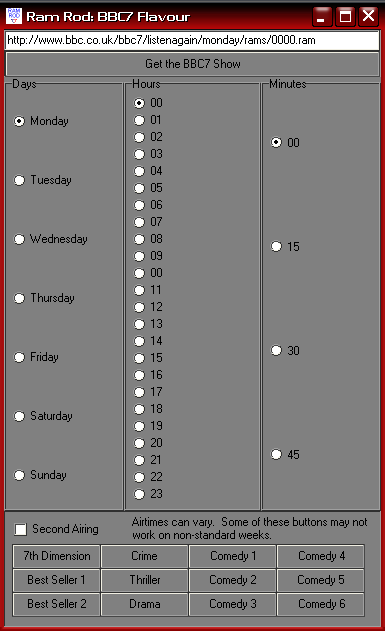
They have a listen again feature that allows you to listent to any of the shows you’ve missed in the last week. This program helps make that easier. So while I am home sick today, I can click on the 7th Dimension button and can listen to their Monday Sci Fi show, an unabbidged reading of Day of the Triffids. When that show is over, I just select Tuesday and click the go button and I’m on to the next show. Since, BBC7 is on a weekly rotating schedule, I can do that for all of the shows, for instance the Crime and Thriller hour is featuring a dramatization of Sara Paretsky VI Warshawski’s novel Deadlock. Since I am a week behind I can easily click through the episodes as I catch up.

In any case, maybe someone will find this useful. It’s great to be able to hear Michaela say “Saturday at 11 on BBC7” and within three clicks, be listening to it…

A working screen shot of The Code Cave's Ram Rod program, BBC7 Flavour.

This Delphi demo with source shows how to download a file from the interenet.
Downloads:
Here is the EXE: http://www.thecodecave.com/downloads/delphi/RamRod4BBC7.exe
Source:
Continue reading RamRod – BBC7 Flavour

Bad Image Finder Updated….

I’ve updated my earlier post about “How to find bad JPEG files in a directory – via Delphi (Source Code)“. It now includes a routine to do extra corruption checking if the image is a JPEG. The problem is that I don’t fully see/agree with the logic in this routine… but it seems to work better the person I wrote it for…. I just need some non-artificially corrupted JPEG files to test it on…

Anyway, see if you can make better sense of this…
[delphi]
while (Cardinal(pB) < pE) do begin if (pB^ < $E1) then begin Result := TRUE; Break; end else begin inc(pB); if (pB^ >= $E1)
then begin
inc(pB);
if (pB^ >= $E1)
then begin
Result := TRUE;
Break;
end;
dec(pB);
end;
dec(pB);
end;
inc(pB, 16);
end; [/delphi]

It goes backwards through the last line of the image and checks to see if the color (I believe) is less than the constant $E1. If it is, then result is changed from FALSE to TRUE and the routine exits with IsValidJPEG returning TRUE. Otherwise, if all the pixels in that line have a color greater than or equal too $E1 (labeled suspect blue),then the result remains FALSE and IsValidJPEG returns false…

So… basically it makes sure that there’s at least one valid colored pixel on the line and then it is assumed the jpeg is valid? That seems kindof sketchy to me… but if it works…

Any thoughts?

How to find bad JPEG files in a directory – via Delphi (Source Code)

UPDATE: Source, EXE and ZIP updated to include new corruption detected routine…

Let’s just dive right into this one…
Here is the exe:
http://www.TheCodeCave.com/downloads/delphi/BadImageFinder.exe

Here is the Zip of the exe, forms and source:
http://www.TheCodeCave.com/downloads/delphi/BadImageFinder.zip

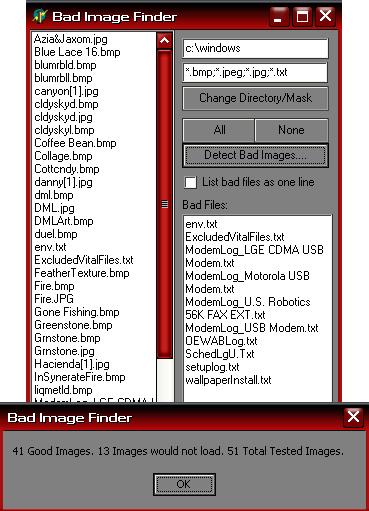
Here’s an image:The main screen

Here is the source for the main BadImageFinder_Main.pas file… (Hope this helps!)
Continue reading How to find bad JPEG files in a directory – via Delphi (Source Code)

Resizing JPEGS in Delphi to create Thumbnails for posting to the web

I thought I might post this example… It works really well with the Light box java script plugin for WordPress… It is a single file (DPR) Delphi console app that can be used in a batch file to resize jpegs to any percentage of the original size.

I use it with ZTree by tagging all of the JPegs I wish to resize and then hitting CTRL B. Ctrl B will create a batch file out of all of the tagged files with the command line that I enter. So the command line I use is “ResizeJPeg %4.%5” and 10 seconds later, I have a large set of images and thumbnails I can post to the web.

BTW I use net drive to make drive X: be a my FTP directory. NetDrive is WONDERFUL!!! I dare say it is ALMOST as useful as ZTree…. Almost….

For those who have no care to be interested in compiling Delphi Source code, here is the EXE: ResizeJPEG.exe

[delphi]
// ****************************************************************************
// ResizeJPEG.DPR 01/Jul/2004
// Written by Brian Layman (AKA Capt. Queeg)
// Visit him at http://www.TheCodeCave.com
//
// This routine was written to help resize jpegs for posting to the web
//
//
// Warning: This routine opens your images and replaces files without
// warnings. It is not ever supposed to edit your original image, but
// if something unexpected happens, you could lose some important images.
// Understand every line of this example before you run it. Or better yet,
// do not run this example at all. You should stop right now and erase the
// files. For if it causes blue smoke to be emitted from your network card,
// if it erases all users from your computer, or if it makes your sister
// break up with her lawyer boyfriend and start dating a caver, it is
// not my fault. (Actually that last one might be an improvement, but
// it is still not my fault.) But the fact of the manner is, anything
// could happen when you mess with the registry and this example IS,
// in all seriousness, dangerous.
//
// Usage: ResizeJPEG.exe JPGNAME.JPG <-- Resizes the image to 10% of original // ResizeJPEG.exe JPEGNAME 50 <-- Resizes the image to 50% of original // // License - If this helps you - Great! Use it, modify it share it. // // Donations - If this project really helps you out, feel free to make a $5 // (US) token donation via Paypal to Brian@TheCodeCave.com or just leave a // comment on my blog and include your country of origin. // // History: // 01/Jul/2004 - BL - Created // // **************************************************************************** program ResizeJPEG; uses ExceptionLog, Forms, Classes, JPEG, Graphics, SysUtils; {$R *.RES} {****************************************************************************** DoResize This routine receives two JPEGs and the percentage (as a whole number) of the original size. It only does aspect ratio resizing. The creation and freeing of the JPEGs must be done outside this routine. srcJPEG must contain an image. destJPEG's contents will be overwritten. Passing a zero or negative percentage will ******************************************************************************} procedure DoResize(srcJPEG, destJPEG: TJPEGImage; const Pct: Integer; BMPName: String = ''); var Bitmap: TBitmap; begin // DoResize if (not(Assigned(srcJPEG) and Assigned(destJPEG))) then raise Exception.Create('There has been a programming error. ' + 'The JPEG parameters passed to DoResize have not ' + 'been initialized.'); // Error out if we don't have a valid source image if (srcJPEG.Empty) then raise Exception.Create('The parameters passed cannot produce a valid image. ' + 'The source image is blank.'); // Error out if we don't have a valid source image if (Pct <= 0) then raise Exception.Create('The parameters passed cannot produce a valid image. ' + 'The percentage (' + IntToStr(Pct) + '%) is invalid.'); Bitmap := TBitmap.Create; try Bitmap.Width := Trunc(srcJPEG.Width * (PCT/100)); Bitmap.Height := Trunc(srcJPEG.Height * (PCT/100)); Bitmap.Canvas.StretchDraw(Bitmap.Canvas.ClipRect, srcJPEG); destJPEG.Assign(Bitmap); if (BMPName <> ”)
then Bitmap.SaveToFile(BMPName);
finally
Bitmap.Free;
end;
end; // DoResize

var
JPEGOrig, JPEGTemp: TJPEGImage;
ImgName, imgExt: String;
Percentage: Integer;
CreateBMP: Boolean;
begin
Application.Initialize;
// Retreive first parameter and strip off any path info.
// That’s the file name. This now includes the extension.
ImgName := LowerCase(ExtractFileName(ParamStr(1)));

// Determine the extension
ImgExt := ExtractFileExt(ImgName);

// If there is an extension, remove it from the file name.
// If there is no extension, assume ‘.jpg’ for now.
if (ImgExt <> ”)
then ImgName := copy(ImgName, 1, Length(ImgName) – Length(ImgExt))
else ImgExt := ‘.jpg’;

// The third parameter is for the percentage of change.
// If not provided, it defaults to 10%
Percentage := StrToIntDef(ParamStr(2), 10);

CreateBMP := Boolean(StrToIntDef(ParamStr(3), 0));

// This if statement both verifies that the file is there and that it now has
// a .jpg or .jpeg extension. If these conditions are not met, the program
// exits without an error.
if (FileExists(ImgName + ImgExt) and ((ImgExt = ‘.jpg’) or (ImgExt = ‘.jpeg’)))
then begin
// Create the object for manipulating the new image
JPEGTemp := TJPEGImage.Create;
try
// Create the object for storing the original image
JPEGOrig := TJPEGImage.Create;
try
// Load the original
JPEGOrig.LoadFromFile(ImgName + ImgExt);

// Call the subroutine for resizing the original and putting it in the
// temporary object.
if (CreateBMP)
then DoResize( JPEGOrig, JPEGTemp, Percentage, ImgName + ‘_s.bmp’)
else DoResize( JPEGOrig, JPEGTemp, Percentage);

// Save the new image with a “_s” tacked onto the file name.
JPEGTemp.SaveToFile(ImgName + ‘_s’ + ImgExt);
finally // try around JPEGOrig usage
// Free the original object
JPEGOrig.Free;
end; // try around JPEGOrig usage
finally // try around JPEGTemp usage
// Free the new/temp object
JPEGTemp.Free;
end; // try around JPEGTemp usage
end; // if fileexists
end.[/delphi]