Delphi for PHP Article 1: A Video Walk Through

Rumors have been flying around for the last month about Borland producing a PHP product. “PHP? Are they nuts?” some said, “Concentrate on what you know! Are you trying to create another Kylix just to have it fade away to nothing?” Needless to say, I was a bit more optimistic than that… I mean come on! RAD PHP development? How cool would that be? PHP has the EXACT same feel as Pacal did back in the late 80s. It’s a baby language just starting to grow up. Even the people in it have the same core “I’m gonna help you because I know later you will help me” attitude that Pascal and Delphi always had.

Plus, since the restructuring of Borland has sifted the chaff from the wheat, CodeGear seems have its act together and the people of CodeGear are really the cream of the crop. (Yes, I know. I just said that they are Cream of Wheat, let it go… just let it go.)

Well, dreams came true when I was invited to be a CodeGear field tester. And last Thursday morning, with the verbiage hot off the presses from the Borland legal department, I was granted a limited exemption from my NDA (Non-disclosure agreement) to pitch a possible Google Summer of Code 2007 joint D4p/WordPress project to Automattic (I’ll let you know later how that turns out…). That NDA exemption also gave me permission to post articles and write reviews of the product. So here we are today!

So, now I can show you tell you all about the cool stuff I’ve been doing and show you movies I’ve made of the product in action.

In my usual fashion, I’ve written a gargantuan article. Instead of posting huge thing, I’m splitting the sections off into separate articles. Today, I just want to give you walk through of the product and show you some of the stuff that makes it unique.

This video uses a pre-release version of Delphi for PHP. Components, look and feel, and features may change before release. THIS VIDEO HAS SOUND.

If you have any problems with the video playback on any browser please let me know and I will try to get it to work.

Build your own spam filter with PHP and DNSBLs

Have you ever gotten an email asking if want certain parts of your body enlarged, parts that you might not even have? Was the next email you read one asking if you want to loose the inches you’ve recently gained? Did you ever notice how these emails are always from people that you are fairly certain have nothing to do with the contents of the email. Did MTeresa@Vatican.org really send that diet pill email? Have you ever gotten returned or rejected “can’t be delivered” emails from addressed you’ve never ever sent an email to?

I have.

SPAM. It’s HORRIBLE! My email box for Brian@TheCodeCave.com probably gets 3 to 1 spam over real email. I expected that. I put that address out everywhere and don’t protect it. It is meant to be my public address. But the FROM addresses on all that email never indicates who the email is really from. Even the company information inside the email header is faked. The spammers will grab someother name on their spam list and use it as their from address. I’ve had my name put into the from address of emails a few times. It’s an annoying problem, just ask the Nuclear Moose.

Why this can happen is a long story. It all relates back to the fact that SMTP and port 25 were never meant for submitting emails to email servers. SMTP was only meant for server to server communications. However, that’s for a different post. The long and short of it is that everything can be faked except for one thing: the IP address of the server that sent the email.

Because that IP address is accurate, you can use it to tell if the person that sent the email is a spammer. The post tells you a couple ways to do that. And because this is The Code Cave, you get a fully functional php routine to boot.
Continue reading Build your own spam filter with PHP and DNSBLs

How not to query a Quake, Halflife, RtCW, FarCry game server status via PHP…

This is the story of a man who simply want to create a nice page describing the users of a few games servers for a Return to Castle Wolfenstein mod called The WildWest.

He was over joyed when he stumbled across a PEAR module called GameServerQuery. He’d spent hours and hours trying to get QStat to work on his 1and1.com server, but it never did work and no one could tell him why. He spent additional hours trying to find a PHP module that did the same thing, but everything he found was a wrapper for QStat. He’d given up on the search a full year before he stumbled across PEAR’s GameServerQuery. So, you can just imagine his joy.

Well, that joy was short lived…as the pain soon began. If you don’t want to know the whole sad story, feel free to jump ahead to the summary section where you can see the final results and decide what will best work for you.

The Painful Process

Now, if you are on a shared server, chances are you cannot install cusotm modules until you gotten your own instance of PEAR up and running. Read about how to do that here. After you have done this you are ready to install the GameServerQuery module.

Here’s how an average user would install the GameServerQuery module:
pear install –alldeps Net_GameServerQuery

Except that for 1and1, it won’t work. That command asks PEAR to install the latest officially released version. Right now that’s version 0.2.0. An Alpha release. And by default, 1and1.com only allows stable versions to be installed in a generic request.

So you have to request a specific version. Here’s how you do that:
pear install –alldeps “channel://pear.php.net/Net_GameServerQuery-0.2.0”

BUUUUUT for 1and1.com, that won’t work. It gives you an error that Net_GameServerQuery requires PHP version 5 but the default version installed on 1and1.com is version 4.4.2. But as loyal readers of TheCodeCave.com know, all 1and1.com users can run php 5 with a 1 line change to .htaccess. However, even with that change, PEAR has no way of determining that, at runtime, php5 will be used instead of php4. So, you have to tell the module to install no matter what… To do this you override that option by adding the –force option. Just like this:
pear install –alldeps –force “channel://pear.php.net/Net_GameServerQuery-0.2.0”

AND THAT installs GameServerQuery!

Hooray!!!

Except…. that this version doesn’t work. It is all full of alpha version issues. For example, it was obviously written on a Windows Machine for all of the slashes are back slashes instead of forward slashes. That simply won’t work on a Linux server. It’s a novice PHP programmer mistake. Another problem is that as the code is written on 1and1.com, you would have to put a php.ini file in every PEAR GameServerQuery subdirectory. And that’s just not the way to do things!

Fortunately the newest version of GameServerQuery is available through CVS to install:
http://cvs.php.net/viewvc.cgi/pear/Net_GameServerQuery/?pathrev=RELEASE_1_0_4

However, my CVS program is royally messed up right now and I haven’t needed it for ages. So I wasn’t about to mess with it again. So I decided to build an htm file from the contents of the XML file
(http://cvs.php.net/viewvc.cgi/pear/Net_GameServerQuery/package.xml?revision=1.4&content-type=text%2Fplain&pathrev=1.4) that describes the source files in the repository.

I REALLY think that should have been the hard way to do it. But I could not figure out the url for the zip or tarball for that release. If you know of an easier way to download a zip of a specific version of a viewvc processed cvs archive, I’d REALLY like to hear from you!

But anyway, I did the old right-click-save-as dance for all of the files and put them in the appropriate directories. I’ll save you that work. Here’s a zip: GameServerQuery_1_0_4.zip

You can extract it to the PEAR/PHP directory or to your web directory…

I have zipped up the examples too:
GameServerQuery_1_0_4_examples.zip

They’ve been somewhat mutilated by me in my testing. You can get the real ones here:
http://cvs.php.net/viewvc.cgi/pear/Net_GameServerQuery/docs/examples/?pathrev=RELEASE_1_0_4
if those don’t work.

Version 1.0.4 is a working version (with one minor change) of GameServerQuery and produces very nice report of the server properties and reports.

BUUUUUT it won’t run 1and1.com. This one is not their fault. It won’t ANY shared server to the best of my knowledge. I have seen at least one reference saying that access to socket level communication is restricted to root level access on (all?) shared server environments. It makes some sense that it would be. There is only 1 machine and that one machine might have to try and leverage a common socket across many different virtual servers. 1and1 just won’t/can’t let a single server lock up a socket.

What will happen when you try to connect out on a port, is that you will set off all sorts of internal alarms and you’ll get an email from the Customer Compliance Operatives (I’m serious – that’s how they sign their emails: “Customer Compliance Operative – 1&1 Internet Inc.”), but that’s a tale for another time.

So, what do you do? Well, it is simple. You use XAmPP to create a server on your local windows machine. Don’t bother with the whole PEAR install thing, just extract the zip (with directories in tact) to the folder that contains your example files and all will work beautifully. Then you just need to modify the scripts to produce static files and upload the results to your 1and1.com account on a regular basis – say every 15 minutes or so. Easy Peasy!

Summary

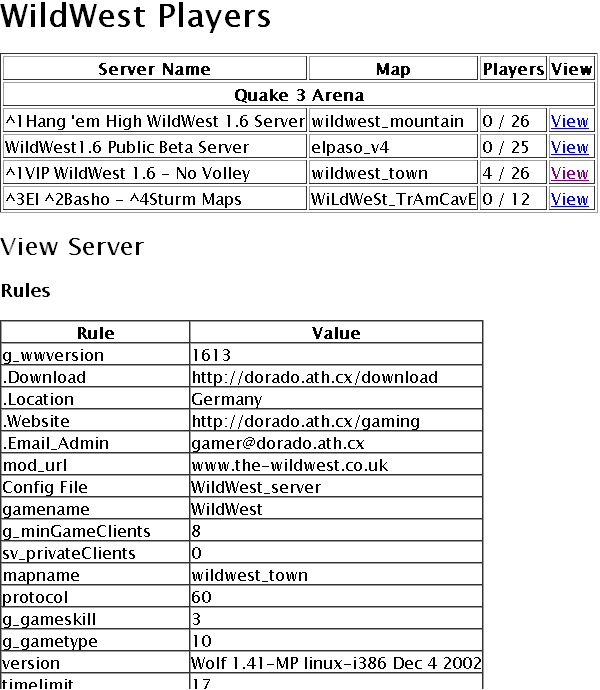
While manually downloading the 1.0.4 version of GameServerQuery produces a functional report on dedicated webservers, for it will not work on vitual hosts, you get a basic array in return and must do all the needed formatting yourself. The example files show some simple ways to do that. As shown here:
Game Server Query Pear Module output

Now that I knew the terms to search for, I was able to find another package on SourceForge that does this exact same thing in a much more professionally refined fashion. The package is called PHGStats. It includes an installation script that guides you through creating a configuration file for the servers you will monitor. It produces will formatted pages with special functions for each game, such as color code support in server and player names.
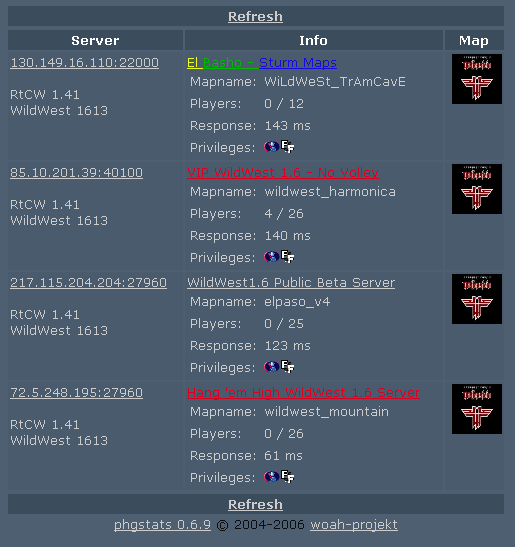
With very little configuration, you get nice server lists that look like this:

PHGStats server list.

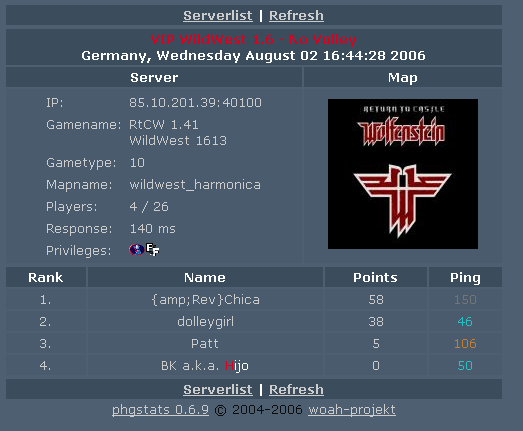
and player lists that look like this:
PHGStats player list.

I think both tools have their place. I will probably use the QueryGameServer to create a program that monitors the servers and emails people when there is somene waiting around for a game. I’ll probably have it check the servers every 3 minutes or something like that. The second heavy weight tool will be used to generate pages every 15 minutes or so…

You have been hacked! or What not to do with your 1and1 account…

Well, I had a nice post about how I was distracted from posting more Delphi code because I was playing with a new pear module I’d found called GameServerQuery. I was finishing that post by asking if anyone had gotten it to work because I was pretty sure I had everything correct but it wasn’t working. Before I published the post I noticed someone had telneted into my account and run some bash commands. And I knew it was not me…

They searched for my local ip address and an example file I used for Game Server Query. Very odd…

Then I got an email from 1and1 saying I was hacked and that “WordPress needed to be updated because it had many security holes”. Uhhhh, no it doesn’t.

Long story short – I wasn’t hacked my anyone but a 1and1 representitive and dumbing language down for the end user is a bad practice if you don’t also provide them with an explaination of what you REALLY mean.

I’ve got enough materials for four or five posts out of this whole thing, but if I combine all the detail here, this post will be 5 pages long and it won’t make any sense when read as a whole.

So, here’s a summary and some good things to know when working with 1and1.com shared host accounts –

1. They say: Don’t use your account to host a game server or simliar program.
They mean: We monitor and block outbound socket connections from your server. By doing this we lock out people looking for a cheap game server, and we protect our customers sites from several common attacks. We will allow FSocketOpen but the traffic is interupted and you will be contacted by a “Customer Compliance Operative”.

“Customer Compliance Operative”?!?!?!!? So, is that like one of the Men in Black or more like a Mafia enforcer? Will I be zapped by a blinky light and forget all the PHP code for openning sockets if I continue with this post?

UPDATE: I just found a reference that indicates that this is probably NOT 1and1.com fault.
Someone was investigating why Traceroute was not available on shared servers and discovered that socket traffic could not be accessed without root level access. Of course root level access cannot be givin on a shared server. If anyone can Confirm or Deny this, I’d appreciate the additional information…
2. 1and1 passwords should not be considered secure and therefore should only be used on 1and1. Any/all 1and1 account representatives have access to your root passwords and can login as you and for all intents and purposes impersonate you using your accounts. What bothers me most about this is that they don’t have a policy of notifying you that they have logged in as you to do something… That’s wrong…

3. 1and1 Support reps as a whole – as might be expected – have only general knowlege about the vast number of programs out there that could be running on your server. So they will look for alarm words and offer generic advice when they see one of these dangerous words. This could be considered a form of Red Zone Management, I guess. They get involved only when they need to and only know the hot topic of they day. So they will search for a file called XMLRPC.php since last year it had a hole in it. So, that means you were probably hacked. If they see WordPress, they know it had vulnerablities earlier in the year, so they can assume you were hacked. They will not research/know the versions of the files involved even if they are listed in the logs. Again, this is really to be expected. I would not want every customer support rep to be a $90,000 a year security expert. I sure would not be paying what I am paying right now for the service.

4. When working with support, if you want a good solid response help them give it to you. You can be in control of the calls and guiding the representative will make the call easier on both sides. This is true of any company any where in the world. Not every support rep will have the same level of training, the pressing calls of the moment can and will take priority to the detriment of other calls, if something is important to you trust but verify it has been done.

5. The latest version of the Pear module GameServerQuery is good and functional. The latest version is not what pear serves up. You have to retreive it manually. PhGStats is a MUCH more refined tool and produces more fully functional pages. There’s a place for both of these tools. That place, btw, is NOT 1and1.com – see point 1.

More on each of these topics later…

How to run PHP5 on 1and1.com in 1 easy step…

It actually can’t get any easier than this.

Just put the following line in your .htaccess file:

AddType x-mapp-php5 .php
AddHandler x-mapp-php5 .php

And your done! Your site is now running under PHP5.

Enjoy…


Want proof? Want to know details?

Well… Here you go…

It turn’s out that 1and1.com accounts all come with PHP4 active. By default php files are processed by PHP Version 4.4.2.

Test this out on your 1&1 server without affecting the operation of your site:

Create a new directory called TestPHP4

Create a file in that folder called index.php that contains the following text

[php]

phpinfo();
?>

[/php]

Then open that directory in your web browser.

You’ll get something that looks like this:

PHP Logo

PHP Version 4.4.2

System Linux infong 2.4 #1 SMP Wed Jan 18 14:53:29 CET 2006 i686 unknown
Build Date Feb 6 2006 10:16:02
Configure Command ‘../configure’ ‘–with-pear’ ‘–with-mysql=/usr’ ‘–with-zlib’ ‘–enable-debug=no’ ‘–enable-safe-mode=no’ ‘–enable-discard-path=no’ ‘–with-gd=/usr’ ‘–with-png-dir=/usr/lib’ ‘–enable-track-vars’ ‘–with-db’ ‘–with-gdbm’ ‘–enable-force-cgi-redirect’ ‘–with-ttf=/usr/’ ‘–enable-ftp’ ‘–with-mcrypt’ ‘–enable-dbase’ ‘–enable-memory-limit’ ‘–enable-calendar’ ‘–enable-wddx’ ‘–with-jpeg-dir=/usr/src/kundenserver/jpeg-6b’ ‘–enable-bcmath’ ‘–enable-gd-imgstrttf’ ‘–enable-shmop’ ‘–enable-mhash’ ‘–with-mhash=/usr/src/kundenserver/mhash-0.8.9/’ ‘–with-openssl’ ‘–enable-xslt’ ‘–with-xslt-sablot’ ‘–with-dom’ ‘–with-dom-xslt’ ‘–with-dom-exslt’ ‘–with-imap’ ‘–with-curl’ ‘–with-iconv=/usr/local’ ‘–with-freetype-dir=/usr/include/freetype2’ ‘–with-bz2’ ‘–with-gettext’ ‘–enable-exif’ ‘–with-idn’ ‘–enable-mbstring=all’
Server API CGI
Virtual Directory Support disabled
Configuration File (php.ini) Path /usr/local/lib/php.ini
PHP API 20020918
PHP Extension 20020429
Zend Extension 20050606

Now copy and rename the TestPHP4 directory as TestPHP5 (or create the directory as above manually). Now create one more file in the TestPHP5 directory named .htaccess

Make certain a period is in front of htaccess like this: .htaccess

The period indicates this it is a hidden file. It tells your system how to process requests. In this case we will tell it to process all .php files as php5 files. That is done by adding the following line:

AddType x-mapp-php5 .php

Now save that file and browse to the directory with your web browser. You’ll see something like the following:

PHP Version 5.1.4

System Linux infong371 2.4.28-grsec-20050113a #1 SMP Thu Jan 13 08:59:31 CET 2005 i686
Build Date May 4 2006 13:56:29
Configure Command ‘../configure’ ‘–program-suffix=5’ ‘–with-pear=/usr/local/lib/php5’ ‘–with-config-file-path=/usr/local/lib/php5’ ‘–with-libxml-dir=/usr/local/php5’ ‘–without-sqlite’ ‘–with-config-file-scan-dir=.’ ‘–with-mysqli=/usr/local/mysql/bin/mysql_config’ ‘–enable-soap’ ‘–with-xsl=/usr/local/php5’ ‘–enable-mbstring=all’ ‘–with-curl=/usr/local/php5’ ‘–with-mcrypt=/usr/local/php5’ ‘–with-gd’ ‘–with-pdo-mysql=/usr/local/mysql’ ‘–with-freetype-dir’ ‘–with-libxml-dir=/usr/local/php5’ ‘–with-mysql=/usr/local/mysql’ ‘–with-zlib’ ‘–enable-debug=no’ ‘–enable-safe-mode=no’ ‘–enable-discard-path=no’ ‘–with-png-dir=/usr/lib’ ‘–enable-track-vars’ ‘–with-db’ ‘–with-gdbm’ ‘–enable-force-cgi-redirect’ ‘–with-ttf=/usr/’ ‘–enable-ftp’ ‘–enable-dbas’ ‘–enable-memory-limit’ ‘–enable-calendar’ ‘–enable-wddx’ ‘–with-jpeg-dir=/usr/src/kundenserver/jpeg-6b’ ‘–enable-bcmath’ ‘–enable-gd-imgstrttf’ ‘–enable-shmop’ ‘–enable-mhash’ ‘–with-mhash=/usr/src/kundenserver/mhash-0.8.9/’ ‘–with-openssl’ ‘–enable-xslt’ ‘–with-xslt-sablot’ ‘–with-dom’ ‘–with-dom-xslt’ ‘–with-dom-exslt’ ‘–with-imap’ ‘–with-iconv=/usr/local’ ‘–with-bz2’ ‘–with-gettext’ ‘–enable-exif’ ‘–with-idn’
Server API CGI
Virtual Directory Support disabled
Configuration File (php.ini) Path /usr/local/lib/php5/php.ini
Scan this dir for additional .ini files .
PHP API 20041225
PHP Extension 20050922
Zend Extension 220051025

You now have two different directories that process files using two different php engines.

Pretty cool huh?

Please include your work to support the answer…

Cindy’s comment on my last post reminded me that I did not show any of the routines I tried while trying to figure out how to get the full raw email from the built in PHP imap_ routines.

So, here it is… It is obviously scrap work, but some one might find it useful to have all in one place. Just save this as a php file on your server (some place not shared since you’ll have your email password in it in raw text) and then change the mail server, username and password references (3 of them) to your own. As is, this routine will display a VERY simple webmail reader. It displays a list of messages in your box and the contents of 1 message.

It should give you the groundworks for building something more complex.

However, what it does not include is any part of the TRUE header which is what I pointed out here that I really need.

BTW this routine is OBVIOUSLY NOT safe html. If you display an email that has an embedded code that does nasty stuff, this testing routine will not protect you from it. It is JUST test code. Use it wisely.

[php]
This is just an example of how I research a topic.
‘);
print(‘Therefore it is not fully documented or clean.
It contains code fragments of my own making and those found on the web, who knows where.

‘);
print(‘There are THREE places where you must put in your email server, email username and email password.
‘);
print(‘Otherwise, you will get very limited results.

‘);

function list_emails(){
$MAILSERVER=”{imap.1and1.com:143}”;
// or $MAILSERVER=”{pop.1and1.com:110}”;
// or $MAILSERVER=”{localhost:143}”;
$PHP_AUTH_USER = “YourAddrHere@thecodecave.com”;
$PHP_AUTH_PW = “YOUR_PW_HERE”;

$mbox=imap_open($MAILSERVER,
$PHP_AUTH_USER,
$PHP_AUTH_PW);

print(‘


‘);
print(‘
THIS SECTION REPORTS ON THE FULL MAIL BOX

‘);

echo “Number of Total Emails: ”
.imap_num_msg($mbox);
echo ” Number of Recent Emails: ”
.imap_num_recent($mbox).”

“;
$headers=imap_headers($mbox);
for($x=0; $x < count($headers); $x++) { $idx=($x+1); echo $idx."
$headers[$x]

“;
}
imap_close($mbox);
}

function view_message_num($num){
$MAILSERVER=”{imap.1and1.com:143}”;
// or $MAILSERVER=”{pop.1and1.com:110}”;
// or $MAILSERVER=”{localhost:143}”;
$PHP_AUTH_USER = “YourAddrHere@thecodecave.com”;
$PHP_AUTH_PW = “YOUR_PW_HERE”;

$mbox=imap_open($MAILSERVER,
$PHP_AUTH_USER,
$PHP_AUTH_PW);
$header=imap_headerinfo($mbox,
$num,
180, 180);
print(‘


‘);
print(‘
This is a print_r of the header contents.

‘);
print_r($header);
print(‘


‘);
print(‘
This is a print_r of only the header->from contents.
I wanted to ensure the print_r contained all the info from the subarrays. This text should also be found above.

‘);
print_r($header->from);
print(‘


‘);
print(‘
This is the header info parsed out

‘);
$from = $header->from;
$udate=$header->udate;
$date=Date(“F j, Y, g:i a”, $udate);
echo “Message Number: “. $num.”
“;
$subject= $header->fetchsubject;
if (is_array($from)){
while(list($key, $val) = each($from)) {
echo “From Address: “;
echo $fromaddr=sprintf(“%s@%s”,
$from[0]->mailbox,
$from[0]->host).

“;
echo “Personal : “.
$from[0]->personal.

“;
echo “Adl : “.
$from[0]->adl.

“;
echo “Mailbox : “.
$from[0]->mailbox.

“;
echo “Host : “.
$from[0]->host.

“;
echo “Subject : “.
$subject.

“;
echo “Date : “.
$date.

“;
echo “To Address : “.
$header->toaddress.


“;
}
}

print(‘


‘);
print(‘
This is a print_r of the results of a fetchstructure

‘);
$mid = $num;
$struct = imap_fetchstructure($mbox, $mid);
print_r($struct);
$parts = $struct->parts;
$i = 0;

if (!$parts)
{
/* Simple message, only 1 piece */
$attachment = array(); /* No attachments */
$content = imap_body($mbox, $mid);
}
else
{
/* Complicated message, multiple parts */

$endwhile = false;

$stack = array(); /* Stack while parsing message */
$content = “”; /* Content of message */
$attachment = array(); /* Attachments */

while (!$endwhile)
{
if (!$parts[$i])
{
if (count($stack) > 0)
{
$parts = $stack[count($stack)-1][“p”];
$i = $stack[count($stack)-1][“i”] + 1;
array_pop($stack);
}
else
{
$endwhile = true;
}
}

if (!$endwhile)
{
/* Create message part first (example ‘1.2.3’) */
$partstring = “”;
foreach ($stack as $s)
{
$partstring .= ($s[“i”]+1) . “.”;
}
$partstring .= ($i+1);

if (strtoupper($parts[$i]->disposition) == “ATTACHMENT”) { /* Attachment */
$attachment[] = array(“filename” => $parts[$i]->parameters[0]->value,
“filedata” => imap_fetchbody($mbox, $mid, $partstring));
}
elseif (strtoupper($parts[$i]->subtype) == “PLAIN”)
{ /* Message */
$content .= imap_fetchbody($mbox, $mid, $partstring);
}
}

if ($parts[$i]->parts)
{
$stack[] = array(“p” => $parts, “i” => $i);
$parts = $parts[$i]->parts;
$i = 0;
}
else
{
$i++;
}
} /* while */
} /* complicated message */

print(‘


‘);
print(‘
This is a print_r of the results of the entire content of the email turned into an array as offered by RJ
NOTE: THIS MIGHT NOT BE SAFE HTML

‘);
print_r($content);

print(‘


‘);
print(‘
This is a print_r of the body in text format. This in theory should be included above, but this is quote protected.

‘);
$Body_text = quoted_printable_decode($content);
print_r($Body_text);

imap_close($mbox);
}

/*********************************************************************************/
/* Calling routines */
/*********************************************************************************/
list_emails();
if (!isset($num)) {
$num =1;
}
view_message_num($num);
?>


type!=0){
//DECODE PART
//decode if base64
if ($p->encoding==3)$part=base64_decode($part);
//decode if quoted printable
if ($p->encoding==4)$part=quoted_printable_decode($part);
//no need to decode binary or 8bit!

//get filename of attachment if present
$filename=”;
// if there are any dparameters present in this part
if (count($p->dparameters)>0){
foreach ($p->dparameters as $dparam){
if ((strtoupper($dparam->attribute)==’NAME’) ||(strtoupper($dparam->attribute)==’FILENAME’)) $filename=$dparam->value;
}
}
//if no filename found
if ($filename==”){
// if there are any parameters present in this part
if (count($p->parameters)>0){
foreach ($p->parameters as $param){
if ((strtoupper($param->attribute)==’NAME’) ||(strtoupper($param->attribute)==’FILENAME’)) $filename=$param->value;
}
}
}
//write to disk and set partsarray variable
if ($filename!=”){
$partsarray[$i][attachment] = array(‘filename’=>$filename,’binary’=>$part);
$fp=fopen($filestore.$filename,”w+”);
fwrite($fp,$part);
fclose($fp);
}
//end if type!=0
}

//if part is text
else if($p->type==0){
//decode text
//if QUOTED-PRINTABLE
if ($p->encoding==4) $part=quoted_printable_decode($part);
//if base 64
if ($p->encoding==3) $part=base64_decode($part);

//OPTIONAL PROCESSING e.g. nl2br for plain text
//if plain text

if (strtoupper($p->subtype)==’PLAIN’)1;
//if HTML
else if (strtoupper($p->subtype)==’HTML’)1;
$partsarray[$i][text] = array(‘type’=>$p->subtype,’string’=>$part);
}

//if subparts… recurse into function and parse them too!
if (count($p->parts)>0){
foreach ($p->parts as $pno=>$parr){
parsepart($parr,($i.’.’.($pno+1)));
}
}
return;
}

//open resource
$MAILSERVER=”{imap.1and1.com:143}”;
// or $MAILSERVER=”{pop.1and1.com:110}”;
// or $MAILSERVER=”{localhost:143}”;
$PHP_AUTH_USER = “YourAddrHere@thecodecave.com”;
$PHP_AUTH_PW = “YOUR_PW_HERE”;

$link=imap_open($MAILSERVER,
$PHP_AUTH_USER,
$PHP_AUTH_PW);

$msgid = 2;
//fetch structure of message
$s=imap_fetchstructure($link, $msgid);
print_r($s);
die();
//see if there are any parts
if (count($s->parts)>0){
foreach ($s->parts as $partno=>$partarr){
//parse parts of email
parsepart($partarr,$partno + 1);
}
}

//for not multipart messages
else{
//get body of message
$text=imap_body($link,$msgid);
//decode if quoted-printable
if ($s->encoding==4) $text=quoted_printable_decode($text);
//OPTIONAL PROCESSING
if (strtoupper($s->subtype)==’PLAIN’) $text=$text;
if (strtoupper($s->subtype)==’HTML’) $text=$text;

$partsarray[‘not multipart’][text]=array(‘type’=>$s->subtype,’string’=>$text);
}
print(‘


‘);
print(‘
This is a print_r of another method of getting the complete parts of the email. This is the parts array.

‘);
print_r($partsarray);
?>
[/php]
WP-Contract-Form 0.2 released

The original version had some issues that have now been corrected. It can be downloaded here:
http://www.thecodecave.com/downloads/plugins/wp-contract-form.zip

Change Log:

0.2 REQUIRED RELEASE
Fixed the MD5. It now uses website instead of email too. Then the same email contact can be used for multiple websites.
Removed the CSS styles that were incompatible with my theme (and probably others). They are renamed and can be put back in easily.
Added carraige returns to the email where needed.
Made the whole thing WC3 compliant

0.1 Initial version
Automatically sends the email to the destination AND the user, reversing the From and To.
Required the website to be filled in.
Added a terms field that is customizable.
Added a customizable “I agree” line
Added a checkbox and verified it is filled out in the end.
I did not bother creating a legit POT file for language localization
Generated a unique ID for the contract.

How to install custom PEAR modules on 1and1.com and other shared servers

1and1.com, as I said before, is a great host. Their support may not be able to tell you how to do everything you want to do, but for the most part, they give you full access. If they offer a Free server for three years deal again, snatch it up. You’ll save loads of money and may be offered an upgrade to a professional server for half price as I was.

A couple weeks ago, I told Michael (who paired with Angela has done some neat stuff – I’m gonna have to free up an hour to just browse through their site and listen to the Taiwanese Education Ministry stuff they have there and at http://metroministries.org/ ) that I would post a walk through of installing custom modules for PHP PEAR. PEAR is “custom framework for PHP Components”. In otherwords, PEAR is a HUGE common library of PHP code that will give you access to a wealth of resources you don’t have in the standard installs of PHP. If you want to do something easy or complex, there’s a good chance that there is a pear module that will help you out. Whether it is simply getting the date of a certain holiday, caching a news feed, rotating 3d objects for your visitors, streaming data to them or any of a large number of other tasks, chances are, there is a PEAR module that can give you a head start on your project. Here, take a look: http://pear.php.net/packages.php

Obviously, not all of those modules are installed under the default 1and1 PEAR account and there might be one there that you want but is not available by default. This article tells you how to get one of those modules installed. Fortunately, it’s not that complicated. Really the trick to installing custom PEAR modules at 1 and 1 is as simple as knowing how they are classifed in the PEAR documentation. See 1and1 has PEAR installed, but it is locked down so that you can’t break anything for all of the people that share your webserver. PEAR has planned for this and allows you to install a custom configuration for your particular webserver. This PEAR configuration will be the default for ALL of the server’s you host and will not affect anyone elses. PEAR calls that a “SHARED HOST” and once you have that term, you can follow the documentation here: http://pear.php.net/manual/en/installation.shared.php.

To customize all of that for 1and1, you have to put it in their directory structure. The 1and1 directory structure has two seperat number. First a two (or now maybe three) digit number which indicates the server or server farm you belong to (that’s a guess, but I think it makes sense). The second indicates your contract ID. This is not to be confused with your user ID which is the number that is shared by all of your email addresses and ftp logins. So, the directory structure looks something like this:
/kunden/homepages/10/d55555555/htdocs/ where 10 is the number I am guessing is the server farm and d55555555 is your contract ID. If you keep this in mind when reading through the document, you’ll be able to figure most of it out.

I don’t have time for the full blow by blow walk through with screenshots that I usually do, but hopefully, a quick run through will be all you need and then you can ask any questions you might have in the comments.

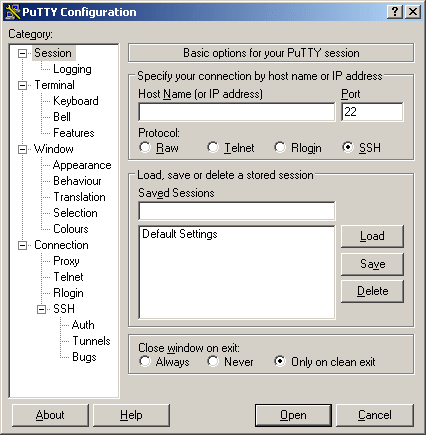
So your first task is to get putty.

That’s this PuTTY:

Not this putty:

Just download it from here: http://www.chiark.greenend.org.uk/~sgtatham/putty/ and install.

Setup an account to log into your site. It is straight forward, if you have difficulties. Please take a break and read the help docs on it and decided if you really want to take on custom pear modules without further reading and studying. Perhaps there is an easier way to do what you want to do.

Once you have putty installed (BTW does anyone have XWindows working through PuTTY for 1and1.com yet? I’ve wanted to try it but haven’t had the time yet…) login using your user number and main password (u35555555 or something like that not your contract ID)

Once you are logged you’ll be at a prompt that looks like this:
u35555555:~ >

Now ask pear what it’s current configuration is:
u35555555:~ > pear config-show

You’ll see that everything (Bin_dir, doc_dir and etc) is using common directory. That’s probably something like this: /usr/local/bin/php

What you need to do is create a custom config file into which you can install all of the modules you use but are not provided by default. In this case, we will be installing the HTTP_Request extension so that we can do some custom page grabbing and XSF attacks (JUST KIDDING!!!).

So, the first thing to do is create the config file in your root directory:
u35555555:~ > pear config-create /homepages/10/d55555555/htdocs/ .pearrc

Now tell the common pear module to create a copy of its directory structure for you to use…
u35555555:~ > pear install -o PEAR

Would you like to see what we’ve done?
Just type:
u35555555:~ > cat .pearrc
You’ll get something that looks like this:
#PEAR_Config 0.9
a:7:{s:7:”php_dir”;s:39:”/homepages/10/d55555555/htdocs/pear/php”;s:8:”data_dir”;s:40:”
/homepages/10/d55555555/htdocs/pear/data”;s:7:”ext_dir”;s:39:”/homepages/10/d5555555
5/htdocs/pear/ext”;s:7:”doc_dir”;s:40:”/homepages/10/d55555555/htdocs/pear/docs”;s:8:”t
est_dir”;s:41:”/homepages/10/d55555555/htdocs/pear/tests”;s:9:”cache_dir”;s:41:”/homepa
ges/10/d55555555/htdocs/pear/cache”;s:7:”bin_dir”;s:35:”/homepages/10/d55555555/htdoc
s/pear”;}

And that’s pretty much it! You’re installed. You can, if you want, see if a specific module is installed with a command like:
u35555555:~ > pear list-files HTTP
or
u35555555:~ > pear search HTTP_Request

You can try to install things:
u35555555:~ > pear install HTTP_Request

But you may find that other modules are required. So you must install them too
u35555555:~ > pear install Net_URL

However, the EASIEST thing to do is to have PEAR install all fo the modules you need automatically with the –alldependency swithc
u35555555:~ > pear install HTTP_Request –alldeps

That’s it! Your all installed.

Here is one final helpful command: config-show. If you (and I) did everything right, you should get something like the following:

u35555555:~ > pear config-show
Configuration (channel pear.php.net):
=====================================
Auto-discover new Channels auto_discover
Default Channel default_channel pear.php.net
HTTP Proxy Server Address http_proxy
PEAR server [DEPRECATED] master_server pear.php.net
Default Channel Mirror preferred_mirror pear.php.net
Remote Configuration File remote_config
PEAR executables directory bin_dir /homepages/10/d55555555/htdocs/pear
PEAR documentation directory doc_dir /homepages/10/d55555555/htdocs/pear/docs
PHP extension directory ext_dir /homepages/10/d55555555/htdocs/pear/ext
PEAR directory php_dir /homepages/10/d55555555/htdocs/pear/php
PEAR Installer cache directory cache_dir /homepages/10/d55555555/htdocs/pear/cache
PEAR data directory data_dir /homepages/10/d55555555/htdocs/pear/data
PHP CLI/CGI binary php_bin /usr/local/bin/php
PEAR test directory test_dir /homepages/10/d55555555/htdocs/pear/tests
Cache TimeToLive cache_ttl 3600
Preferred Package State preferred_state stable
Unix file mask umask 22
Debug Log Level verbose 1
PEAR password (for password
maintainers)
Signature Handling Program sig_bin /usr/bin/gpg
Signature Key Directory sig_keydir /usr/local/etc/pearkeys
Signature Key Id sig_keyid
Package Signature Type sig_type gpg
PEAR username (for username
maintainers)
User Configuration File Filename /kunden/homepages/10/d55555555/htdocs/.pearrc
System Configuration File Filename /usr/local/etc/pear.conf


(Please let me know if this post works for you or if there are mistakes I need to corred. This was all recovered from the bash log, so I could have miss read a step along the way – Thanks! Brian.)


Cross Site Request Forgery

In June of 2001, Peter Watkins defined the term Cross Site Request Forgery – pronounced Sea Surf. He keeps that discussion here: http://www.tux.org/~peterw/csrf.txt

I’d posted a copy of this text localy on my site and now I’ve now found I have a number of people linking to it.

So, I thought I’d turn it into an object lesson demonstration.

If you got to this link by clicking on a link to http://www.TheCodeCave.com/csrf.txt, you may be surprised to noticed that you are not looking a text file. That’s because I’ve intercepted your request and sent it to another location on my site. This is what a CSRF attack does however it bounces the attack back at you. I could have just as easily detected if you were an admin in any of the most popular open source projects out there, sent you to your site with an attack tailored to your software and then without taking a breath, put you into the text file again. Kinda scary isn’t it?

The trick is to address the danger by making sure that all of your web pages are secure. I’ve been planning for a long time to write a series of post describing what I’ve learned about PHP security. I just haven’t figured out a way to do it without creating a tutorial site. If you check back here: http://www.thecodecave.com/?cat=7 periodically, you can see what I’ve come up with.

From: Peter W <peterw@usa.net>
To: John Percival <john@jelsoft.com>
Cc: bugtraq@securityfocus.com, clambert@whitecrown.net, peterw@
tux.org
Subject: Cross-Site Request Forgeries (Re: The Dangers of Allowing 
Users to Post Images)
Message-ID: <20010615011542.C22677@usa.net>
References: <04f901c0f437$4911b610$9701a8c0@wellingtoncollege.
berks.sch.uk>
In-Reply-To: <04f901c0f437$4911b610$9701a8c0@wellingtoncollege.
berks.sch.uk>; from john@jelsoft.com on Wed, Jun 13, 2001 at 07:33:
04PM +0100

	Cross-Site Request Forgeries
		(CSRF, pronounced "sea surf")

I hope you don't mind if I expand on this a bit. You've come across 
the tip, in my opinion, of a rather large iceberg. It's another
Web/trust-relationship problem. Many Web applications are fairly 
good at identifying users and understanding requests, but terrible 
at verifying origins and intent.

The problem isn't the IMG tag on the message board, it's the 
backend app you seek to attack via the IMG tag. And I suspect lots 
of Web apps are vulnerable. Lots. I've been to training on highly-
regarded, widely-used, expensive Web app development frameworks, 
and none of the classes taught how to avoid the problems I will 
attempt to describe. In fact, they all seem to teach the "easy way" 
of handling what look like user requests, which is, of course, the 
vulnerable way. 

Anyway, let's look at how your post relates to what I call CSRF.

On Wed, Jun 13, 2001 at 07:33:04PM +0100, John Percival wrote:

> This exploit shows how almost any script that uses cookie 
> session/login data to validate CGI forms can be exploited if the 
> users can post images.  What is the problem? Well, by using an 
> [img] (or HTML <img> or <iframe> or <script src="">) tag, 
> the user is having anyone who views the thread access that image - 
> that is perform an HTTP GET on the URL specified for the image.
> Even if its not an image, it still can be accessed, but will 
> display a broken image. 

Depending on what's allowed, height/width and CSS/visibility tags 
can be used to hide the broken image icon.

> This means that the user can put a CGI script inside [img]
> tags.

** Learning from Randal's purple dinosaur?

The problem you describe is not uploading images, it's allowing 
users to post code that's inserted in an appropriate HTML tag 
attribute. This is something of a variation on Randal Schwartz's 
purple dinosaur hack,[2] but much more interesting and dangerous 
than even what you describe.

> This script will be called by whoever views that thread. 
> When used maliciously, it could force the user to: unknowingly 
> update their profile, respond to polls in a certain way, post new 
> messages or threads, email a user with whatever text they want, 
> the list goes on. This would be particularly worrying for a 'worm' 
> to spread through a forum, filling it with rubbish posts.

** The difference between XSS and CSRF

Right. There's something much larger going on here. Darnit, I 
wanted to make a nice formal paper out of this, but you're forcing 
my hand. :-) The problem is what I call CSRF (Cross-Site Request 
Forgeries, pronounced "sea surf"). Any time you can get a user to 
open an HTML document, you can use things like IMG tags to forge 
requests, with that user's credentials, to any Web site you want -- 
the one the HTML document is on, or any other.

This looks somewhat similar to Cross-Site Scripting (XSS), but is 
not the same. XSS aimed at inserting active code in an HTML 
document to either abuse client-side active scripting holes, or to 
send privileged information (e.g., authentication/session cookies) 
to a previously unknown evil collection site. 

CSRF does not in any way rely on client-side active scripting, and 
its aim is to take unwanted, unapproved actions on a site where 
the victim has some prior relationship and authority.

Where XSS sought to steal your online trading cookies so an attacker 
could manipulate your portfolio, CSRF seeks to use your cookies to 
force you to execute a trade without your knowledge or consent (or, 
in many cases, the attacker's knowledge, for that matter). [Just an 
extreme example there; I do not have any idea if any trading sites 
are vulnerable. I have not tested *any* applications or sites that I 
don't have some personal involvement in the design and maintenance 
of. Don't ask me to.]

<img src="https://trading.example.com/xfer?from=MSFT&to=RHAT
&confirm=Y">
<img src="https://books.example.com/clickbuy?book=ISBNhere
&quantity=100">

** Ubiquity of attack channels

Since HTML documents are popping up everywhere (even in 
corporate email systems!!!), and it's impossible to discern what IMG
or HREF values might be direct CSRF attacks, or redirect users to 
unwittingly do dangerous things via CSRF redirects, the fix has to 
be in the applications that do the interesting things.

> For example, if a user posted something along these lines:
> [img]http://your.forums/forums/newreply.cgi?action=newthread&
> subject=aaa&body=some+naughty+words&submit=go[/img]
> Then the post would go through, under the name of whoever 
> viewed the image.
> This is of particular danger when an administrator views an image, 
> which then calls a page in an online control panel - thus granting 
> the user access to the control panel.

** Impossible to filter content

Right, and as I say, the site you act against can be somewhere else 
entirely. Here's what a CSRF attack might look like:
 <img src="http://example.net/logo.gif" height=0 width=0 alt="">
That's it. When your client requests logo.gif - exposing no cookies 
- the example.net server redirects you to a URL like the one you 
show, above. So the end result us the same as if the attacker had 
embedded the more obvious URL inside the IMG tag. 

If an attacker wants, he can also use a simple, innocent looking 
hyperlink and hope the victim clicks on it (http://example.net/
kyotoanalysis.htm). You don't allow hyperlinks? Well, someone might 
copy/paste the link, and be stung that way. They'd notice? Maybe 
not -- the URL could be a mostly useful page, with a tiny frameset 
sliver that loads your attack URL.

> How can it be fixed? Well, there are a couple of ways to stop it, 
> but the easiest (in PHP at least) seems to be to have most of the 
> variables used by scripts be used through $HTTP_POST_VARS. So 
> instead of checking for $action in a script, $HTTP_POST_VARS
> ['action'] would be checked. This forces the user to use a POST 
> request, not a GET. 

which means the attacker reverts to using Javascript, or entices 
the victim to click on an image that's acting as a submit control 
in a <form>.  Requiring POST raises the bar, but doesn't really 
fix the problem.

> Alternatively, the sessionid could be required to come with the 
> GET/POST request variables, rather than by cookie.

...thereby exposing an important piece of authentication 
information to history files and proxy servers; I really don't like 
URL mangling for authentication purposes, especially in non-SSL 
systems. A combination of cookie + URL mangling might not be bad, 
though in the message board case, a CSRF attacker could use an 
intermediate redirect (as described earlier) to get the URL 
mangling (from the Referer), and redirect back to the messageboard 
with the proper mangling as well as all cookies that might be 
expected/needed. So in your example case, URL mangling would buy 
nothing. :-(

> Finally, in the specific case of [img] tags, the use of ? or & in 
> the img URL can be disabled by some regexes.

Not at all adequate. Browsers follow redirects on IMG tags, so I 
redirect you to http://example.net/logo.gif which in turn redirects 
you to the final URL, as described earlier.

> If the software that you run is not secure, we recommend that 
> you disable HTML and/or [img] tags, until the fixes have been 
> implemented.

It's much worse than that.

Please see the following URLs for an introduction to the dangers 
of CSRF, and some discussion of countermeasure strategies. 

 http://www.astray.com/pipermail/acmemail/2001-June/000803.html
 http://www.astray.com/pipermail/acmemail/2001-June/000808.html
 http://www.astray.com/pipermail/acmemail/2001-June/000804.html

** Server-Side Countermeasures

The fix MUST be implemented on the backend that's being attacked. 
In your example, newreply.cgi needs to be intelligent enough to 
detect and stop CSRF attacks. 

We've talked about how an attacker can post a message to the 
messageboard with innocent looking URLs. But an attacker can also 
simply send the victim a piece of HTML email including the full 
attack IMG URL. No amount of IMG tag filtering in your 
messageboard posting system can stop that.

** Three-phase tests before acting

When it comes to generic CSRF attacks, any application that 
uses a two-phase approach to action approval is vulnerable (the 
two phases being [1] do you possess authentication information 
and [2] are all the required arguments present). What's needed is 
a third test: is the user really using a proper application form to 
generate the request?

** The 90% solution: Referer tests

For many sites, you can achieve a high level of protection by 
checking the HTTP Referer header. This would prevent things like 
attacks via email. But it would also mean locking out any user whose 
requests did not contain Referer information.[1] As long as the 
values in the allowed Referer list are all coded with XSS and CSRF 
in mind, this could be adequate.  Referer checks should be as 
specific as possible, e.g. you might require the Referer to begin 
with: 
"https://example.com/admin/admin.cgi" or "https://example.com/
admin/" instead of simply "https://example.com/".

** The more difficult cases

Some other applications are more difficult to secure. Consider 
webmail apps. So webmail.example.com decides only "message 
delete" requests from webmail.example.com pages will be accepted: 
well, if the attacker sends a CSRF message to your webmail account, 
then when you read it via webmail, the Referer in the CSRF image 
request (your client thinks it's an image request) says it's indeed 
from the proper webmail server (even in the case of an intermediate 
redirect; check the bugtraq archives for past discussion of 
anonymizing hyperlinks, redirects vs. client-pull, etc.), so the 
request gets through. Basically, any application that allows posting 
of URLs needs more sophisticated protection than Referer checks. 
This would also include messageboards and discussion sites like 
Slashdot. 

> Known Vulnerable: Infopop's UBB 6.04e (probably the whole 6.xx 
> series), ezboard 6.2, WWW Threads PHP 5.4, vBulletin 2.0.0 
> Release Candidate 2 and before (later versions are safe). Probably 
> many more bulletin boards and CGI scripts out there, but those are 
> the main ones that we have been tested positive.

** One-time authorization codes

The URLs I list above outline a server-side one-use-token approach 
to closing the hole. For instance, the page that users are expected 
to use for drafting messages (in your newreply.cgi example) would 
create a one-time use token, good for a limited time. The newreply.
cgi processing script would require this value be present, correct, 
and in time. So while the attacker knows that action, subject, body, 
and authcode values are required, the attacker does not know, and 
cannot ascertain, the proper value needed for the authcode 
argument.[0] These tactics tend to introduce certain 
inconveniences (e.g., preventing use of the "back" button) so you  
may wish to analyze the various actions your application can take 
and provide varying levels of protection. For example, in a webmail 
system sending and deleting messages need more protection than 
displaying messages.

** Unpredicatable argument names?

Other tactics may be possible. For instance, consider
"action=newthread&subject=aaa&body=some+naughty+words&
submit=go". On the server side, you could have an "argument map 
table" for each session, e.g. pick random surrogates for the normal 
argument names. For one user, the system might look for 
"876575665" as an argument name instead of the predictable 
"action", "9876dafd987" for "body", etc. There may be some 
tricks vis-a-vis anonymizing referers if the labels are constant 
throughout a session, but it might be possible to do something
like this to make it more difficult to construct a valid URL for a 
CSRF malicious action.

** Attacking sites behind corporate firewalls

Want more fun? CSRF tactics can be used to attack servers 
behind corporate firewalls. It's not just your public Web apps that 
are at risk. 
<img src="http://intranet/admin/purgedatabase?rowslike=%2A&
confirm=yes">
If the attacker knows enough to make a URL and can get you to 
open a message, that's all it takes. Here we see that HTTP 
Referer headers can be a double-edged sword. Earlier we 
described how Referer tests can add security to many apps 
relatively easily. But Referer headers can also leak information 
about "private" sites if those sites use non-anonymized hyperlinks 
and external document references.

I'm afraid CSRF is going to be a mess to deal with in many cases. 
Like trying to tame the seas.

** Workarounds

Most of us probably depend on applications that won't be fixed
anytime soon. So what can you do to prevent a CSRF attack 
from making your browser request something without your 
approval?
 - Do not use an email client that renders HTML
 - Do not use a newsgroup client tied to your Web browser
 - Do not allow your browser to save usernames/passwords
 - Do not ask Web sites you care about to "remember" your login
 - Be sure to "log off" before and after using any authenticated
   Web site that's important to you [or your employer ;-)], 
   even if that means exiting your Web browser completely
 - Consider using something like Windows 2000's "Run As" 
   shortcut feature or my "runxas" shell script (available at the 
   tux.org URL listed below) to run a Web browser for casual 
   use.

My apologies for the somewhat rambling nature of this post; I may 
yet clean this up and put it in a proper paper, and do some real 
editing... but I hope even in this rough form it makes some sense, 
and helps folks design better, safer applications.

-Peter
http://www.tux.org/~peterw/

[0] Not unless the page that included the authcode is readable, 
e.g. if the composition page had XSS bugs that would facilitate 
construction of a URL for a CSRF attack.

[1] As discussed earlier (http://www.securityfocus.com/arch
ive/1/41653), client-pull pages usually result in no Referer 
information being sent by the client. So if your application 
allows a request with no Referer, an attacker need only direct 
the victim to an HTML document that uses a client-pull META 
tag to send the victim to the CSRF attack URL. This might be 
tricker to pull off, but remains feasible. So if you want to use 
Referer checks, you really ought to go all the way and deny 
every request that lacks a Referer header.

[2] http://www.stonehenge.com/merlyn/ [3]

[3] fellow cornfed users: the horror! footnotes referenced in 
reverse order!