Upgrade your sites to the latest WordPress in 35 seconds.

The 35 Second upgrade processhas been replaced with the “5 Second Upgrade Script” (link). Follow the link for more information.

This post describes a process to upgrade your post to the latest version of WordPress in 35 seconds. Each additional site would add only 5 to 10 seconds, depending upon how fast you type. I’ve measured it myself. The first two runs were 40 seconds and the rest were 35. And just so you know, that is real time and includes manually logging in by typing my password, doing the work, logging out, clicking start run and typing the full URL to the upgrade.php file. If I bookmarked the site and stored my password. I bet I could upgrade my site in 20 seconds. Anyway, I thought you might find this technique useful, so I thought I would share.

The only automation I used is to setup a shell script that will go out and get the latest version of WordPress whenever I ask it to. And since that is a generic process that will work for all versions, I don’t count it as cheating to reach that 35 second mark. I really wanted to hit 30 seconds, but hey this is better than my old methot which involved 15-20 minutes of upload time to take the files from my Windows machine over to the my 1and1.com site.

A Short Warning

Some things you should be scared by:

  • DO NOT USE THIS PROCESS IF YOU HAVE INSTALLED WORDPRESS INTO A DIRECTORY NAMED WORDPRESS
  • Some plugins make/require changes to your php code. Older (WP1.5) plugins often did this. It is safer to disable the plugins before upgrading. Know your site. I don’t need to disable my plugins for this to work. There’s a chance you don’t either.
  • This script uses a directory named wordpress for its work and deletes it when it is done. Anything in the directory off the root name wordpress will be deleted by this process. ~/wordpress is emptied and removed. Gone shall its contents be. No more. Erased and cannot be retrieved. And so shall they be deleted. *blip*
  • This process is meant to update any number of directories hanging off your root directory. It will work if you run out of the root too. In fact if you have a typo in your cd commands, it will update the root and you will have a lot of files to cleanup.
  • This process works to upgrade any site that is running WordPress 1.5 or newer.
  • This process will NOT delete any obsolete files. So, if you use this process to upgrade to WordPress 2.1 when it is released, because it includes a major rearranging of the files, you will end up with some legacy files cluttering up your webspace. This is not horrible unless a security hole is known to exist in one of the existing files. You could, on your own, modify this script to delete existing WordPress files before the install.
  • This script will replace all standard WordPress files with the latest and greatest. If you are using an older/custom plugin that requires you to actually edit files distributed through wordpress, you’ll have to re-make those changes.
  • REMEMBER TO BACKUP YOUR SITE. If you are thinking about updating your site, you should have a ready backup handy incase frogs and locusts start swarming out of your CPU fan. If such things seem unlikely to occur, or your one of those that loves the smell of fried chips in the morning, you may opt to proceed without a backup.

Pre-Requisites

Other things you should know:

  • This instructions are optimized for a 1and1 Linux host account. If you have a Linux account from another provider, the instruction should be close enough for you to follow.
  • I’m gonna assume you have an account on a *nix server.
  • I’m gonna assume you have the access and a way to Telnet/SSH into your account. Basicaly, to the untrained eye, telnet/ssh allows you to access your account from a DOS prompt. (No hate mail please! I said to the untrained eye!)
  • I’m gonna assume you have the vi editor on your server. vi is a text editor that you will propably rarely use and that is optimized to make you very quickly forget the basics of how to use it. After stumbling around in it this time, I think I came up with a quick and easy set of instructions that will work for this post.

How to get Telnet/SSH access

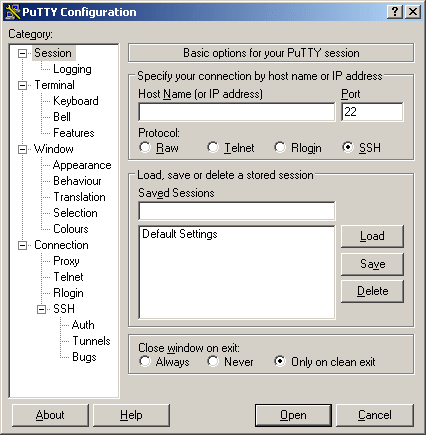
So your first task is to get putty and that’s this PuTTY:
Not this putty:

(Old Joke. I’m sorry, but it was a good one and heck, cut and paste is easier than looking up the urls and retyping all of this.)

Just download it from here: http://www.chiark.greenend.org.uk/~sgtatham/putty/ and install.

Now, configure PuTTY to log into your site. It is straight forward, if you have difficulties. Please take a break and read the help docs on it and decided if you really want to take on updating via scripts without further reading and studying. Manual updates take longer but they are safer.

Once you have putty installed, login using your user number and main password (u35555555 or something like that for a 1and1.com user)

Once you are logged you’ll be at a prompt that looks like this:
USERNAME:~>

You can now use unix commands to wander around in your account. Be careful, you CAN break stuff. *nix is a strange world if you are not familiar with it.

The Script

As mentioned before, this upgrade process requires you to create a script. A BASH script is like a DOS Batch file. It is a series of commands that are executed sequentially. You create the script once and can run it MANY times. In fact you should be able to use it for all future WP releases. However, if you are performing more than a maintenence upgrade (i.e. if you are switching from 1.5 to 2.04 or from 2.0.4 to 2.1) you might want to follow the manual instructions that come with WordPress as it will result in a cleaner install. It’s up to you. The point is, you can always use this script to update to the latest release over and over again.

The process the script follows is simple.
1. Remove the files and directories used by this process to ensure a clean run.
2. Grab the latest gz file from wordpress.org
3. Uncompress the gz file – this creates a tar file
4. Uncomress the tar file – this creates a wordpress directory tree
5. Change to the directory housing the active wp site
6. Copy all of the files and directories from wordpress over to the current directory.
7. Remove the wordpress directory
8. Remove the tar

In terms of BASH commands, the script file will contain something like this:

rm latest.tar.gz
rm latest.tar
wget http://wordpress.org/latest.tar.gz
gunzip latest.tar.gz
tar -xf latest.tar
cd ~/wpdir4site1
cp -R -v –remove-destination ~/wordpress/* .
rm ~/wordpress/ -R
rm latest.tar

“wpdir4site1” represents the directory in which your site has WP installed. You’ll need to change that text to use the right name. It is the directory in which WordPress’s Index.PHP resides and WP-Admin hangs off of it. If you are unsure of what to put here, STOP. Script updates are not for you. It is better to take a couple minute to update your site than to put something wrong in here and have the script erase everything on your site.

The next line is the one that does all of the work. So, you need to copy the cd and the cp lines if you want to change this script to update more sites. Then your script would contain something like this:

rm latest.tar.gz
rm latest.tar
rm ~/wordpress/ -R
wget http://wordpress.org/latest.tar.gz
gunzip latest.tar.gz
tar -xf latest.tar
cd ~/wpdir4site1
cp -R -v –remove-destination ~/wordpress/* .
cd ~/wpdir4site2
cp -R -v –remove-destination ~/wordpress/* .
cd ~/wpdir4site3
cp -R -v –remove-destination ~/wordpress/* .
cd ~/wpdir4site4
cp -R -v –remove-destination ~/wordpress/* .
rm ~/wordpress/ -R
rm latest.tar

Create The Script

So, here’s where you use PuTTY to log into your account (see above). Once you are at the bash prompt, you will use the vi program to create your script in your root directory.

So just type in:
vi updatewp.sh

Then hit the letter i
That will put vi in insert mode.
Then just type in the script as I described in the previous section. If you want you can use Notepad to customize the script to fit your directory structure and then copy it into the Windows clipboard, and paste it into PuTTY by right clicking the window.
Once, you have the script file looking as you want it to appear or if you want to give up and start over, hit Escape. That will take you out of Insert mode.
If you are satisfied with what you see, hit colon (:), hit w and then hit enter. That will save your work. Then hit :q and press enter to quit.
If you just wish to quit without saving, hit colon (:) and then type q! and press enter.
In review here are all of the vi commands you need to know

  • i = Insert mode
  • escape = Exit Insert Mode
  • :w = Write file
  • :q = Quit softly
  • :q! = Quit forcibly

Oh, and don’t paste the file in without updating the directory names, because if you run it like that, say when you are proof reading a blog post, you will update your root directory with the current version of WP and that means loads of files to clean up. Luckily you can identify them via their modified date. And no, I will not tell you how I know this!

Let’s get busy

Now you’ve done all of the hard work. You’re up to the 35 second challenge.

Each time you upgrade, do this process:
1. Telnet/SSH/PuTTY into your account.
2. Type “sh updatewp.sh” and then press enter
3. Close your Telnet/SSH/PuTTY program.
4. Visit your upgrade url and press the “Step 1” link (I do this by hitting Start->Run and typing “http://www.MySiteUrl.com/wp-admin/upgrade.php”)

This process is also great for quickly restoring a corrupt/hacked site back to operation.

I can do all that in 35 seconds, how fast can you do it?
WordPress 2.0.4 released but…

UPDATE – This post no longer applies.

This post is obsolete. It describes two issues I had with WP2.0.4 just prior to it being released. The first is a Maxthon browser specific error, that is suppressed by default in Maxthon and IE. In IE however there is never a way that it can be shown. At least that’s what my testing indicates.

The second error was due to a zero byte Index.php files being located in the plugins directory. IF index.php is there, it replaces the dashboard upon subsequent visits. That’s a nifty trick… I put the index.php from my bubble headed boy page in there and now the wp Dashboard hosts bubble headed boy! How useful is that?!?!!

Anyway, I’m now “good” with 2.0.4 – both of these things are “non-issues” – Install away!

Well, Matt released version 2.0.4 a short while ago. I’d love to jump on the Go, download and Install Now band wagon, but frankly I am just not there yet. I’m seeing weird problems that just shouldn’t be there. Admittedly, these problems are far better to suffer though than dealing with some malicious member bumping themselves up to administrator level or doing something worse to your blog than that. Still, I would have preferred these problems being confirmed and fixed or at least knowing why they were happenning here and perhaps not elsewhere. I’m not doing anything out of the ordinary with this site at the moment.

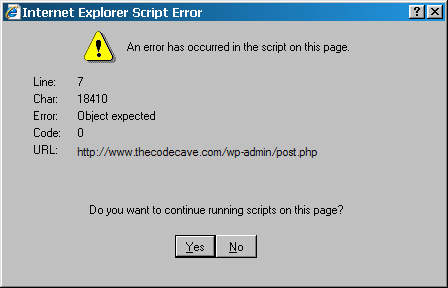
I’ve just spent 4 hours trying to find the first problem. I am getting this error all over the post.php page:
Object expected on line 7 character WHAT???? 18410????

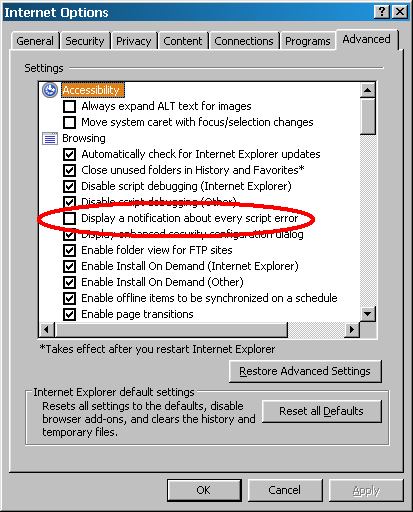
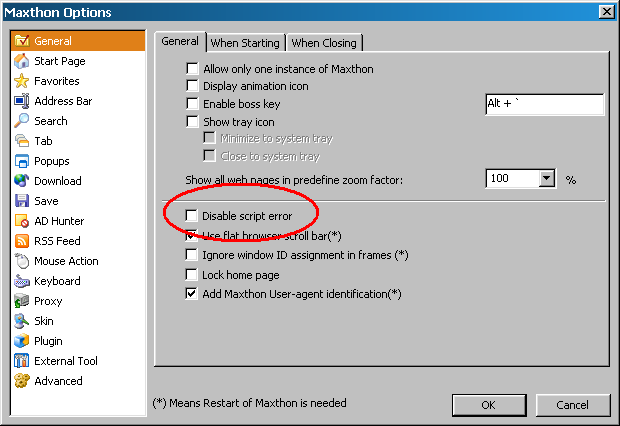
You’ll only see this message if you turn back on the annoying Script-Error-Popup that everyone disables because 90% of the sites out there contain errors:

IE:
Should be checked

or Maxthon:
Should be unchecked

I can often produce it upon saving a post, deleting a post, leaving the write tab, heck I even sometimes get two of them when closing down the browser.

I’ve just found that the error is never raised/actively supressed from IE7 proper. However, the Maxthon browser raises the error. If this is truly a Maxthon only issue, than I’ll just turn back off the error popup and go on happily with life. Since this error can be easily ignored, I’m not thaaat worried about it anyway. I am a little concerned that it could be masking other behaviour…

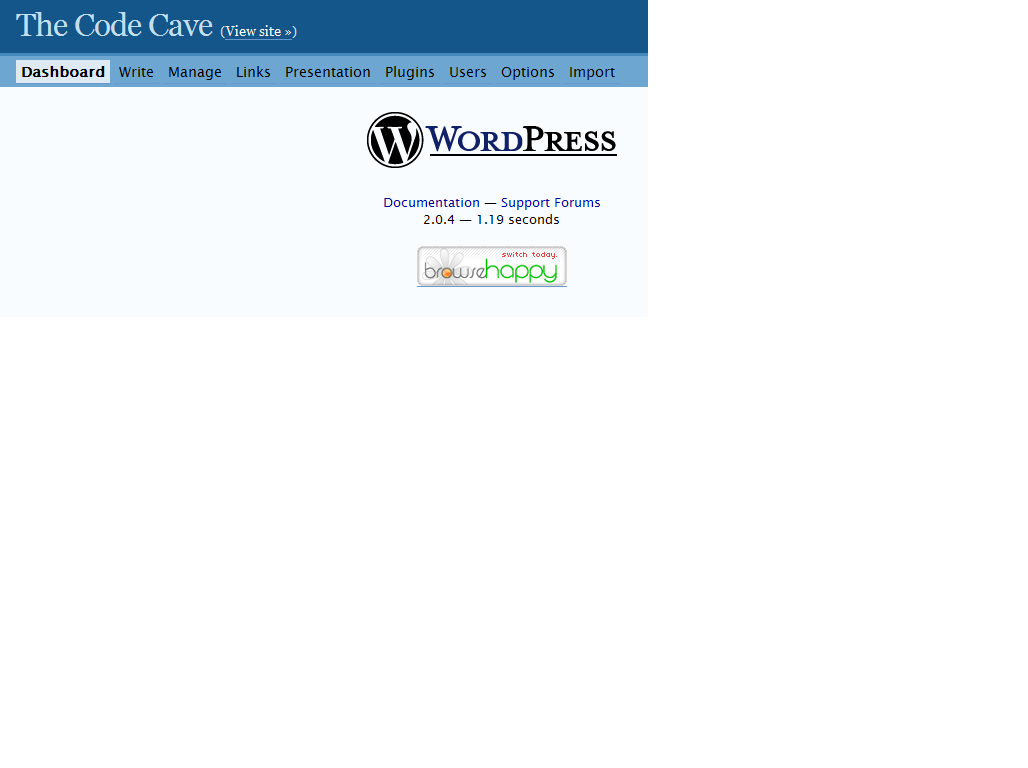
The other issue is a bigger deal, but I’ve heard from two people who don’t see this bahaviour. My dashboard tab/button points to
/wp-admin/admin.php?page=index.php
and therefore only displays this when I click on it:
la la la la Don't Worry.  Browse happy, la la la

Look Ma! No dashboard!

Sooo, I’m still investigating. When I have found the reason for these, I’ll make another post describing the really quick way to download and install these upgrads…

But till I get this isolated, please excuse the dust and any weird behavior… though for now, I am off to bed…

Thanks

WordPress 2.04 Beta 2 includes a vital security fix.

Quick someone call Sam!
Original image by Andrew Krespanis

Thanks to some drastic and controversial actions taken by SpamKarma creator Dr. Dave, a large percentage of the blogging populace has been alerted to a security hole in WordPress. He even went to the effort of activating a warning message that was sent out to everyone who uses his SK2 plugin. This has resulted in a lot of fear spreading amoung a huge number of bloggers. This sort of thing just spreads exponentialy. Here’s a quasi random sampling of two dozen of the first posts on it: .......................

And these were just from the English blogs that posted about this on the same day as the notice going out. The neat thing is that these are some of the most on-top-of-things bloggers out there. Those 24 blogs have some great content and gread visual styles. The are well worth perusing…

Anyway, as you can guess he’s taken plenty of heat for this, because loads of people are now searching for the hole and trying to figure out how to exploit it. Most of these people just want to protect their own blogs. Others might be searching so that they can use this exploit against others. There are certain people I would not like to be right now…

The good, the bad and the ugly

The most common fix being spread out there is to disable “Anyone can register”. The good news is that this will eliminate the possiblity of new people exploiting this issue. The bad news is that I would wager most bloggers don’t know the hearts of even HALF of their members. The ugly truth is that I bet many of the WP bloggers out there (the pajama media in particular) have members that are REALLLLLY pissed at them right now. Hey, its ugly but it happens. Now that this exploit is known, do you really trust that unknown/angry member to not go and read up on the details? Should you delete their account; so that they are even angrier the next time an exploit is announced? Don’t look at me, I can’t answer that one for ya…

Another alternative

The really good news is that Ryan Boren released the beta version of WordPress 2.0.4 on Sunday. The Beta2 version of the release includes a fix for this issue.

Here’s what Ryan said in a WP public list:

To recap, there is a bug in core WP involved that I believe I’ve fixed
for 2.0.4. This is the core API bug Dave is talking about on his blog.

I was in error before to say that this is a problem to be fixed solely
by the plugins. There are some plugins that need help beyond the fix to
the core, but the core fix should cover most plugins. Sorry for the
confusion.

And with that, I really need to get some sleep. Later all.

If you want to test the beta release, the beta2 beta3 version is available for download here:
zip
tar.gz
Please be aware that this IS a beta release and has not been tested against all common plugins and themes.

That said, WordPress 2.0.4 is under some intense scrutiny and *MIGHT* be released in just four days. You can see that for yourself here. In fact, you might want to keep that link around. Modifying that link is much easier than asking around “When will WP x.y will be out? Huh? Huh? Huh?” If there is an answer to that question, there will be a link like that, showing the date. Can you figure out what the link for the 2.1 release is?

WP 2.0.4 Status and Some Details

Many people have been running 2.0.4 for ages now, but it is still under development. There have already been a number of changes and fixes since the beta2 version. Beta2 will not be the version that is released, but you might prefer running it to turning off your membership.

This fix is important, but the danger is as all encompassing holes that existed prior to version 2.0.3. It involves an assumption, by plugin authors, that the WordPress core takes care of all security concerns. The fact of the matter is, a WordPress plugin should be written so that it is secure in and of itself. It only makes sense. This fix enhances the security around plugins. But plugin authors should still be aware that they must always make certain the logged in user has the rights to do the action the plugin is about to perform.

Likewise, WordPress bloggers should be aware that that the more powerful a plug in is, the more risk you expose your self to if someone gets to it through a security hole. This was just as true before this hole was disclosed as it is now.

You are your own blogs best protection

For example, if you really think your WordPress blog needs to be able to restructure all of your table, did you chose a plugin made by someone that looks like the have professional experience in web security or was your plugin written by a highschool senior or college freshman? I’m just asking… And so should you…

Now, there has been so much FUD that everyone is in a panic. I’m not saying that you should do nothing. You might actually want to disable the creation of new user accounts. You might want to disable some trouble users. You might want to update to the beta 2.04. Or you might just want to take a breath and realize that chances are, no one is out to destroy you or your blog – even just for the fun of it.

The fact of the matter is that there are still thousands of blogs out there running version 2.0.2 of WordPress (100,000+ results from google) and earlier despite our best efforts to get people to update and realize the serious nature of the risk. When there are published security holes allowing allowing mass deletions of posts, there are much easier targets with more bang for the buck than your WP 2.0.3 blog.

You ARE running at least 2.0.3 right?

UPDATE

Beta 3 was released 7 minutes ago at 12:38pm EST/16:38 UTC. I’ve updated the links above to point at beta3. The only change between b2 and b3 is a minor fix I tested and improved for Ryan last night. In some rare circumstances the author link at the bottom of the posts might have been incorrect. Those of us without themes that support multiple authors would be unaffected by this change. So, there’s no real reason to get b3 if you have b2 installed already. The release MAY come sooner than I mentioned in this article. Perhaps by as much as 3 days sooner…but I wouldn’t mind another evening just to try to exploit this version.

Measuring a site’s popularity

I was going to post this to wp-hackers in reply to a couple other posts but decided it was WAY to off topic
[wp-hackers] Close old comments and pingbacks: feature or plugin? Jamie Holly
[wp-hackers] Close old comments and pingbacks: feature or plugin? David Chait

I decided it is too off topic and Robert Deaton would get on my case again. 😉 I didn’t want to waste the typing. So you all get an extra post today…

> I’d have more fun designing for a site getting .75M hits/day —
> send me some of that traffic! 😉

0.75m is 0.75m, Kudos to Jamie. Actually I guess its .36m/day between the two sites. Still in large part, I ignore hits when figuring out how my sites are doing…

More specifically, I can’t see how it much helps in comparing two sites either. My reasoning: To go to an extreme, if a site is Flash based, I’d assume the hits/visit is low as it would be with a largely text based site – perhaps even < 10 hits per visit. If a site has lots of graphics and little tag images (translation flags, "new" buttons, whatever), I would assume the hits/visit are WAY higher. My hits per visit is around 47 - I suspect I should try to lower that. So, if I use only hits as a measure and compare myself with a text based site with 12 hits per visit, my hit count would be four times higher but we would get the same level of traffic. And even that ratio is subject to the definition of "a visit". I use two different stat engines to evaluate my sites: AWStats and WebStatistics. AWStats often reports "Unique Visitors" to be as low as 1/3 of the "Unique Visits" reported by WebStatics. Part of the difference there is the visitors/visits issue, another part is awstats filtering out search engines and another part of it is AWStats has a much more liberal definition of what constitutes a single "visit". I'm just not certain that I have a number of people spending an 1+ browsing my site. It's really cool if I do, but I suspect it is people returning to the site (tab) once or twice within a 2 hour period. Am I correct in saying that the ONLY way to compare the traffic between two sites is to look at the same stat by the same stat engine on both sites (e.g. comparing "Number of visits" in AWStats.)? Am I way off on this? As I said at the beginning. 0.75m/day is 0.75m. That's more traffic then any of my current sites will ever see. What is the best method of measuring a blog's popularity? I know it isn't alexa... I currently have half the traffic of my wife's site but Alexa sure doesn't show that... http://www.alexa.com/data/details/?url=Thecodecave.com http://www.alexa.com/data/details/?url=www.knitchat.com Denise's site has been around for almost two years vs four months for my site. So, I'm pleased with my progress. "My unique Visitors" have been doubling each month. I don't think that will happen this month since I have missed half a month of posts, I expect only a 20% increase over last month... But all's good...

WordPress 2.1 Bug Hunt….

This is a post testing WP 2.03 action compared to 2.1

You can see the same action in WP 2.1 here:

http://www.thecodecave.com/21/

And the issue is logged here:

http://trac.wordpress.org/ticket/2918 


This should be raw text no link

Here is text again

this is more


This text will have an image inserted

SP

between it

This text will have an image inserted

between it and then it will be deleted


This text will have an image inserted

SP      


between it and then it will be resized


Inserte & deleted and reinserted

SP 


this is no link

I’m still here and working on new plugins…

It’s been nutso at work since I got back and I’ve been researching a new idea too. So, I’ve not had time for posting. But I will share with you some of what’s caught my attention.

I have two plug-ins I am working on. One is in the EARLY testing phase. It’s called No-More-404. It allows all of the permalink structures you used before to be handled and not present 404 errors. I would like it to present 301 (moved/redirect) messages and point you to the correct structure, but right now I haven’t found an elegant way of doing that. The plugin is toooo top heavy if I build in all of the routines I would need to use using the method I have right now. So, it looks like version 1 of the plugin will simply allow multiple permalink structures for the initial link to your site. Google frowns on that, but it is better than everyone getting 404 errors. After they click (or crawl)on another link, the new structure will be used. But it would be better if I could force it to the official structure.

I am also working on a DNSBL routine that may become a WP plugin or maybe a VB plugin as well. Basically it will block spams based up on the IP address used to send the message. It would be strange to have WP manage your spam, but as long as both VBulletin and WordPress have Cron ablities, it will work for someone that does not have shell access to their host.

But I ran across a technical problem yesterday and it vexed me. I think I have it solved though. Some of you may find this interesting so, I’ll provide part of the conversation I’ve had over at http://www.codingforums.com/showthread.php?t=89994. Besites I am soooo light on words lately…

PHP Imap_blah function to retrieve full Internet header


I’ll switch over to the pear library if need be, but I CANNOT believe the built in php functions don’t do what I want them to do.

I can use imap_header to get the basic "to" and "from" stuff in emails. They give the "typical end user" level of info about the origin of the email. However, what I want retrieve is the ip address of the smtp server that processed the email. That information is included in EVERY email and is available from IMAP servers (at least it is available to Outlook because you can right click on an email and choose options to see it).

I cannot find an IMAP_BLAHBLAHBLAH function that either returns this info or returns the full raw text of the message. I need the email’s Internet headers. This stuff:

Quote:

Return-Path: <tkuhnel@alushiptechnology.com>
Delivery-Date: Mon, 26 Jun 2006 23:53:47 -0400
Received-SPF: none (mxus6: 74.139.17.40 is neither permitted nor denied by domain of alushiptechnology.com) client-ip=74.139.17.40; envelope-from=tkuhnel@alushiptechnology.com; helo=Laskowski6;
Received: from [74.139.17.40] (helo=Laskowski6)
by mx.perfora.net (node=mxus6) with ESMTP (Nemesis),
id 0MKvMg-1Fv4dv28vt-0006m9 for *@thecodecave.com; Mon, 26 Jun 2006 23:53:47 -0400
From: "Adam Field" <tkuhnel@alushiptechnology.com>
To: <*@thecodecave.com>
Subject: RICARDO examined BENJAMIN of a please
Date: Tue, 27 Jun 2006 03:53:44 +0480
MIME-Version: 1.0
Content-Type: multipart/related;
type="multipart/alternative";
boundary="—-=_NextPart_000_006A_01C69962.9CE1DB50"
X-Priority: 3
X-MSMail-Priority: Normal
X-Mailer: Microsoft Outlook Express 6.00.2900.2670
X-MimeOLE: Produced By Microsoft MimeOLE V6.00.2900.2670
Message-ID: <0MKvMg-1Fv4dv28vt-0006m9@mx.perfora.net>
Envelope-To: *@thecodecave.com

But all I get from imap_headerinfo is this stuff :
$header=imap_headerinfo($mbox,
$num,
180, 180);
print_r($header);

Quote:

stdClass Object ( [date] => Tue, 27 Jun 2006 03:53:44 +0480 [Date] => Tue, 27 Jun 2006 03:53:44 +0480 [subject] => RICARDO examined BENJAMIN of a please [Subject] => RICARDO examined BENJAMIN of a please [message_id] => <0MKvMg-1Fv4dv28vt-0006m9@mx.perfora.net> [toaddress] => [to] => Array ( [0] => stdClass Object ( [personal] => [mailbox] => brian [host] => thecodecave.com ) ) [fromaddress] => "\"Adam Field\"" [from] => Array ( [0] => stdClass Object ( [personal] => "Adam Field" [mailbox] => tkuhnel [host] => alushiptechnology.com ) ) [reply_toaddress] => "\"Adam Field\"" [reply_to] => Array ( [0] => stdClass Object ( [personal] => "Adam Field" [mailbox] => tkuhnel [host] => alushiptechnology.com ) ) [senderaddress] => "\"Adam Field\"" [sender] => Array ( [0] => stdClass Object ( [personal] => "Adam Field" [mailbox] => tkuhnel [host] => alushiptechnology.com ) ) [Recent] => [Unseen] => [Flagged] => [Answered] => [Deleted] => D [Draft] => [Msgno] => 1 [MailDate] => 27-Jun-2006 03:53:47 +0000 [Size] => 12651 [udate] => 1151380427 [fetchfrom] => "Adam Field" [fetchsubject] => RICARDO examined BENJAMIN of a please )

The imap_body requests provide no more info with the default parameters.

I suspect the quotes I’ve provided here are more info than is needed for anyone that knows the answer, but I wanted to be clear about what I was asking.

So, how do I get that Received-SPF or Recieved info?

If this is not possible, is PEAR my best bet or do I have to go old school on this thing and communicate with it via FTP or telnet?

Input is appreciated!

A reply:

to find the SMTP address, would it not be as easy as extracting the hostname from the sender’s email address, and converting it to an IP address if necessary with gethostbyname() (http://us2.php.net/manual/en/function.gethostbyname.php)?

My Response:

Unfortunately, it is rarely that simple.

Take for example that address on the spam I quoted earlier. tkuhnel@alushiptechnology.com was used as the sender. However, that address is probably some innocent business man that had their email address plastered into several thousand spam emails.

Alushiptechnology.com evaluates to 62.233.142.37. That is very different from the address of the SMTP server that we see in the email 74.139.17.40. Additionally, since shared servers have become more common, it is not at all unusual for the SMTP server to be a common server – say smtp.lunarpages.com and the website url/email address to be on a totally different server like Support@codingforums.com.

So, unfurtunately, all things being equal, gethostbyname() is a good idea that won’t work in this situation. However, if we were to check on the IP address of the SMTP server, we can tell that it is blocked. Here is one of the places I would check: http://www.spamcop.net/w3m?action=ch…=74.139.17.40+

I’ll see if PEAR has a solution for me. But I still find it hard to believe that this info is not available from the built in functions that otherwise seem so robust!

If any of my readers have any other suggestions, your input would be much appreciated too!!!

Tags allowed in WordPress Comments & Posts

There have been some comments on the WP support forum asking what tags are allowed in WP comments.

If you are a user of the editor or author security levels with unfiltered HTML rights, you are technicially allowed to enter any HTML tags.

Otherwise, these are comment tags that are allowed by the filtering engine used by WordPress (KSES):

  • address
  • a
    • href
    • title
    • rel
    • rev
    • name
  • abbr
    • title
  • acronym
    • title
  • b
  • big
  • blockquote
    • cite
  • br
  • button
    • disabled
    • name
    • type
    • value
  • caption
    • align
  • code
  • col
    • align
    • char
    • charoff
    • span
    • valign
    • width
  • del
    • datetime
  • dd
  • div
    • align
  • dl
  • dt
  • em
  • fieldset
  • font
    • color
    • face
    • size
  • form
    • action
    • accept
    • accept-charset
    • enctype
    • method
    • name
    • target
  • h1
    • align
  • h2
    • align
  • h3
    • align
  • h4
    • align
  • h5
    • align
  • h6
    • align
  • hr
    • align
    • noshade
    • size
    • width
  • i
  • img
    • alt
    • align
    • border
    • height
    • hspace
    • longdesc
    • vspace
    • src
    • width
  • ins
    • datetime
    • cite
  • kbd
  • label
    • for
  • legend
    • align
  • li
  • p
    • align
  • pre
    • width
  • q
    • cite
  • s
  • strike
  • strong
  • sub
  • sup
  • table
    • align
    • bgcolor
    • border
    • cellpadding
    • cellspacing
    • rules
    • summary
    • width
  • tbody
    • align
    • char
    • charoff
    • valign
  • td
    • abbr
    • align
    • axis
    • bgcolor
    • char
    • charoff
    • colspan
    • headers
    • height
    • nowrap
    • rowspan
    • scope
    • valign
    • width
  • textarea
    • cols
    • rows
    • disabled
    • name
    • readonly
  • tfoot
    • align
    • char
    • charoff
    • valign
  • th
    • abbr
    • align
    • axis
    • bgcolor
    • char
    • charoff
    • colspan
    • headers
    • height
    • nowrap
    • rowspan
    • scope
    • valign
    • width
  • thead
    • align
    • char
    • charoff
    • valign
  • title
  • tr
    • align
    • bgcolor
    • char
    • charoff
    • valign
  • tt
  • u
  • ul
  • ol
  • var

Using Delphi and TWebBrowser to process WordPress’s HTML Source code

I don’t have a lot of time since I am heading off to my brother-in-law’s highschool graduation in upstate NY tomorrow. I might be able to post date a few articles for the Verizon Phone tips category, but this will be the last meaty post for a little while. So, today you get a program that I wrote at the beginning of the month when I wanted to let people know I’d written an article about the release of WordPress 2.03: TrackbackGrabber.

This little routine will go to a WordPress post, grab the source code and isolate all of the track backs for you. It turns them in to seperate lines of <255 characters each that you can paste into your ping back line on your post. Then when you publish an article, you will let everyone on that list know about it. This is somethign I used to do manually and it took forever! IMPORTANT: Don’t abuse this or it will back fire and you’ll quickly be labeled a spammer and will be reported to Akismet, Spam Karma and other spam filtering tools. If that happens none of your comments, trackbacks or manually typed entries, will get through anywhere!

Concepts Demonstrated:


  • Surfing the web using Delphi

  • Using a TWebBrowser Active X control to navigate the DOM structure of a website

  • Retreiving the source code of a webpage

  • The fundamentals of creating a web bot in Delphi

  • Filtering contents of a TMemo

  • How to tell when a page has loaded in the TWebBrowser

That last one was the tricky part. If you access WebBrowser1.Document too soon, you will get an access violation. Sleeps and process messages, no matter how many you use or how long you wait, do NOT consistently work. Pressing the button (calling WebBrowser1.Navitate twice) always worked but I found WebBrowser1.ReadyState in the documentation and checking that seems to be the right way to do it.

Exe: http://www.thecodecave.com/downloads/delphi/TrackbackGrabber.exe
Source Code: http://www.thecodecave.com/downloads/delphi/TrackbackGrabber.zip

Main unit:
[delphi]
// ****************************************************************************
// TrackBackGrabber_Main 06/Jun/2006
// Written by Brian Layman (AKA Capt. Queeg AKA SilverPaladin)
// Visit him at http://www.TheCodeCave.com
//
// WordPress’s Trackback system is a way to connect articles about the same
// topic. If you post something related to a popular article, this tool allows
// you to tell other bloggers that have posted related articles that you have
// additional information on the subject.
//
// Warning: I can’t think of any way that this routine could cause harm to
// your computer, but it could spell the end of your blog if you abuse it.
// Abuse this tool and it WILL back fire. You’ll quickly be labeled a
// spammer and will be reported to Akismet, Spam Karma and other spam
// filtering tools. If that happens, none of your comments, trackbacks or
// manually typed entries, will get through anywhere! It would really stink
// to have every comment you leave on any WordPress blog automaticly
// deleted.
//
// As always, I’ll say it is a good best practice to understand every line
// of new code before you run it. Who knows what could be lurking? Better
// yet, do not run this example at all. You should stop right now and erase
// the files. For if it causes blue smoke to be emitted from your network
// card, if it erases all users from your computer, or if it makes your
// sister break up with her lawyer boyfriend and start dating a caver, it
// is not my fault. (Actually that last one might be an improvement, but
// it is still not my fault.) But the fact of the matter is, computers
// have a mind of their own and we programmers live on the wild side.
//
// Usage: TrackBackGrabber.exe
// Supply an URL to a WordPress post and it will grab all of the track
// back links and then consolidate those to lines 255 characters long.
// Then all you need to do is paste each line into your WordPress post’s
// track back field and hit save. Each site will only be updated once.
//
// Licensing – You can use this source as you will. It’s free for
// commercial, shareware and gpl use as you like. I hope it helps.
// If this program & source really helps you out, please visit
// http://www.thecodecave.com/did-that-help/ and read more.
//
// History:
// 06/Jun/2006 – BL – Created
//
// ****************************************************************************
unit TrackbackGrabber_Main;

interface

uses
Windows, Messages, SysUtils, Classes, Graphics, Controls, Forms, Dialogs,
StdCtrls, OleCtrls, SHDocVw, mshtml;

type
TfrmTrackback = class(TForm)
memoResults: TMemo;
btnGather: TButton;
editAddress: TEdit;
WebBrowser1: TWebBrowser;
procedure btnGatherClick(Sender: TObject);
private
{ Private declarations }
procedure ProcessPage;
public
{ Public declarations }
end;

var
frmTrackback: TfrmTrackback;

const
// This defines what to look for.
// In this case it is TrackBacks.
// Deliberate references to this article for.
SEARCH_STR = ‘Trackback from Memo1.Lines.Count)
do begin
S := Memo1.Lines[0] + ‘ ‘ + Memo1.Lines[Loop];
if (Length(S) < 255) then Memo1.Lines[0] := S else begin Memo1.Lines.Insert(0, Memo1.Lines[Loop]); inc(Loop); end; Memo1.Lines.Delete(Loop); end; end; // ProcessPage end. [/delphi]

Matt Mullenweg on WordPress & OpenSource Development

Matt had a very eloquent monolog on WP-Hackers at the beginning of this month.

It’s something that is worth reading over several times and I’m putting it here so that you and I both have an oportunity to do just that. If you are involved in any type of open source development, this is worth reading.

Go ahead, it’s really not that long…
Original Source

I can’t speak for everyone, but all of my work on WP from the beginning
has been with the knowledge that someone would rip/sell/steal/etc any
and all of it. Just like giving people freedom to say whatever they want
means that they might say things that you disagree with, in the end I
think the inherent freedom is more important than control. In my
experience I’ve found the good far outweighs the bad. I’ve applied the
principles of “give as much away as possible” to other parts of my life
and it has been nothing but rewarding.

Even *if* there were some sort of awful license violation, in 99.9% of
cases it’s not worth pursuing. The time and cost of a legal battle (in
another country, to top it off) would be energy far better spent on
bugs, support, features, etc. Besides, if the features are that great
it’d be better just to clean-room implement them as GPL rather than
extracting them forcibly from someone who doesn’t want to share. (Not to
mention it would probably be 3-5x faster.)

I think supporting a platform you’re building on is a no-brainer
business decision though, natural selection will do far more than legal
action in the long-run for these types of cases.

I have always recommended people doing development around WordPress
license their work as GPL, as I think that provides the most long-term
benefit for both the individual and the community. (It’s a virtuous
cycle.) We’ve socially encouraged that with GPL requirements on
wp-plugins and in the theme competitions, and I think the flourishing of
those areas is a testament to the power of the GPL and open source.
(Thousands of examples are available outside of the WP ecosystem, too.)

When I see or hear about people who want to work for themselves or make
a living off of WordPress-related things but having trouble the problem
has never been with the license. If you want a Real Job with a Big
Company, don’t you think organizations like New York Times and CNET that
are putting huge investments into using WordPress aren’t crazy for
people who know the system really well? Watch Craigslist, Monster, etc
for listing with “WordPress” in them, they’re popping up pretty commonly
now.

For people just looking for some extra beer/server money from their
work, the biggest mistake I see is simply not asking. Make it *really
easy* for people to find your Paypal or Amazon wishlist. I won’t say how
many times I’ve tried to buy a book or something as a thank you for
people on this list and couldn’t for love or money find something on
their site that enabled me to. (As an aside, if you’re overseas try to
have a donation mechanism that’s easy for US folks too.) Have a mailing
list for release announcements. If you’d work on something more if you
got more money, then tell people. Provide amazing free support and put a
“if you found this useful” link at the end of every email. If you’re
open to people sponsoring features, or paid customizations, make that
obvious. Also consider publishing how much you get in donations, as most
people VASTLY overestimate donations, or they assume someone else is
doing it so they don’t need to. Outright charging is usually not the
most successful model.

Finally, I think striking out on your own can be incredibly rewarding
and is a great lifestyle and challenge, though I know it’s not for
everybody. Biggest mistake I see in this group is forgetting it’s a
business, just like anything else. Buy or check out as many books about
small businesses, finances, entrepreneurship, etc as you can. At the
same time, don’t forget to budget time for community. Before I left
CNET and started Automattic I knew about a dozen people doing
full-time WP consulting and work, names you mostly don’t know because
they were so caught up in their own work they weren’t improving the core
platform they were building their livelihood on. I swore I wouldn’t let
that happen, and luckily have found a model that allows 95+ percent of
work to be completely Open, but it’s something you have to plan ahead of
time because it’s very easy to get caught up. There are business models
around consulting, support, services, training, development,
advertising, and dozens of other things that can include and encourage
supporting Open Source. I will happily phone chat for 30 minutes with
anyone in the WP community who is fleshing out a sustainable business
idea to strike it out on your own. I’m happy to share what I’ve found
worked and what didn’t. If you need help, just ask!