Trigger a hardware detection scan from Delphi, InstallShield, C++, script or Run prompt

In my deployment process, it had looked like I was going to need to detect some changes in hardware and then perform a reboot.
I researched how to do this but it turns ou that I don’t need this code. Into the cave it goes.

You can of course run the “Add New Hardware” wizard manually. Here’s the command line to do just that:
“C:\WINDOWS\system32\rundll32.exe” C:\WINDOWS\system32\shell32.dll,Control_RunDLL “C:\WINDOWS\system32\hdwwiz.cpl”,Detect Hardware

However, what if you want to automate the process.

The information for how to do this is relatively scarce even though there is a technet page about it. Strangely enough the first thing I found was an NSIS script for doing this through that open source instalation program. The strange thing about it is that it was on a WinAMP website (link).

Here’s that code:
[code]
Function ScanForNewHW
SetPluginUnload alwaysoff
StrCpy $1 “”

System::Call ‘setupapi::CM_Locate_DevNodeA(*i .r0, t r1, i r2) i .r3’
System::Call ‘setupapi::CM_Reenumerate_DevNode(i r0, i r4) i .r5’

SetPluginUnload manual
System::Free 0
FunctionEnd
[/code]

Armed with the DLL name, the second thing I found was an Install Shield script (link) that allowed it to be done:
[code]
function ScanForHardwareChanges()
NUMBER devInst, myreturn;
begin
if(UseDLL(WINSYSDIR ^ “cfgmgr32.dll”) != 0)then
MessageBox(“Didn’t load Dll”, SEVERE);
return FALSE;
endif;
myreturn = CM_Locate_DevNodeA(&devInst, “\0”, 0);
myreturn = CM_Reenumerate_DevNode(devInst, 0);
UnUseDLL(WINSYSDIR ^ “cfgmgr32.dll”);
return TRUE;
end;
[/code]

Armed with the DLL name and a possible procedure name, I was able to track down the Microsoft support page about it (link). That page provided a C routine for calling the code. Here it is:

[C]
BOOL ScanForHardwareChanges()
{
DEVINST devInst;
CONFIGRET status;

//
// Get the root devnode.
//

status = CM_Locate_DevNode(&devInst, NULL, CM_LOCATE_DEVNODE_NORMAL);

if (status != CR_SUCCESS) {
printf(“CM_Locate_DevNode failed: %x\n”, status);
return FALSE;

}

status = CM_Reenumerate_DevNode(devInst, 0);

if (status != CR_SUCCESS) {
printf(“CM_Reenumerate_DevNode failed: %x\n”, status));
return FALSE;
}

return TRUE;
}
[/c]

However, I wanted to do this in Delphi. With the correct constant names, I was able to find two references to this routine. The Delphi JEDI project has a provides a routine for loading the DLL that allows these calls to be made and either someone (link) translated Microsoft’s code into a routine for scanning for the hardware or there was a, now gone, JEDI demo project that included this routine. Either way, the French site was the first one I’d found that scanned for new hardware with Delphi.

Here is that code:

[delphi]
procedure SomeProcedure;
// First you need to load the module.
LoadConfigManagerApi;
// Then call a translation of the MS routine
ScanForHardwareChanges;
end;

// Here’s the translation of the ScanForHardwareChanges
function ScanForHardwareChanges: boolean;
var
dev: DEVINST;
status: CONFIGRET;
begin

status := CM_Locate_DevNode(dev, ”, CM_LOCATE_DEVNODE_NORMAL);

if (status <> CR_SUCCESS) then
begin
result := FALSE;
exit;
end;

status := CM_Reenumerate_DevNode(dev, 0);

if (status <> CR_SUCCESS) then
begin
result := FALSE;
exit;
end;
Result := TRUE;
end;
[/delphi]

That routine was picked up on a Russian site (link) and modified to be independent of the JEDI files. However, both of these routines include way more information than is needed.

The process is really simple.
1. Load the DLL
2. Get the location of the two methods you need.
3. Call them (using the appropriate constants
4. Unload everything.

I’ve written my own Delphi routine that does all that and has no extra baggage dragged (drug?) along for the ride..

My all-in-one solution:
[delphi]
{******************************************************************************
ScanForHardwareChanges
by Brian Layman at TheCodeCave.com
******************************************************************************}
function ScanForHardwareChanges: Boolean;
const
CFGMGR32_DLL = ‘cfgmgr32.dll’;
CM_LOCATE_DEVNODE_NAME = ‘CM_Locate_DevNodeA’;
CM_REENUMERATE_DEVNODE_NAME = ‘CM_Reenumerate_DevNode’;
CM_LOCATE_DEVNODE_NORMAL = $00000000;
CR_SUCCESS = $00000000;
var
DeviceNode: DWord;
HCfgMgr: THandle;
CM_Locate_DevNode: function(var dnDevInst: DWord; pDeviceID: PAnsiChar;
ulFlags: ULONG): DWord; stdcall;
CM_Reenumerate_DevNode: function(dnDevInst: DWord; ulFlags: ULong): DWord; stdcall;
begin // ScanForHardwareChanges
Result := FALSE;
HCfgMgr := LoadLibrary(CFGMGR32_DLL);
if (HCfgMgr < 32) then MessageDlg('Error: could not find Configuration Manager DLL', mtError, [mbOk], 0) else begin try CM_Locate_DevNode := GetProcAddress(HCfgMgr, CM_LOCATE_DEVNODE_NAME); CM_Reenumerate_DevNode := GetProcAddress(HCfgMgr, CM_REENUMERATE_DEVNODE_NAME); if (CM_Locate_DevNode(DeviceNode, NIL, CM_LOCATE_DEVNODE_NORMAL) = CR_SUCCESS) then Result := (CM_Reenumerate_DevNode(DeviceNode, 0) = CR_SUCCESS); finally // wrap up FreeLibrary(HCfgMgr); end; // try/finally end; end; // ScanForHardwareChanges [/delphi] As a bonus, here it is combined into a project that scans for new hardware and then reboots the computer. Continue reading Trigger a hardware detection scan from Delphi, InstallShield, C++, script or Run prompt
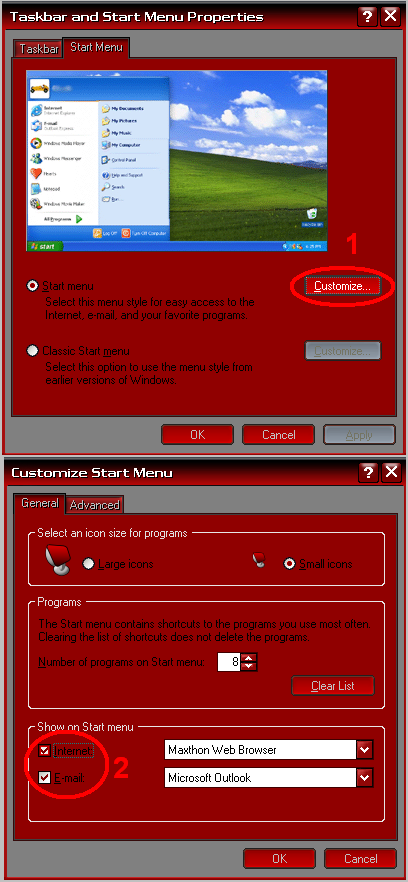

How to remove the Internet and Mail icons from the Start Menu with RegEdit

There’s always the easy way. by Right clicking and choosing properties on the start bar:
Just click away...

But here’s the quick and dirty… Create a .reg file with this content and apply it.
Windows Registry Editor Version 5.00

[HKEY_CURRENT_USER\Software\Microsoft\Windows
\CurrentVersion\Explorer\StartPage]
“Favorites”=hex:00
“FavoritesChanges”=dword:00000001
“FavoritesResolve”=hex:00,00,00,00,00,00,00,00

Scripters, here are the commands to do it from a batch file
[DOS]
:: Clear the pinned icons
REG ADD “HKCU\Software\Microsoft\Windows\CurrentVersion\Explorer\StartPage” /V “Favorites” /T REG_BINARY /D 00 /F
REG ADD “HKCU\Software\Microsoft\Windows\CurrentVersion\Explorer\StartPage” /V “FavoritesResolve” /T REG_BINARY /D 0000000000000000 /F
REG ADD “HKCU\Software\Microsoft\Windows\CurrentVersion\Explorer\StartPage” /V “FavoritesChanges” /T REG_DWORD /D 00000001 /F
[/DOS]

A brand new Doctor Who episode: “Blood of the Daleks”

If you aren’t familiar with the Eighth Doctor, the one before Christopher Eccleston, you can listen to a brand
episode that aired on BBC7 this past Sunday starring Paul McGann.

Here is a quick sample: Link

Blood of the Daleks(link)

The Time Lord has plenty to deal with as an intruder appears in the TARDIS and the Daleks prepare to blight a damaged world.

(two-parter)
Written by Steve Lyons, directed by Nicholas Briggs
With Paul McGann (the Doctor), Sheridan Smith (Lucie Miller), Katarina Olssen (Headhunter), Anita Dobson (Eileen Klint), Kenneth Cranham (Tom Cardwell), Hayley Atwell (Asha/Martez), Gerry O’Toole (Lowell), Nicholas Briggs (Daleks)
31 December 2006 and 7 January 2006

(BTW the first 5 minutes might sound a little bit familiar to the big fans…)

2006

For 2007, I will corrupt my site with a bunch of non-tech related posts and lots of ads. Well, okay… it is not as bad as all that… There’s no massive swing taking place. This is still cold storage for thoughts, ideas and code you or I might need sometime in the future. But I’m going to add a couple more things.

As you can see on the right, I have added an AdSense widget. Back in January of 2006, I added AdSense to my wife’s blog. It worked well and more than paid for the resources she used. However, it did not pay for 100% of my hosting cost. My goal for this year is to add a few more donated sites, to what I host, and to make my hosting of sites 100% self supporting. They are almost there already. It won’t take much to push it over the top. So, some non-intrusive ads will be shown on The Code Cave. A single day that is a New week, New month, and New year is just tooooo convenient stats-wise to miss. (I get a lot of traffic on the posts for my phones. Maybe if I get inspired, I’ll modify the widget to only show on those posts. Those folks are (I think) are more likely to click the ads anyway… We’ll see…)

But what of 2006?

And why were you tagged?
I heard a good quote yesterday “Who you are *today* is a direct result of the decisions you’ve made in the last six months.”

So, I’ve picking up the tagging chain from Michael’s Technozid (I still try to type Technozoid but there’s no second o) and will review the last year… And I’ve spread the joy by tagging 5 blogs I think you all might like. (see the list at the end). I’ve only done this kind of a post once before, but hey… looking at your choices over the last year makes more sense, I think, than making a bunch of resolutions. If you want to make progress, you’ve got to know where you’ve been…

Here you go, who I am today is because of this:
Gained or lost weight?
I’m almost exactly the same as I was this time last year. Last year I was in the middle of a big swing in my weight. I’d already lost 30 pounds to get to where I am at right now (205) and would continue to drop 30 more. I’d stopped the strict dieting and much of the exercise and have been balanced at 205 for the last six months regardless of what I eat or do. So, that’s pretty good but I’ve been ramping up the exercise again since November. I’m putting myself into training for mountain biking more in the summer. I REALLY enjoyed the parks I went to this fall. I plan to do much more of this and might even participate in a race or two… not sure about that… I’ve got someone pushing me towards it though and I’d love spending more time with him. He’s a good honorable man, and everyone should have more good examples in their life.

Longer or shorter hair?
Hmmm…. longer for just another 20 minutes. Then it comes off! I was planning on returning to my longer than shoulder blades length in anticipation for getting back on two wheels (with a motor this time in the spring. I should have enough $$ set aside to get a junker bike that will last me for a year). But I also think that the longer hair is going to interfere with my exercise plans. So, now that the Christmas skits are over at church, I’m going back to short short.
Continue reading 2006

The very last Foxtrot daily comic strips (ever?)

FoxTrot to Cease Dailies

Kansas City, MO (Universal Press Syndicate: News Release 12/05/2006)

Bill Amend’s popular FoxTrot comic strip will go to a Sunday-only publication schedule as of Dec. 31, 2006, announced Universal Press Syndicate today. The last daily will be Saturday, Dec. 30. Reruns of dailies will be available for Web usage.

“After spending close to half of my life writing and drawing FoxTrot cartoons, I think it’s time I got out of the house and tried some new things,” said Amend. “I love cartooning and I absolutely want to continue doing the strip, just not at the current all-consuming pace. I’ve been blessed over the years with a terrific syndicate, patient newspaper clients, and more support from readers than I probably deserve, and I want to assure them all that while I’ll be now a less-frequent participant on the comics pages, I’ll continue to treat my visits as the special privilege they are.”

Amend, who started the strip in April, 1988, and who has more than 1,000 client newspapers, is taking time to pursue other creative outlets. “In addition to Sunday newspapers, we may see FoxTrot entertaining us in other kinds of media platforms,” says Lee Salem, president and editor of Universal Press Syndicate.

Amend has more than 30 published FoxTrot comic collections and has licensed his characters for calendars and wallpapers for cell phones. He was nominated in 2006 as a finalist for cartoonist of the year by the National Cartoonists Society’s Reuben Award.

Creator(s): Bill Amend

Contact(s): Kathie Kerr

Here are the last 6 daily strips provided by the UComics site (click to expand):

Continue reading The very last Foxtrot daily comic strips (ever?)

Don’t use YourDomain.com or MySite.com in your examples

Every time you type one of those urls, some domain parking twit gets another link to their site and who knows how many more hits.

The Internet Assigned Numbers Authority (IANA) has reserved an url or two specificly for examples.

If you use Example.com, Example.net, Example.org, or Example.info you are not going to be helping deliver traffic to someone you don’t know anything about. These four Example.TLD (top level domain) addresses are IANA_RESERVED and you can use them safely.

Note that other example sites like .US .be .dk .de .co.uk etc are all owned by different companies. Only use the four mentioned above.

Any bash buffs out there? WordPress update script 2 alpha

Are any of you all good and *nix scripts?

I’ve been working on the next version of the “35 second upgrade” script and I’d like some second eyes on it before I release it officially.. I would like your help in ensuring this method isn’t gonna crash any typical *nix based, non-core-code-customized blogs. I was wondering if some of you might review this script and tell me of any errors or problems you can foresee. I’ve got it working just fine updating my blogs. But, I’d like more of a confidence factor than what I can get just having it work for me and only me.

Current Improvements:
1. Can update any number of directories by just adjusting the array at the top
2. Can pull from other sources. You don’t HAVE to update to the current and can just use it to roll back your code, every night, to your customized WP version.
3. Now works for blogs stored in the “WordPress” directory.
4. Cleans up after itself
5. Error checking
6. Observes tmp directory locations.

Coming soon:
1. File backups
2. SQL backups

If you know anything about scripts, could you give it a review and tell me what you think?

This IS alpha stuff, so use it with that in mind…

Source code follows
Continue reading Any bash buffs out there? WordPress update script 2 alpha