How not to query a Quake, Halflife, RtCW, FarCry game server status via PHP…

This is the story of a man who simply want to create a nice page describing the users of a few games servers for a Return to Castle Wolfenstein mod called The WildWest.

He was over joyed when he stumbled across a PEAR module called GameServerQuery. He’d spent hours and hours trying to get QStat to work on his 1and1.com server, but it never did work and no one could tell him why. He spent additional hours trying to find a PHP module that did the same thing, but everything he found was a wrapper for QStat. He’d given up on the search a full year before he stumbled across PEAR’s GameServerQuery. So, you can just imagine his joy.

Well, that joy was short lived…as the pain soon began. If you don’t want to know the whole sad story, feel free to jump ahead to the summary section where you can see the final results and decide what will best work for you.

The Painful Process

Now, if you are on a shared server, chances are you cannot install cusotm modules until you gotten your own instance of PEAR up and running. Read about how to do that here. After you have done this you are ready to install the GameServerQuery module.

Here’s how an average user would install the GameServerQuery module:
pear install –alldeps Net_GameServerQuery

Except that for 1and1, it won’t work. That command asks PEAR to install the latest officially released version. Right now that’s version 0.2.0. An Alpha release. And by default, 1and1.com only allows stable versions to be installed in a generic request.

So you have to request a specific version. Here’s how you do that:
pear install –alldeps “channel://pear.php.net/Net_GameServerQuery-0.2.0”

BUUUUUT for 1and1.com, that won’t work. It gives you an error that Net_GameServerQuery requires PHP version 5 but the default version installed on 1and1.com is version 4.4.2. But as loyal readers of TheCodeCave.com know, all 1and1.com users can run php 5 with a 1 line change to .htaccess. However, even with that change, PEAR has no way of determining that, at runtime, php5 will be used instead of php4. So, you have to tell the module to install no matter what… To do this you override that option by adding the –force option. Just like this:
pear install –alldeps –force “channel://pear.php.net/Net_GameServerQuery-0.2.0”

AND THAT installs GameServerQuery!

Hooray!!!

Except…. that this version doesn’t work. It is all full of alpha version issues. For example, it was obviously written on a Windows Machine for all of the slashes are back slashes instead of forward slashes. That simply won’t work on a Linux server. It’s a novice PHP programmer mistake. Another problem is that as the code is written on 1and1.com, you would have to put a php.ini file in every PEAR GameServerQuery subdirectory. And that’s just not the way to do things!

Fortunately the newest version of GameServerQuery is available through CVS to install:
http://cvs.php.net/viewvc.cgi/pear/Net_GameServerQuery/?pathrev=RELEASE_1_0_4

However, my CVS program is royally messed up right now and I haven’t needed it for ages. So I wasn’t about to mess with it again. So I decided to build an htm file from the contents of the XML file
(http://cvs.php.net/viewvc.cgi/pear/Net_GameServerQuery/package.xml?revision=1.4&content-type=text%2Fplain&pathrev=1.4) that describes the source files in the repository.

I REALLY think that should have been the hard way to do it. But I could not figure out the url for the zip or tarball for that release. If you know of an easier way to download a zip of a specific version of a viewvc processed cvs archive, I’d REALLY like to hear from you!

But anyway, I did the old right-click-save-as dance for all of the files and put them in the appropriate directories. I’ll save you that work. Here’s a zip: GameServerQuery_1_0_4.zip

You can extract it to the PEAR/PHP directory or to your web directory…

I have zipped up the examples too:
GameServerQuery_1_0_4_examples.zip

They’ve been somewhat mutilated by me in my testing. You can get the real ones here:
http://cvs.php.net/viewvc.cgi/pear/Net_GameServerQuery/docs/examples/?pathrev=RELEASE_1_0_4
if those don’t work.

Version 1.0.4 is a working version (with one minor change) of GameServerQuery and produces very nice report of the server properties and reports.

BUUUUUT it won’t run 1and1.com. This one is not their fault. It won’t ANY shared server to the best of my knowledge. I have seen at least one reference saying that access to socket level communication is restricted to root level access on (all?) shared server environments. It makes some sense that it would be. There is only 1 machine and that one machine might have to try and leverage a common socket across many different virtual servers. 1and1 just won’t/can’t let a single server lock up a socket.

What will happen when you try to connect out on a port, is that you will set off all sorts of internal alarms and you’ll get an email from the Customer Compliance Operatives (I’m serious – that’s how they sign their emails: “Customer Compliance Operative – 1&1 Internet Inc.”), but that’s a tale for another time.

So, what do you do? Well, it is simple. You use XAmPP to create a server on your local windows machine. Don’t bother with the whole PEAR install thing, just extract the zip (with directories in tact) to the folder that contains your example files and all will work beautifully. Then you just need to modify the scripts to produce static files and upload the results to your 1and1.com account on a regular basis – say every 15 minutes or so. Easy Peasy!

Summary

While manually downloading the 1.0.4 version of GameServerQuery produces a functional report on dedicated webservers, for it will not work on vitual hosts, you get a basic array in return and must do all the needed formatting yourself. The example files show some simple ways to do that. As shown here:
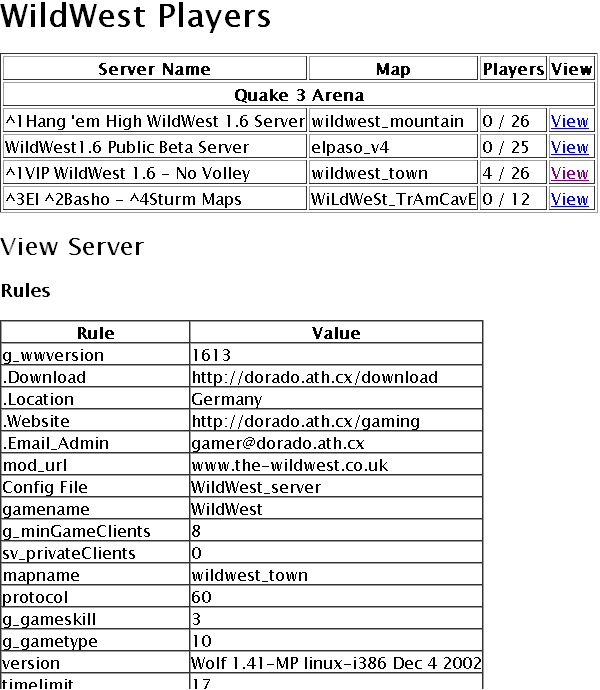
Game Server Query Pear Module output

Now that I knew the terms to search for, I was able to find another package on SourceForge that does this exact same thing in a much more professionally refined fashion. The package is called PHGStats. It includes an installation script that guides you through creating a configuration file for the servers you will monitor. It produces will formatted pages with special functions for each game, such as color code support in server and player names.
With very little configuration, you get nice server lists that look like this:
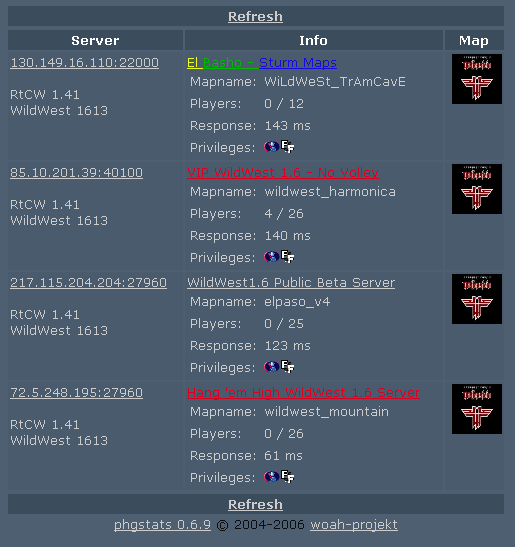
PHGStats server list.

and player lists that look like this:
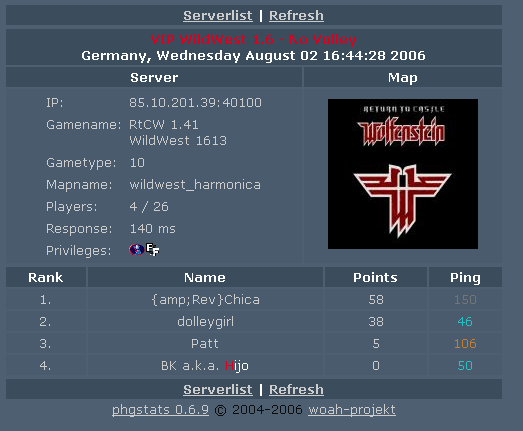
PHGStats player list.

I think both tools have their place. I will probably use the QueryGameServer to create a program that monitors the servers and emails people when there is somene waiting around for a game. I’ll probably have it check the servers every 3 minutes or something like that. The second heavy weight tool will be used to generate pages every 15 minutes or so…

A Princess of Mars

By Edgar Rice Burroughs

A Princess of Mars (Mars (del Rey Books Numbered))

You can view this book’s Amazon detail page here.

Tags:

Started reading:
31st Jul 2006
Finished reading:
2nd Aug 2006

Review

Rating: 6

I started reading A Princess of Mars by Edgar Rice Burroughs to my kids a year ago. I downloaded the text to my PDA from which I can read to them with the lights out. I picked it up again in audio format when I finished Dragons Dawn.

This is a very important peice as the John Carter’s story was the tale ever sold by Burroughs. At age 35, Burroughs had previously had a largely unsuccesful life. He quickly followed this success by publishing the first Tarzan novel. From that point on, his success was secured. This novel grew into a series of 18 novels covering the adventures of John Carter, Apache hunter from the late 1800’s and his heroic wife Dejah Thoris, Princess of Mars.

Reading books from around the turn of the last century is always interesting. In the year 1900, everyone assumed all was known and science was at an end, yet novels such as this one would strive to stretch the boundaries.

I do think this novel was initially intended as a commentary on such social topics as Native American relations, communism, slavery and the affects of war on culture. Many of these themes were eventually lost as the adventure of the story grew on Burroughs. Throughout these advendures is characters portrayed the strict honor and morals of Burroughs’ time.

BTW DO NOT or even borrow the audio version of this book. It will ruin the story. The directorial decisions made in the production of the audio book, insult and ruin the story. The free audio version available from librivox, though read by almost a dozen narrators, from what I’ve heard, its quality far out strips the quality of the one that is for sale.

Dragonsdawn (Dragonriders of Pern Series)

By Anne McCaffrey

Dragonsdawn (Dragonriders of Pern Series)

You can view this book’s Amazon detail page here.

Tags:

Started reading:
24th Jul 2006
Finished reading:
31st Jul 2006

Review

Rating: 8

You won’t find me giving any of the books from the Dragon Riders of Pern series anything other than an 8, 9 or a 10. This is my favorite series.

This book jumps back several thousand years in the history of the planet PERN and describes the first 10 years of its colonization. This is a period of time when there is no such thing as a “dragon” on PERN or any other planet. The colonists of this planet look forward to setting up a peaceful agronomical society. An escape from the years of war against the Nathy and from the poluted and corrupted mother earth and subsequent colonies on Mars, First Centauri and elsewhere.

It describes the first obstacles that faced a society that would soon splinter and begin a millenium of decline into an economy similar to those found during Earth’s middle ages.

This is a good pre-history to the main thrust of the PERN series. I highly recommend it to you – AFTER you have read the other PERN books.

How to scroll to the end of a TMemo or TRichEdit in Delphi

This is a simple one, but I had to look it up.

So, by my self imposed rules, I have to post it.

This text will constantly scroll memo-like-fields to the end.

[delphi]
Memo1.SelStart:=Length(Memo1.Text);
Memo1.SelLength:=0;
SendMessage(Memo1.Handle, EM_SCROLLCARET, 0, 0);

[/delphi]

This allows you to have an active logging component at the bottom of a form. Proof of concept coming soon.

Upgrade your sites to the latest WordPress in 35 seconds.

The 35 Second upgrade processhas been replaced with the “5 Second Upgrade Script” (link). Follow the link for more information.

This post describes a process to upgrade your post to the latest version of WordPress in 35 seconds. Each additional site would add only 5 to 10 seconds, depending upon how fast you type. I’ve measured it myself. The first two runs were 40 seconds and the rest were 35. And just so you know, that is real time and includes manually logging in by typing my password, doing the work, logging out, clicking start run and typing the full URL to the upgrade.php file. If I bookmarked the site and stored my password. I bet I could upgrade my site in 20 seconds. Anyway, I thought you might find this technique useful, so I thought I would share.

The only automation I used is to setup a shell script that will go out and get the latest version of WordPress whenever I ask it to. And since that is a generic process that will work for all versions, I don’t count it as cheating to reach that 35 second mark. I really wanted to hit 30 seconds, but hey this is better than my old methot which involved 15-20 minutes of upload time to take the files from my Windows machine over to the my 1and1.com site.

A Short Warning

Some things you should be scared by:

  • DO NOT USE THIS PROCESS IF YOU HAVE INSTALLED WORDPRESS INTO A DIRECTORY NAMED WORDPRESS
  • Some plugins make/require changes to your php code. Older (WP1.5) plugins often did this. It is safer to disable the plugins before upgrading. Know your site. I don’t need to disable my plugins for this to work. There’s a chance you don’t either.
  • This script uses a directory named wordpress for its work and deletes it when it is done. Anything in the directory off the root name wordpress will be deleted by this process. ~/wordpress is emptied and removed. Gone shall its contents be. No more. Erased and cannot be retrieved. And so shall they be deleted. *blip*
  • This process is meant to update any number of directories hanging off your root directory. It will work if you run out of the root too. In fact if you have a typo in your cd commands, it will update the root and you will have a lot of files to cleanup.
  • This process works to upgrade any site that is running WordPress 1.5 or newer.
  • This process will NOT delete any obsolete files. So, if you use this process to upgrade to WordPress 2.1 when it is released, because it includes a major rearranging of the files, you will end up with some legacy files cluttering up your webspace. This is not horrible unless a security hole is known to exist in one of the existing files. You could, on your own, modify this script to delete existing WordPress files before the install.
  • This script will replace all standard WordPress files with the latest and greatest. If you are using an older/custom plugin that requires you to actually edit files distributed through wordpress, you’ll have to re-make those changes.
  • REMEMBER TO BACKUP YOUR SITE. If you are thinking about updating your site, you should have a ready backup handy incase frogs and locusts start swarming out of your CPU fan. If such things seem unlikely to occur, or your one of those that loves the smell of fried chips in the morning, you may opt to proceed without a backup.

Pre-Requisites

Other things you should know:

  • This instructions are optimized for a 1and1 Linux host account. If you have a Linux account from another provider, the instruction should be close enough for you to follow.
  • I’m gonna assume you have an account on a *nix server.
  • I’m gonna assume you have the access and a way to Telnet/SSH into your account. Basicaly, to the untrained eye, telnet/ssh allows you to access your account from a DOS prompt. (No hate mail please! I said to the untrained eye!)
  • I’m gonna assume you have the vi editor on your server. vi is a text editor that you will propably rarely use and that is optimized to make you very quickly forget the basics of how to use it. After stumbling around in it this time, I think I came up with a quick and easy set of instructions that will work for this post.

How to get Telnet/SSH access

So your first task is to get putty and that’s this PuTTY:

Not this putty:

(Old Joke. I’m sorry, but it was a good one and heck, cut and paste is easier than looking up the urls and retyping all of this.)

Just download it from here: http://www.chiark.greenend.org.uk/~sgtatham/putty/ and install.

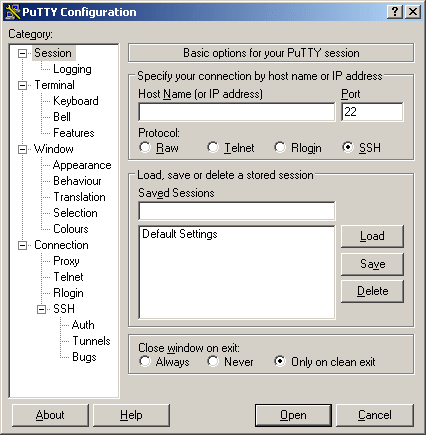
Now, configure PuTTY to log into your site. It is straight forward, if you have difficulties. Please take a break and read the help docs on it and decided if you really want to take on updating via scripts without further reading and studying. Manual updates take longer but they are safer.

Once you have putty installed, login using your user number and main password (u35555555 or something like that for a 1and1.com user)

Once you are logged you’ll be at a prompt that looks like this:
USERNAME:~>

You can now use unix commands to wander around in your account. Be careful, you CAN break stuff. *nix is a strange world if you are not familiar with it.

The Script

As mentioned before, this upgrade process requires you to create a script. A BASH script is like a DOS Batch file. It is a series of commands that are executed sequentially. You create the script once and can run it MANY times. In fact you should be able to use it for all future WP releases. However, if you are performing more than a maintenence upgrade (i.e. if you are switching from 1.5 to 2.04 or from 2.0.4 to 2.1) you might want to follow the manual instructions that come with WordPress as it will result in a cleaner install. It’s up to you. The point is, you can always use this script to update to the latest release over and over again.

The process the script follows is simple.
1. Remove the files and directories used by this process to ensure a clean run.
2. Grab the latest gz file from wordpress.org
3. Uncompress the gz file – this creates a tar file
4. Uncomress the tar file – this creates a wordpress directory tree
5. Change to the directory housing the active wp site
6. Copy all of the files and directories from wordpress over to the current directory.
7. Remove the wordpress directory
8. Remove the tar

In terms of BASH commands, the script file will contain something like this:

rm latest.tar.gz
rm latest.tar
wget http://wordpress.org/latest.tar.gz
gunzip latest.tar.gz
tar -xf latest.tar
cd ~/wpdir4site1
cp -R -v –remove-destination ~/wordpress/* .
rm ~/wordpress/ -R
rm latest.tar

“wpdir4site1” represents the directory in which your site has WP installed. You’ll need to change that text to use the right name. It is the directory in which WordPress’s Index.PHP resides and WP-Admin hangs off of it. If you are unsure of what to put here, STOP. Script updates are not for you. It is better to take a couple minute to update your site than to put something wrong in here and have the script erase everything on your site.

The next line is the one that does all of the work. So, you need to copy the cd and the cp lines if you want to change this script to update more sites. Then your script would contain something like this:

rm latest.tar.gz
rm latest.tar
rm ~/wordpress/ -R
wget http://wordpress.org/latest.tar.gz
gunzip latest.tar.gz
tar -xf latest.tar
cd ~/wpdir4site1
cp -R -v –remove-destination ~/wordpress/* .
cd ~/wpdir4site2
cp -R -v –remove-destination ~/wordpress/* .
cd ~/wpdir4site3
cp -R -v –remove-destination ~/wordpress/* .
cd ~/wpdir4site4
cp -R -v –remove-destination ~/wordpress/* .
rm ~/wordpress/ -R
rm latest.tar

Create The Script

So, here’s where you use PuTTY to log into your account (see above). Once you are at the bash prompt, you will use the vi program to create your script in your root directory.

So just type in:
vi updatewp.sh

Then hit the letter i
That will put vi in insert mode.
Then just type in the script as I described in the previous section. If you want you can use Notepad to customize the script to fit your directory structure and then copy it into the Windows clipboard, and paste it into PuTTY by right clicking the window.
Once, you have the script file looking as you want it to appear or if you want to give up and start over, hit Escape. That will take you out of Insert mode.
If you are satisfied with what you see, hit colon (:), hit w and then hit enter. That will save your work. Then hit :q and press enter to quit.
If you just wish to quit without saving, hit colon (:) and then type q! and press enter.
In review here are all of the vi commands you need to know

  • i = Insert mode
  • escape = Exit Insert Mode
  • :w = Write file
  • :q = Quit softly
  • :q! = Quit forcibly

Oh, and don’t paste the file in without updating the directory names, because if you run it like that, say when you are proof reading a blog post, you will update your root directory with the current version of WP and that means loads of files to clean up. Luckily you can identify them via their modified date. And no, I will not tell you how I know this!

Let’s get busy

Now you’ve done all of the hard work. You’re up to the 35 second challenge.

Each time you upgrade, do this process:
1. Telnet/SSH/PuTTY into your account.
2. Type “sh updatewp.sh” and then press enter
3. Close your Telnet/SSH/PuTTY program.
4. Visit your upgrade url and press the “Step 1” link (I do this by hitting Start->Run and typing “http://www.MySiteUrl.com/wp-admin/upgrade.php”)

This process is also great for quickly restoring a corrupt/hacked site back to operation.

I can do all that in 35 seconds, how fast can you do it?

WordPress 2.0.4 released but…

UPDATE – This post no longer applies.

This post is obsolete. It describes two issues I had with WP2.0.4 just prior to it being released. The first is a Maxthon browser specific error, that is suppressed by default in Maxthon and IE. In IE however there is never a way that it can be shown. At least that’s what my testing indicates.

The second error was due to a zero byte Index.php files being located in the plugins directory. IF index.php is there, it replaces the dashboard upon subsequent visits. That’s a nifty trick… I put the index.php from my bubble headed boy page in there and now the wp Dashboard hosts bubble headed boy! How useful is that?!?!!

Anyway, I’m now “good” with 2.0.4 – both of these things are “non-issues” – Install away!

Well, Matt released version 2.0.4 a short while ago. I’d love to jump on the Go, download and Install Now band wagon, but frankly I am just not there yet. I’m seeing weird problems that just shouldn’t be there. Admittedly, these problems are far better to suffer though than dealing with some malicious member bumping themselves up to administrator level or doing something worse to your blog than that. Still, I would have preferred these problems being confirmed and fixed or at least knowing why they were happenning here and perhaps not elsewhere. I’m not doing anything out of the ordinary with this site at the moment.

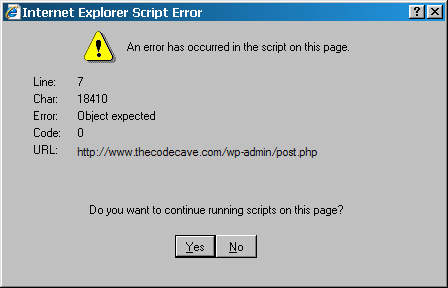
I’ve just spent 4 hours trying to find the first problem. I am getting this error all over the post.php page:
Object expected on line 7 character WHAT???? 18410????

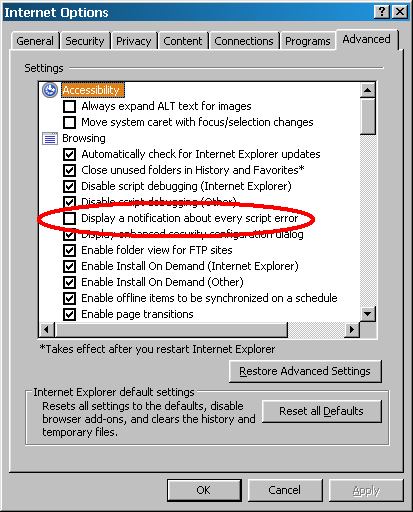
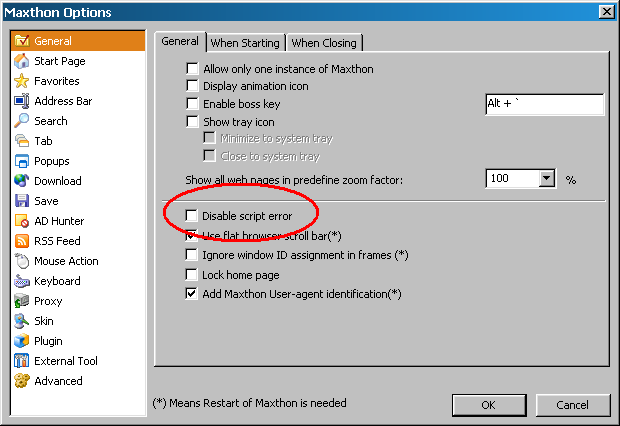
You’ll only see this message if you turn back on the annoying Script-Error-Popup that everyone disables because 90% of the sites out there contain errors:

IE:
Should be checked

or Maxthon:
Should be unchecked

I can often produce it upon saving a post, deleting a post, leaving the write tab, heck I even sometimes get two of them when closing down the browser.

I’ve just found that the error is never raised/actively supressed from IE7 proper. However, the Maxthon browser raises the error. If this is truly a Maxthon only issue, than I’ll just turn back off the error popup and go on happily with life. Since this error can be easily ignored, I’m not thaaat worried about it anyway. I am a little concerned that it could be masking other behaviour…

The other issue is a bigger deal, but I’ve heard from two people who don’t see this bahaviour. My dashboard tab/button points to
/wp-admin/admin.php?page=index.php
and therefore only displays this when I click on it:
la la la la Don't Worry.  Browse happy, la la la

Look Ma! No dashboard!

Sooo, I’m still investigating. When I have found the reason for these, I’ll make another post describing the really quick way to download and install these upgrads…

But till I get this isolated, please excuse the dust and any weird behavior… though for now, I am off to bed…

Thanks

How to suspend random computers at your office via cellphone

Rickard Liljeberg has posted a video of the feature in action at his office. Their victim computer of choice was the Dell GX520 and they were having random shutdowns that Dell support could not explain. Kudos for him giving credit to coworker Chris for researching the problem and sysadmin Ben for putting 1 and 1 together and coming up with two.

I was alerted to this by a friend at the office who regularly reads The Register. When he saw an article referencing the Dell Gx520, the computer we use at all of our sites, it caught his eye. We have hundreds, if not thousands, of these computers in the field.

Apparently, certain cell phone can trigger the circuits that suspend a Dell computer. The phone in the video appears to be an older analog phone. So, I’m not quite as worried about this as I might otherwise be. We haven’t had a rash of call about random shutdowns. In fact, I’d originally decided not to log an issue on this as we don’t use the suspend feature. However, if the phone is triggering the circuits, software and bios settings probably do not matter.

Dell’s response to The Register was:

Communication devices do sometimes cause interference with other communication devices. The level of interference created may depend in part on the model and condition of the phone.

Dell systems are designed to operate in line with industry standards for power and electro-magnetic shielding. We recommend to customers who are experiencing interference to avoid using mobile phones within one foot of the system. We encourage customers to contact Dell directly if they have other concerns.

It looks like Rickard has posted the video on the public Google video site. So, I can show it here too.

Here it is in action:

WordPress 2.04 Beta 2 includes a vital security fix.

Quick someone call Sam!
Original image by Andrew Krespanis

Thanks to some drastic and controversial actions taken by SpamKarma creator Dr. Dave, a large percentage of the blogging populace has been alerted to a security hole in WordPress. He even went to the effort of activating a warning message that was sent out to everyone who uses his SK2 plugin. This has resulted in a lot of fear spreading amoung a huge number of bloggers. This sort of thing just spreads exponentialy. Here’s a quasi random sampling of two dozen of the first posts on it: .......................

And these were just from the English blogs that posted about this on the same day as the notice going out. The neat thing is that these are some of the most on-top-of-things bloggers out there. Those 24 blogs have some great content and gread visual styles. The are well worth perusing…

Anyway, as you can guess he’s taken plenty of heat for this, because loads of people are now searching for the hole and trying to figure out how to exploit it. Most of these people just want to protect their own blogs. Others might be searching so that they can use this exploit against others. There are certain people I would not like to be right now…

The good, the bad and the ugly

The most common fix being spread out there is to disable “Anyone can register”. The good news is that this will eliminate the possiblity of new people exploiting this issue. The bad news is that I would wager most bloggers don’t know the hearts of even HALF of their members. The ugly truth is that I bet many of the WP bloggers out there (the pajama media in particular) have members that are REALLLLLY pissed at them right now. Hey, its ugly but it happens. Now that this exploit is known, do you really trust that unknown/angry member to not go and read up on the details? Should you delete their account; so that they are even angrier the next time an exploit is announced? Don’t look at me, I can’t answer that one for ya…

Another alternative

The really good news is that Ryan Boren released the beta version of WordPress 2.0.4 on Sunday. The Beta2 version of the release includes a fix for this issue.

Here’s what Ryan said in a WP public list:

To recap, there is a bug in core WP involved that I believe I’ve fixed
for 2.0.4. This is the core API bug Dave is talking about on his blog.

I was in error before to say that this is a problem to be fixed solely
by the plugins. There are some plugins that need help beyond the fix to
the core, but the core fix should cover most plugins. Sorry for the
confusion.

And with that, I really need to get some sleep. Later all.

If you want to test the beta release, the beta2 beta3 version is available for download here:
zip
tar.gz
Please be aware that this IS a beta release and has not been tested against all common plugins and themes.

That said, WordPress 2.0.4 is under some intense scrutiny and *MIGHT* be released in just four days. You can see that for yourself here. In fact, you might want to keep that link around. Modifying that link is much easier than asking around “When will WP x.y will be out? Huh? Huh? Huh?” If there is an answer to that question, there will be a link like that, showing the date. Can you figure out what the link for the 2.1 release is?

WP 2.0.4 Status and Some Details

Many people have been running 2.0.4 for ages now, but it is still under development. There have already been a number of changes and fixes since the beta2 version. Beta2 will not be the version that is released, but you might prefer running it to turning off your membership.

This fix is important, but the danger is as all encompassing holes that existed prior to version 2.0.3. It involves an assumption, by plugin authors, that the WordPress core takes care of all security concerns. The fact of the matter is, a WordPress plugin should be written so that it is secure in and of itself. It only makes sense. This fix enhances the security around plugins. But plugin authors should still be aware that they must always make certain the logged in user has the rights to do the action the plugin is about to perform.

Likewise, WordPress bloggers should be aware that that the more powerful a plug in is, the more risk you expose your self to if someone gets to it through a security hole. This was just as true before this hole was disclosed as it is now.

You are your own blogs best protection

For example, if you really think your WordPress blog needs to be able to restructure all of your table, did you chose a plugin made by someone that looks like the have professional experience in web security or was your plugin written by a highschool senior or college freshman? I’m just asking… And so should you…

Now, there has been so much FUD that everyone is in a panic. I’m not saying that you should do nothing. You might actually want to disable the creation of new user accounts. You might want to disable some trouble users. You might want to update to the beta 2.04. Or you might just want to take a breath and realize that chances are, no one is out to destroy you or your blog – even just for the fun of it.

The fact of the matter is that there are still thousands of blogs out there running version 2.0.2 of WordPress (100,000+ results from google) and earlier despite our best efforts to get people to update and realize the serious nature of the risk. When there are published security holes allowing allowing mass deletions of posts, there are much easier targets with more bang for the buck than your WP 2.0.3 blog.

You ARE running at least 2.0.3 right?

UPDATE

Beta 3 was released 7 minutes ago at 12:38pm EST/16:38 UTC. I’ve updated the links above to point at beta3. The only change between b2 and b3 is a minor fix I tested and improved for Ryan last night. In some rare circumstances the author link at the bottom of the posts might have been incorrect. Those of us without themes that support multiple authors would be unaffected by this change. So, there’s no real reason to get b3 if you have b2 installed already. The release MAY come sooner than I mentioned in this article. Perhaps by as much as 3 days sooner…but I wouldn’t mind another evening just to try to exploit this version.

You have been hacked! or What not to do with your 1and1 account…

Well, I had a nice post about how I was distracted from posting more Delphi code because I was playing with a new pear module I’d found called GameServerQuery. I was finishing that post by asking if anyone had gotten it to work because I was pretty sure I had everything correct but it wasn’t working. Before I published the post I noticed someone had telneted into my account and run some bash commands. And I knew it was not me…

They searched for my local ip address and an example file I used for Game Server Query. Very odd…

Then I got an email from 1and1 saying I was hacked and that “WordPress needed to be updated because it had many security holes”. Uhhhh, no it doesn’t.

Long story short – I wasn’t hacked my anyone but a 1and1 representitive and dumbing language down for the end user is a bad practice if you don’t also provide them with an explaination of what you REALLY mean.

I’ve got enough materials for four or five posts out of this whole thing, but if I combine all the detail here, this post will be 5 pages long and it won’t make any sense when read as a whole.

So, here’s a summary and some good things to know when working with 1and1.com shared host accounts –

1. They say: Don’t use your account to host a game server or simliar program.
They mean: We monitor and block outbound socket connections from your server. By doing this we lock out people looking for a cheap game server, and we protect our customers sites from several common attacks. We will allow FSocketOpen but the traffic is interupted and you will be contacted by a “Customer Compliance Operative”.

“Customer Compliance Operative”?!?!?!!? So, is that like one of the Men in Black or more like a Mafia enforcer? Will I be zapped by a blinky light and forget all the PHP code for openning sockets if I continue with this post?

UPDATE: I just found a reference that indicates that this is probably NOT 1and1.com fault.
Someone was investigating why Traceroute was not available on shared servers and discovered that socket traffic could not be accessed without root level access. Of course root level access cannot be givin on a shared server. If anyone can Confirm or Deny this, I’d appreciate the additional information…
2. 1and1 passwords should not be considered secure and therefore should only be used on 1and1. Any/all 1and1 account representatives have access to your root passwords and can login as you and for all intents and purposes impersonate you using your accounts. What bothers me most about this is that they don’t have a policy of notifying you that they have logged in as you to do something… That’s wrong…

3. 1and1 Support reps as a whole – as might be expected – have only general knowlege about the vast number of programs out there that could be running on your server. So they will look for alarm words and offer generic advice when they see one of these dangerous words. This could be considered a form of Red Zone Management, I guess. They get involved only when they need to and only know the hot topic of they day. So they will search for a file called XMLRPC.php since last year it had a hole in it. So, that means you were probably hacked. If they see WordPress, they know it had vulnerablities earlier in the year, so they can assume you were hacked. They will not research/know the versions of the files involved even if they are listed in the logs. Again, this is really to be expected. I would not want every customer support rep to be a $90,000 a year security expert. I sure would not be paying what I am paying right now for the service.

4. When working with support, if you want a good solid response help them give it to you. You can be in control of the calls and guiding the representative will make the call easier on both sides. This is true of any company any where in the world. Not every support rep will have the same level of training, the pressing calls of the moment can and will take priority to the detriment of other calls, if something is important to you trust but verify it has been done.

5. The latest version of the Pear module GameServerQuery is good and functional. The latest version is not what pear serves up. You have to retreive it manually. PhGStats is a MUCH more refined tool and produces more fully functional pages. There’s a place for both of these tools. That place, btw, is NOT 1and1.com – see point 1.

More on each of these topics later…