How to fix error C00D11DA: an error occurred while verifying the license

So, this HUGE thunderstorm rolled through last night and took out the power a bunch of times. The first time the power went out, I had the computer on and was playing a licensed media file.

Upon rebooting the computer, I found that NONE of my licensed media would play. That REALLY stunk. I listen to unabbridged audio books all the time. I have several libary accounts with branches that offer LibaryReserve borrowing through Overdrive Media, the Ohio eBook Project website (http://ohdbks.lib.overdrive.com) and Net Library accounts. Each branch offers different lists of audio books, so I probably have free access to 3000 or so audio books.

So it was a ROYAL pain when none media player could play none of these files. Media Player wouldn’t even do the OverDrive Media Player’s security update task.

When I tried to do anything related to Media Player’s Digital Rights management, I got the error “Windows Media Player cannot play, synchronize, or burn a protected file because an error occurred while verifying the license.” That’s error C00D11DA if you must know… It means that one or more of your license files are corrupt. In my case, it seems all of them were. I could neither do a restore nor a backup of the licenses. Here’s how to fix that…

ATTEMPT 1: Surgical Assualt
The first choice you have, if the problem is with one song or story or whatever, is to delete that wma file, download a new unlicensed one and aquire a new license. That’s the easy fix. But my problem was with ALL licensed media. The Windows Media Player would not even attempt to get a new license for any file.

ATTEMPT 2: Send in the Ground Forces
You might be able to do a license restore and save your self a lot of pain. So try this first.
1. Run media player
2. Choose Tools-> Manage Licenses
3. Click “Restore now”

Hopefully that works. Of course that depends upon you having backed them up before, and who does that? Who even knows that menu entry is there???

Anyway, it didn’t work for me. So, I searched my hard drive and registry for anything related to the licensing. Google revealed nothing until I found a post by a guy that had just paid $35 to MS Support for the fix. (HAH! This morning I can’t find the link, but the very first result is a more detailed blog entry by Cris Lanier describing what I was about to tell you in this post. Oh well, I’ll tell you anyway and turn it into a three step process. If you want to do this process manually, or have some OS other than XP, I recommend that you use the link I provided to Chris’s blog.)

ATTEMPT 3: Throw out the baby with the bath water it’s time for Global Thermonuclear War

Well, that’s it. Now, it is time to quit playing games get serious. Now, to fix your Digital Rights Management problem, we are going to erase everything your computer knows about the DRM licenses you have and tell it to start over. Since this process will delete all licenses you have, after we’re done, you’ll have to redownload the WMA (or whatever they are) and reaquire a new license. Hopefully, that’s not a problem for you, but if it is, there’s really not much else that can be done at this point, as far as I know. A call to MS and a few hundred dollars in support fees might get them to rebuild the license database, but I wouldn’t count on it. In the meantime, the rest of us are gonna give DRM a brain transplant. Or at least we’ll remove the old brain and see if a new one grows back…

SUMMARY:
Delete the C:\Documents and Settings\All Users\DRM directory
Delete these two registry branches:
HKEY_LOCAL_MACHINE\SOFTWARE\Microsoft\DRM
HKEY_CURRENT_USER\Software\Microsoft\Windows Media\WMSDK

WindowsXP three step process: (Close all media players first)
1. Click Start->Run paste in the following line, press enter and hit Y if you are sure you did it correctly:
rd /s “C:\Documents and Settings\All Users\DRM”
2. Click Start->Run paste in the following line, press enter and hit Y if you are sure you did it correctly:
reg delete “HKLM\SOFTWARE\Microsoft\DRM”
3. Click Start->Run paste in the following line, press enter and hit Y if you are sure you did it correctly:
reg delete “HKCU\Software\Microsoft\Windows Media\WMSDK”

That’s it. You’re done. Now re-download the files and re-aquire your licenses. You should be in business.

Using Delphi and TWebBrowser to process WordPress’s HTML Source code

I don’t have a lot of time since I am heading off to my brother-in-law’s highschool graduation in upstate NY tomorrow. I might be able to post date a few articles for the Verizon Phone tips category, but this will be the last meaty post for a little while. So, today you get a program that I wrote at the beginning of the month when I wanted to let people know I’d written an article about the release of WordPress 2.03: TrackbackGrabber.

This little routine will go to a WordPress post, grab the source code and isolate all of the track backs for you. It turns them in to seperate lines of <255 characters each that you can paste into your ping back line on your post. Then when you publish an article, you will let everyone on that list know about it. This is somethign I used to do manually and it took forever! IMPORTANT: Don’t abuse this or it will back fire and you’ll quickly be labeled a spammer and will be reported to Akismet, Spam Karma and other spam filtering tools. If that happens none of your comments, trackbacks or manually typed entries, will get through anywhere!

Concepts Demonstrated:


  • Surfing the web using Delphi

  • Using a TWebBrowser Active X control to navigate the DOM structure of a website

  • Retreiving the source code of a webpage

  • The fundamentals of creating a web bot in Delphi

  • Filtering contents of a TMemo

  • How to tell when a page has loaded in the TWebBrowser

That last one was the tricky part. If you access WebBrowser1.Document too soon, you will get an access violation. Sleeps and process messages, no matter how many you use or how long you wait, do NOT consistently work. Pressing the button (calling WebBrowser1.Navitate twice) always worked but I found WebBrowser1.ReadyState in the documentation and checking that seems to be the right way to do it.

Exe: http://www.thecodecave.com/downloads/delphi/TrackbackGrabber.exe
Source Code: http://www.thecodecave.com/downloads/delphi/TrackbackGrabber.zip

Main unit:
[delphi]
// ****************************************************************************
// TrackBackGrabber_Main 06/Jun/2006
// Written by Brian Layman (AKA Capt. Queeg AKA SilverPaladin)
// Visit him at http://www.TheCodeCave.com
//
// WordPress’s Trackback system is a way to connect articles about the same
// topic. If you post something related to a popular article, this tool allows
// you to tell other bloggers that have posted related articles that you have
// additional information on the subject.
//
// Warning: I can’t think of any way that this routine could cause harm to
// your computer, but it could spell the end of your blog if you abuse it.
// Abuse this tool and it WILL back fire. You’ll quickly be labeled a
// spammer and will be reported to Akismet, Spam Karma and other spam
// filtering tools. If that happens, none of your comments, trackbacks or
// manually typed entries, will get through anywhere! It would really stink
// to have every comment you leave on any WordPress blog automaticly
// deleted.
//
// As always, I’ll say it is a good best practice to understand every line
// of new code before you run it. Who knows what could be lurking? Better
// yet, do not run this example at all. You should stop right now and erase
// the files. For if it causes blue smoke to be emitted from your network
// card, if it erases all users from your computer, or if it makes your
// sister break up with her lawyer boyfriend and start dating a caver, it
// is not my fault. (Actually that last one might be an improvement, but
// it is still not my fault.) But the fact of the matter is, computers
// have a mind of their own and we programmers live on the wild side.
//
// Usage: TrackBackGrabber.exe
// Supply an URL to a WordPress post and it will grab all of the track
// back links and then consolidate those to lines 255 characters long.
// Then all you need to do is paste each line into your WordPress post’s
// track back field and hit save. Each site will only be updated once.
//
// Licensing – You can use this source as you will. It’s free for
// commercial, shareware and gpl use as you like. I hope it helps.
// If this program & source really helps you out, please visit
// http://www.thecodecave.com/did-that-help/ and read more.
//
// History:
// 06/Jun/2006 – BL – Created
//
// ****************************************************************************
unit TrackbackGrabber_Main;

interface

uses
Windows, Messages, SysUtils, Classes, Graphics, Controls, Forms, Dialogs,
StdCtrls, OleCtrls, SHDocVw, mshtml;

type
TfrmTrackback = class(TForm)
memoResults: TMemo;
btnGather: TButton;
editAddress: TEdit;
WebBrowser1: TWebBrowser;
procedure btnGatherClick(Sender: TObject);
private
{ Private declarations }
procedure ProcessPage;
public
{ Public declarations }
end;

var
frmTrackback: TfrmTrackback;

const
// This defines what to look for.
// In this case it is TrackBacks.
// Deliberate references to this article for.
SEARCH_STR = ‘Trackback from Memo1.Lines.Count)
do begin
S := Memo1.Lines[0] + ‘ ‘ + Memo1.Lines[Loop];
if (Length(S) < 255) then Memo1.Lines[0] := S else begin Memo1.Lines.Insert(0, Memo1.Lines[Loop]); inc(Loop); end; Memo1.Lines.Delete(Loop); end; end; // ProcessPage end. [/delphi]

Matt Mullenweg on WordPress & OpenSource Development

Matt had a very eloquent monolog on WP-Hackers at the beginning of this month.

It’s something that is worth reading over several times and I’m putting it here so that you and I both have an oportunity to do just that. If you are involved in any type of open source development, this is worth reading.

Go ahead, it’s really not that long…
Original Source

I can’t speak for everyone, but all of my work on WP from the beginning
has been with the knowledge that someone would rip/sell/steal/etc any
and all of it. Just like giving people freedom to say whatever they want
means that they might say things that you disagree with, in the end I
think the inherent freedom is more important than control. In my
experience I’ve found the good far outweighs the bad. I’ve applied the
principles of “give as much away as possible” to other parts of my life
and it has been nothing but rewarding.

Even *if* there were some sort of awful license violation, in 99.9% of
cases it’s not worth pursuing. The time and cost of a legal battle (in
another country, to top it off) would be energy far better spent on
bugs, support, features, etc. Besides, if the features are that great
it’d be better just to clean-room implement them as GPL rather than
extracting them forcibly from someone who doesn’t want to share. (Not to
mention it would probably be 3-5x faster.)

I think supporting a platform you’re building on is a no-brainer
business decision though, natural selection will do far more than legal
action in the long-run for these types of cases.

I have always recommended people doing development around WordPress
license their work as GPL, as I think that provides the most long-term
benefit for both the individual and the community. (It’s a virtuous
cycle.) We’ve socially encouraged that with GPL requirements on
wp-plugins and in the theme competitions, and I think the flourishing of
those areas is a testament to the power of the GPL and open source.
(Thousands of examples are available outside of the WP ecosystem, too.)

When I see or hear about people who want to work for themselves or make
a living off of WordPress-related things but having trouble the problem
has never been with the license. If you want a Real Job with a Big
Company, don’t you think organizations like New York Times and CNET that
are putting huge investments into using WordPress aren’t crazy for
people who know the system really well? Watch Craigslist, Monster, etc
for listing with “WordPress” in them, they’re popping up pretty commonly
now.

For people just looking for some extra beer/server money from their
work, the biggest mistake I see is simply not asking. Make it *really
easy* for people to find your Paypal or Amazon wishlist. I won’t say how
many times I’ve tried to buy a book or something as a thank you for
people on this list and couldn’t for love or money find something on
their site that enabled me to. (As an aside, if you’re overseas try to
have a donation mechanism that’s easy for US folks too.) Have a mailing
list for release announcements. If you’d work on something more if you
got more money, then tell people. Provide amazing free support and put a
“if you found this useful” link at the end of every email. If you’re
open to people sponsoring features, or paid customizations, make that
obvious. Also consider publishing how much you get in donations, as most
people VASTLY overestimate donations, or they assume someone else is
doing it so they don’t need to. Outright charging is usually not the
most successful model.

Finally, I think striking out on your own can be incredibly rewarding
and is a great lifestyle and challenge, though I know it’s not for
everybody. Biggest mistake I see in this group is forgetting it’s a
business, just like anything else. Buy or check out as many books about
small businesses, finances, entrepreneurship, etc as you can. At the
same time, don’t forget to budget time for community. Before I left
CNET and started Automattic I knew about a dozen people doing
full-time WP consulting and work, names you mostly don’t know because
they were so caught up in their own work they weren’t improving the core
platform they were building their livelihood on. I swore I wouldn’t let
that happen, and luckily have found a model that allows 95+ percent of
work to be completely Open, but it’s something you have to plan ahead of
time because it’s very easy to get caught up. There are business models
around consulting, support, services, training, development,
advertising, and dozens of other things that can include and encourage
supporting Open Source. I will happily phone chat for 30 minutes with
anyone in the WP community who is fleshing out a sustainable business
idea to strike it out on your own. I’m happy to share what I’ve found
worked and what didn’t. If you need help, just ask!

Performing a reset on your Verizon LG phones isn’t hard e.g. LG vx5200 and LG vx8100

[CLOSED TO COMMENTS]

So you changed some setting on your phone and now you don’t know how to fix it? Have no fear, there is a simple process that can restore your phone to the default settings:

  1. Click OK/Menu
  2. Click right twice to get to the Settings and Tools Menu
  3. Click down until you get to the System (this is 5 on a 5200)
  4. Click down until you get to the Security (this is also 5 on a 5200)
  5. Enter your lock code. If you have not customized it, this is the last for digits of your phone number.
  6. Click Reset Default
  7. You’ll see a message that says “Reset Default: Preference settings will be set to factory defaults. Press OK to continue.” You know what to do here…

I’ve not done this on my phone. I like my settings. But I’m told that this will NOT remove the custom rings you have uploaded on your phone AND there is a seperate menu item for deleting contacts. So, I don’t think it will remove your contact information either BUT I cannot guarantee this. Choosing this option MIGHT remove all of those settings.

If someone reading this follows these instructions, please let me know, in a comment, what is cleared and what is not.

Make your Verizon cell phone safe! Set the Emergency numbers!

Your cell phone can be configured with up to three emergency numbers that work for your area. 911 is now pretty common in the US but it was not always so. There still may be areas that don’t use 911 but use a different number. In anycase, you set three numbers that ALWAYS work wether the phone is locked or not. One should be your equivelent to 911. The second number in your phone is, by default, 611. 611 is the universal phone company repair service. It is also used on many colleges as the campus police number. So, some people will be used to calling it. The third number *611 will get you directly to verizon’s customer service. So, if you lock your phone you can call them and ask them how to unlock it 🙂 plus someone should always be there eventually…

Anyway, wouldn’t it be MUCH more useful for you to have the local fire department number as one that you or your kids can dial even if the phone is locked? Or maybe your spouse’s phone?

Anyway, changing these number is probably a pretty good idea and here’s how to do it:

  1. Click OK/Menu
  2. Click right twice to get to the Settings and Tools Menu
  3. Click down until you get to the System (this is 5 on a lg vx5200)
  4. Click down until you get to the Security (this is also 5 on a lg vx5200)
  5. Enter your lock code. If you have not customized it, this is the last for digits of your phone number.
  6. Click Emergency #s
  7. You’ll see a message that says “Reset Default: Preference settings will be set to factory defaults. Press OK to continue.” You know what to do here…

Resetting the resolution of a monitor from within Delphi

This is a rescue app that can help a computer that turns on and is obviously working but the customer says nothing comes up on the screen. They quite often won’t admit what was done but the monitor says Freq Out of Range or nothing at all.

Just put this in the startup folder, reboot, and your problem is solved. It also works as a good party trick…

EXE: http://www.TheCodeCave.com/downloads/delphi/ResetRes86.exe
Source and exe: http://www.TheCodeCave.com/downloads/delphi/ResetRes86.zip[delphi]

// ****************************************************************************
// ResetRes86 01/Jan/2000
//
// Written by Brian Layman (AKA Capt. Queeg AKA SilverPaladin)
// Visit him at http://www.TheCodeCave.com
//
// A rescue util for Windows machines that have been set to a resolution not
// supported by the monitor. This has made me a hero for many a customer.
//
// I also used two modified versions of this tool, each associated with a
// hot key to switch between the resolution my monitors at could use and
// the resolution my monitors at home could use back when I strapped a
// handle onto my work computer and carried it back and forth.
//
// Warning: This routine changes your Windows settings. It can be used as a
// joke or a tool. It is a good best practice to understand every line
// of new code before you run it, who knows what could be lurking. Better
// yet, do not run this example at all. You should stop right now and erase
// the files. For if it causes blue smoke to be emitted from your network
// card, if it erases all users from your computer, or if it makes your
// sister break up with her lawyer boyfriend and start dating a caver, it
// is not my fault. (Actually that last one might be an improvement, but
// it is still not my fault.) But the fact of the matter is, computers
// have a mind of their own and we programmers live on the wild side.
//
// Usage: ResetRes.exe
// Simply place this file in the folder:
// C:\Documents and Settings\All Users\Start Menu\Programs\Startup
// and reboot the computer. When the next person logs it, the monitor
// will be at a resolution and hz cycle supported by all modern CRT and
// LCDs.
//
// Suggested Usage: If you have a game that
//
// Donations – If this program & source really helps you out, feel free to
// buy me a cappacino, movie ticket, ebook, or something else small for
// my next “Dad’s Night Out”. You can Paypal to Brian@TheCodeCave.com. Or
// leave a comment on my blog with your country of origin. Or even better
// yet, add me to your blog roll.
//
// History:
// 01/Jan/2000 – BL – Created
//
// ****************************************************************************
program ResetRes86;

uses
Forms, Windows;

{$R *.RES}

var
pDMode : _DEVICEMODEA;
begin
// The only required line for a Delphi app…
Application.Initialize;

// Assign the desired device mode
// The BitsPerPel is the only non-selfexlanatory setting I think.
// It controls the color depth as follows.
// 4 = “16 Colors”
// 8 = “256 Colors”
// 16 = “High Color”
// 24, 32 = “True Color”
pDMode.dmBitsPerPel := 8;
pDMode.dmPelsWidth := 800;
pDMode.dmPelsHeight := 600;

// Some touch screen LCDs don’t display at a rate higher than 60
pDMode.dmDisplayFrequency := 60;

// Mark the items that we are changing.
PDMode.DmFields := (DM_BITSPERPEL or DM_PELSWIDTH or DM_PELSHEIGHT or DM_DISPLAYFREQUENCY);
// Pass in the size, since we could change any number of fields.
pDMode.dmSize := SizeOf(pDMode);

// Call ChangeDisplaySettings to assign the settings to the registry and make
// it take effect.
// CDS_UPDATEREGISTRY The graphics mode for the current screen will be changed
// dynamically and the graphics mode will be updated in the registry. The mode
// information is stored in the USER profile.
ChangeDisplaySettings(pDMode, CDS_UPDATEREGISTRY);
end.[/delphi]

Congratulations to Cindy Moore!

She’s the winner of my First-Blog-I-Wander-Into-that-Has-Me-in-Their-Blogroll unannounced contest! Cindy has her blog over at the Digital Ramble.

She wins a large Café Voltaire from my local coffee Arabica Coffee House, or equal funds towards an other beverage that might be more to her tastes ;).


The cozy café down the street...
Congratulations Cindy!
Now go check your paypal account! 😉
(And btw that’s not her in the picture – at least the chances are pretty slim – lol)

I happen to really like her blog. It seems that she’s on a similar mission to mine. And that is (basicaly) to spread the knowledge that she found beneficial and toss in a little about herself along the way. She’s a computer programmer, though not in Delphi, near as I can tell (I guess no one’s perfect.) She’s got at least one WP plugin posted, the Favicon Manager WordPress. This plugin provides an easy way to get ANY image associated with your website to be your FavIcon. It also associates your icon with your feeds – a nice feature.

We both post our reading libraries too, but mine are slanted decidedly more to the fictional side of the scale. Heck, she even uses GAIM. But I warn you, if you thought my posts got to be long winded… you should be prepared. Digital Ramble is right! 😉 All in all, Digital Ramble is a good tech blog with some helpful hints, tips and tools.

Go check it out, it’s well worth the read!

Hidden Notepad.exe feature…

It’s JUST Notepad right?

I mean your normal every-day geek uses it all the time. There’s nothing new under the sun there?

OK, not everyone knows that hitting F5 will insert the date, but I’d bet MOST medium to high level geeks do. Heck, it’s on the menu… And sure to enable goto line you have to turn off word wrap. But I was shocked to learn a new notepad feature today.

According to John TP , it’s an Easter Egg, but I would call it the log feature.

The process is simple. If you need a step by step, go to John’s site. Otherwise save a text file with the first line consisting only of .LOG. Then EVERY time after that you safe the file, you get the date and time added to the end of the file…

Kinda nifty…

I’m not sure how I’d ever use that, but it obviously had a use for MS… Wouldn’t you have to macro this to take advantage of this feature?

I achieve the same thing by having a batch file in my All Users startup group that contains:
@date /t >>c:\Temp\boot.txt
@time /t >>c:\Temp\boot.txt

Then I have an (extra extra) record of everytime my machine is rebooted. Except that now that I’ve blogged about it, any unauthorized boots will be edited out.

But this all makes me wonder what else is in notepad.exe that I don’t know about… a hex editor doesn’t reveal .LOG in string format in the exe. So, who knows… there could be more stuff like this out there…

RamRod – BBC7 Flavour

I’m home sick today.

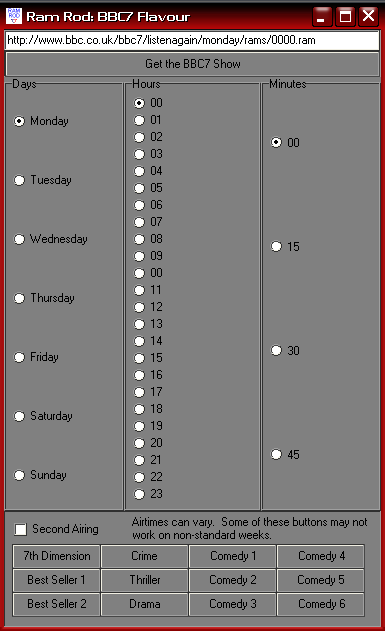
So here’s a quick post with a tool that I wrote to speed up my access to BBC7’s spoken word/audio books shows.

RamRod: BBC7 Flavour

RamRod has been custmized for BBC7 Links

As many of you know, I often spend hours listening to England’s BBC7 radio stream. They re-air all of the serialized Sci Fi, mystery, comedy and Drama radio shows that were broadcast in the last century in the BBC and sometimes in the US.

They have a listen again feature that allows you to listent to any of the shows you’ve missed in the last week. This program helps make that easier. So while I am home sick today, I can click on the 7th Dimension button and can listen to their Monday Sci Fi show, an unabbidged reading of Day of the Triffids. When that show is over, I just select Tuesday and click the go button and I’m on to the next show. Since, BBC7 is on a weekly rotating schedule, I can do that for all of the shows, for instance the Crime and Thriller hour is featuring a dramatization of Sara Paretsky VI Warshawski’s novel Deadlock. Since I am a week behind I can easily click through the episodes as I catch up.

In any case, maybe someone will find this useful. It’s great to be able to hear Michaela say “Saturday at 11 on BBC7” and within three clicks, be listening to it…

A working screen shot of The Code Cave's Ram Rod program, BBC7 Flavour.

This Delphi demo with source shows how to download a file from the interenet.
Downloads:
Here is the EXE: http://www.thecodecave.com/downloads/delphi/RamRod4BBC7.exe
Source:
Continue reading RamRod – BBC7 Flavour

Whoa! Bush makes surprise visit to Baghdad. Cool….

Excerpts from: http://www.cnn.com/2006/WORLD/meast/06/13/iraq.main/index.html

BAGHDAD, Iraq (CNN) — President Bush arrived Tuesday in Baghdad on an unannounced visit to meet with Iraqi Prime Minister Nuri al-Maliki.

Bush and his top officials had begun a two-day summit at Camp David, Maryland, on Monday to discuss Iraq’s progress and had scheduled a teleconference with al-Maliki for Tuesday morning.

But Bush secretly left for Iraq on Monday night to see al-Maliki in person.

Bush’s visit comes less than a week after a U.S. airstrike killed terrorist leader Musab al-Zarqawi and the Iraqi parliament approved the prime minister’s nominations for three key security posts in the new Cabinet, ending a stalemate among politicians over these positions.
[..]
Had those posts been filled sooner, Bush would have made the trip months earlier, [U.S. Presidential counselor Dan] Bartlett said.
[..]
“When you’re dealing with issues of enormous consequence, the security of our country, the security of the Middle East and the world, and you’re making such monumental decisions, it’s critically important that you’re able to meet with the new leader, confer with the leader, who you’re going to be making those decisions with,” Bartlett said.