How to use a Microsoft Zune as a Hard drive from Windows XP

aka How to copy music files onto your Zune.

We might be giving out Zunes at work as a reward for a fitness program. I didn’t want to lose this information. The original place that posted it is gone. It would be a shame to have a 30 Zune and not be able to use it to transfer files. Luckily a simple change in how Windows sees the Zune can take care of this problem.

In short, find the list of all USB devices you’ve attached to your computer. Under the unique ID for your Zune, you’lk find the PortableDeviceNameSpace Key. Under that key change the EnableLegacySupport=1 and PortableDeviceNameSpaceExcludeFromShell to 0.

Step by step:

  1. Plug your Zune into your computer.
  2. Close all the Zune software
  3. Run RegEdit32 from the Start>Run field
  4. When RegEdit comes up, click on HKEY_LOCAL_MACHINE
  5. Hit Ctrl-F and enter PortableDeviceNameSpace as what you want to search for and hit OK.
  6. When it finds what you are looking for you should be in the tree HKEY_LOCAL_MACHINE\System\ControlSet001\Enum\USB\Vid_[A BUNCH OF JUNK]\PortableDeviceNameSpace If you are not in the right place, you can browse around and see if you can find it manually.
  7. Double click on “EnableLegacySupport” and enter 1 for the value and click OK.
  8. Double click on “PortableDeviceNameSpaceExcludeFromShell” and enter 0 for the value and click OK.
  9. Double click on “ShowInShell” and enter 0 for the value and click OK.
  10. Close RegEdit

That’s it. The Zune should be listed under My computer and you can drag and drop items right to it.

Cheers!

Windows Vista Deployment Articles to Read

Note: These links were created with the Copy Text as Link tool for IE.

This live post is a collection of articles related to mass deploying Windows Vista. Please feel free to add your own as we all prepare for this. I’ll add and drop articles from here as they seem to be more or less important.

My current Windows XP deployment technique involves Symantec Ghost, SysPrep, and several custom built applications. We ship multiple computers and the most recent CD boots to a network using DHCP and a dynamicly generated computer name to ensure that a single CD can be used by the shipping and service departments to deliver a consistent image to our clients on new and repaired PCs, regardless of the model. This techniqe also involves creating a factory backup of the image after it is fully configured in the event an install goes bad and must be restarted (hasn’t happend yet) and allows for rolling backups of the operating system partitions and drive mirror.

The goal is to have a similarly efficient deployment process when we deploy Vista based machines on a set date in the near future.
Articles listed here may not be strictly related to Imaging, but may also include details describing running different types of programs under Vista in hopes that any problems can be foreseen:

Deployment
Inside Vista’s new image-based install
The simple life
ImageX and WIM Image Format
Deploying Windows Vista
Windows Vista imaging and deployment
Is the Windows Image (WIM) format used by the Microsoft Systems Management Server (SMS) OS Deployment Feature Pack the final version that Windows Vista will use?
WIM image format From Wikipedia
Customizing Windows Vista Deployments
Hackers get Hacked with new Windows Vista or directly here. – hacking article that discusses sysprep and WIM images.
Plan, Build, and Deploy Guide
A Guide To Pain-Free Desktop Deployment

Networking
Every Vista PC to get a domain name
Could Vista actually slow down networks?

Release/Version Details
Windows Vista Product Overview for IT Professionals
Vista goes gold: the frenzy begins
Work PCs to miss out on key Vista features
Tough new rules on Vista “OEM”
Windows without windows: Microsoft goes command-line with Server Core
Windows Vista RC1: you have the right to do … nothing, actually
Vista’s account protection: one click and it’s gone

Software/hardware issues
Vista scoots to new boot, but it’s still kinda rooted (A discussion of Vista’s handling of the MBR)
HOW TO: Dual-boot XP and Vista
HOW TO: Run Vista on Linux/XP
Vista still lacks full nVIDIA support
Microsoft deliberately blocking disc burning software in Vista, claims Alcohol
HOW TO: Install Nero 7 on Vista
Nero runs under Vista (at last!)
HOW TO: Coax retro DOS games to play on Vista
Need to eavesdrop on a network? Try Microsoft’s new free tool.
Activation
Vista RTM cracked by pirates before release
Microsoft closes piracy loophole: mandatory activation for volume licenced Vista

Virtualization
One for all

Older XP technologies
Let’s build!
Roll with it

A very good walk through of Windows Vista

If you haven’t gotten a chance to play with Windows Vista yet, you might want to take a gander at the LifeHacker article on the subject. It’s picture rich, and a pretty thorough overview of what you’ll be getting.

I just got word yesterday to ramp up for deploying our first Vista based products. It’s coming on like a steam train.

Right now, the way I’m looking at it, I’m not likely to upgrade EVER. Something might change my mind some day… some future game I HAVE to have might require DirectX 10 which, right now, is Vista only. That’s not all that likely. I might get a new machine that has it bundled, I guess. Win XP works well enough for me right now and I am already fighting the activation wizard WAY to often….

In fact, I started my prep work for Vista being the only MS OS sold: I reinstalled Suse Linux on my main machine…

Here’s that article: Q&A with Microsoft about Windows Vista

Click to go to the original site.

A few words about the RISKS of WordPress 1.2, 1.5, 2.0 or anything less than 2.0.4

Summary

As the security risks in legacy versions of WordPress become more widely known, the hacking of sites that haven’t updated will become a more common event. Your site about pet rocks or the joys of train spotting may not be at the top of the attack lists, but you probably don’t want to loose everything you’ve ever written either.

Google searches can identify you as a vulnerable site and as simple defacements become boring, the deletion of posts and comments will become an east way to wrack up points on the hacker bragging lists and punish those “stupid enough” not to upgrade.

The danger of having your name on the “Vulnerable Sites” list will only increase.

The general WordPress user may not get a sense of urgency from the release announcements. So, this article will attempt to describe the danger in continuing to rely on old software and trusting it to keep your website safe.

Conclusion

I know… I know!

The conclusion is supposed to come at the end of the article. Yeah, but this message it too important to be at the end!

Here it is: If you are not running WordPress 2.0.5: upgrade today! Based on exploits already publish, available and used on the web, all of the work you’ve put into your blog could be lost.

Right now a large number of people have the knowledge to:
1. Erase any/all of your posts or comments.
2. Replace your admin password with one of their own choosing.
3. Replace files on your system including index.php.
4. Run commands against your database.
5. Grab any file with a known file name from your directory – even php files – even those with your database password.

In short, they have the ability to use your site to do whatever they want WITHOUT you having to click on anything. Now, most of these holes were closed with WordPress 2.0.3, but it still leaves some LARGE holes open even in 2.0.4. There is no reason not to upgrade to a more recent version right now.

If your convinced, great. Go out and download 2.0.5. If your not convinced, read on and these pages will hopefully scare the willies out of you and get you to upgrade!

WordPress 2.0.6 Beta 1 is out

[edit] Sep. 12 2006: 4pm EST: Updated with changes from discussion with Mark Jarquith. Four of these eleven were removed, but I think I will wait for a response from him before taking them off this list.[/edit]

You can download it here…
http://wordpress.org/beta/wordpress-2.0.6-beta1.zip

There aren’t too many changes for this release:

Ticket Summary
1540 Date format returned by wp_get_archives is not localizable
3419 Multiple Authors for 1 article
3377 Atom feed contradicts itself
3391 Can’t click Labels for Radio Buttons in Moderation Queue
2681 Error on Inline Uploading after deleting page with attached file
3112 Upload bugs
3367 Single quote around double quote mysql string breaks on OpenVMS HP-PHP
3375 delay between ping
3390 Better get_page_uri
3415 Update “no wp-config.php” help link
3267 PHP Error in template-functions-links.php
3215 Login & Update functions everything is broken

Here are the details:
Ticket #3215 Login & Update functions everything is broken – PHP can talk to the server in different languages. On servers using the “Fast CGI” language, an error 500 was received when reaching administration pages. The code was rewritten to have special handling for Fast CGI servers.
Ticket #3267 – PHP Error in template-functions-links.php – The error “PHP Fatal error: Call to a member function get_feed_permastruct() on a non-object ” would crop up in server logs. Correcting the order in which parts of memory were freed has solved the problem.
Ticket #3415 Update “no wp-config.php” help link – The page this error linked to no longer existed on WordPress.Org. The link has been fixed.
Ticket #3390 Better get_page_uri – This is mainly an optimization for pages that display complete page heirarchies / navigation menus. The DB is accessed once rather than many times.
Ticket #3375 delay between ping – NO CHANGE MADE. IGNORE.
Ticket #3367 Single quote around double quote mysql string breaks on OpenVMS HP-PHP – When programing in PHP some systems allow strings like this: ‘This is a quote “Yahoo”.’ However that will not run on some implementations. This ticked essentially changed the format to something like this “This is a quote ‘Yahoo’.”
Ticket #3112 Upload bugs – If you uploaded an image to an empty post, an error would be generated. This fix enables empty post to accept uploads.
Ticket #2681 Error on Inline Uploading after deleting page with attached file – If an attachment existed that referred to a page that was deleted, an error occured when uploading the next attachment. This has been fixed.
Ticket #3391 Can’t click Labels for Radio Buttons in Moderation Queue – You had to click on the buttons instead of the labels for the buttons. This is non-standard behaviour and has been corrected.
Ticket #3377 Atom feed contradicts itself – NO CHANGE WAS MADE. IGNORE THIS.
Ticket #1540 Date format returned by wp_get_archives is not localizable – The format of the date returned in the text of this funciton was hard coded to “Month Year”. Now it depends upon your localized configuration.
(Check here for the latest updates http://trac.wordpress.org/milestone/2.0.6)

There are two tickets that remain open that may or may not be included with this release. These are:
#3370 was reported by one user, and we haven’t been able to recreate
the bug or diagnose what’s causing it on his install. That’s still
2.0.6 Milestone in case someone stumbles on the cause… and a fix in
the next day or two. But since it’s just one person, it’s low priority.

#2987 was added to the 2.0.6 Milestone after 2.0.6 Beta 1 went out,
by a Trac user. I’ll test the patch now and see if it works as
intended for 2.0.6 and will either put it in, or push it off for 2.0.7

A final security fix will be implemented in this release. It is a reportedly “minor” security issue. I have no further details at this point.

All in all, these fixes make WordPress compatible with a wider range of hosts. Basicaly, this is a VITAL release if you are having errors with your current version of WordPress. If you aren’t receiving errors, you will not consider this release quite as vital.

Bible Study Resources

You may not know this, but for the last 10 weeks or so, I have been teaching the 75+ age bible study group at my church. It’s an interesting challenge to come up with material that they are not already intimately familiar with. As a result I spend between 8-14 hours in preparation each week for that Sunday’s lesson. I’ve fond that they don’t often speak up, even when prompted with easy questions. So it’s turned out to be more or less a 45 minute sermons.

I am THOROUGHLY enjoying myself and the responsiblity has brought a bit of structure into my normally hap-hazard life. So many many things have improved since I started doing this. I cannot begin to list them all and it probably isn’t entirely appropriate on a mostly technical resource related site.

But, several people have recently spoken to me what resources I use for my lessons, and it seems appropriate that I might share them here. All most all of my resources come from the Blue Letter Bible site. I’ve found this site has more features than most affordable bible software, and it is free. I will probably post recorded audio of my lessons here sometime, because I find some of the knowlege is already fading and if I don’t get my notes and thoughts down somewhere, I’ll lose them. And that is after all one of the main reasons this site is called The Code Cave. It’s not code, but I still need to put this stuff into cold storage before it melts away.

So, here is a quick tour of the links that I’ve used for a recent lesson:
I use the KJV as a base for my research, because it enables all of the blue letter buttons to the left of the text. Here take a look at 1 Corinthians 7:
http://www.blueletterbible.org/kjv/1Cr/1Cr007.html#top

This of course includes the references to the Greek (click the C), including phrase searches and tense notification
http://www.blueletterbible.org/cgi-bin/c.pl?book=1Cr&chapter=7&verse=1&version=KJV#1

From which you can click on the Strong’s number and see the original sense of the word and see all of its uses
http://www.blueletterbible.org/cgi-bin/words.pl?book=1Cr&chapter=7&verse=1&strongs=680&page=

You can see all of the versions side by side
http://www.blueletterbible.org/cgi-bin/versions.pl?book=1Cr&chapter=7&verse=1&version=KJV#1

You can get the sections (in some versions like the NKJV) in paragraph form
http://www.blueletterbible.org/cgi-bin/tools/printer-friendly.pl?book=1Cr&chapter=7&translation=nkjvp&x=6&y=8

Or in verse/table form (this is what I copy into Open office in order to put notes below each verse)
http://www.blueletterbible.org/cgi-bin/tools/printer-friendly.pl?version=nkjv&book=1Cr&chapter=007&navigated=yes

And there’s an audio link at well so that you can hear the whole bible that way.

I’ve not used the K button for a lesson, but the “Treasury of Scripture [K]nowledge” shows related verses.

I mostly use the verse form of the NKJV, the Greek references from the KJV and the [L]ist of commentaries.

Additional helpful links include:
J Vernon McGee’s 5 year audio program in zipped MP3’s
http://throughthebible.ca/zip/
and his notes he spoke from when making the shows:
http://thruthebible.ca/notes/index.htm

He is a good balance to David Guzik
http://www.enduringword.com/1cor_audio.htm
And his notes
http://www.enduringword.com/commentaries/46.html

Sometimes my lessons land somewhere between the two of them, but on some points, I think they both have missed minor points Paul was making.

Anyway, maybe you’ll find those links useful…

December Mod of the Month: How to make a USB extension cable.

I got tired of fighting the poorly designed slanted USB ports on the front of the Dell GX260 computers.

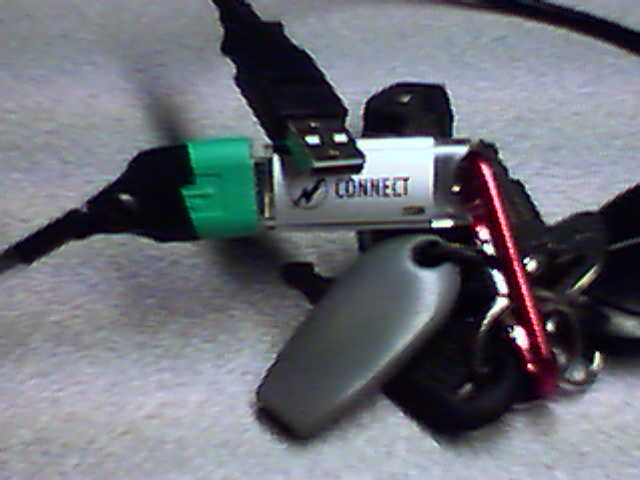
So, inspired by a friend’s similar project, I created this:
Completed USB extension cable

The process is really pretty simple. First you start with a standard USB cable. Mine was about 4 feet long.

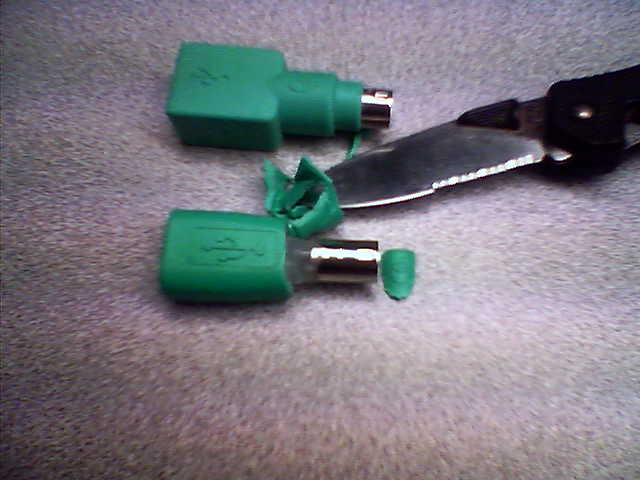
Then you also need one of those USB to PS2 converters that you have laying around from any of the USB mice you’ve bought in the last 5 years. On my first experiment, I pealed all of the outside off. I don’t recommend doing it that way anymore.
Two different USB/PS2 converters

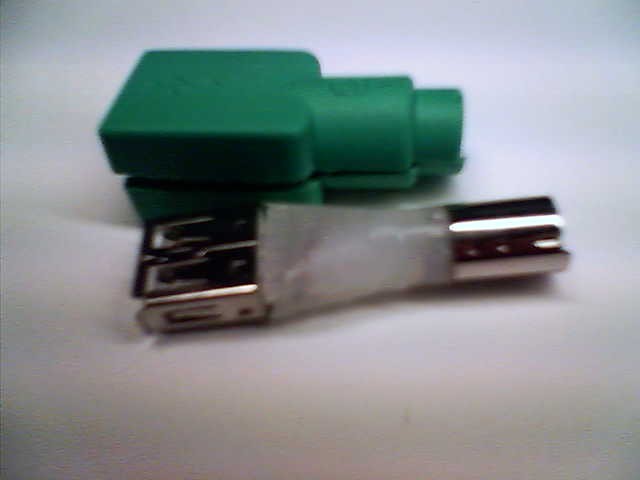
In making my second cable, I’ve found that the BEST way to do this mod is to slice it along the glue line on the side of the wrapper. With this second converter, I fond it even had a couple of plastic pins that will hold it together nicely. Here is the second adapter stripped. With the “wrapper” in-tact, I will be able to make the final product look much more professional using glue instead of tape. You can see the insert naked beside it.
Two different USB/PS2 converters

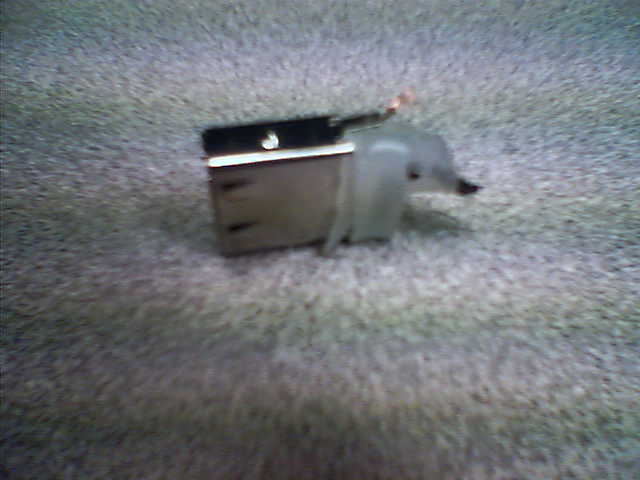
The next bit of the process is to cut off the plastic and the PS2 connector. Discard this part. Be very careful as you get the connector to this point. Hidden in the final part of plastic are four very tiny pins, plus one on the side. You can see the one on the side in the picture. If you break off any of these pins, you’ll be starting over again. You can probably manage if you break the side pin, but you’ll end up having a harder time fitting it back into the “wrapper”.
Here's the stripped connector.

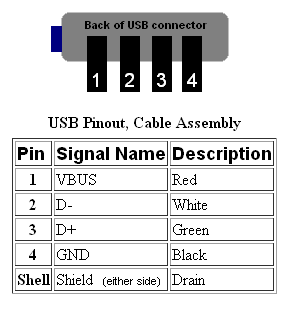
Then you need to do some soldering. The order to connect the pins from cable to the connector is, from left to right, red, white, green, black. The ground connects to the outside of the connector. In my two test cases, the ground connector was on the left, but there’s no reason that this must be so. When you cut the end off of the USB cable, just slice it off a short ways from the device end of the cable. Carefully strip the rubber insulation from around the outside. Then unwrap the shield wires from the inner cables. Then twist it into a single wire.

Here is how the pins should be connected:
USB connector pin out.

Once you have the wires on, it should look like this….
A wired connector

At the end of the day, if you don’t have any shorts, you should have a fully working extension cable that allows devices to be recognized by windows upon insert:
A completed product

Mod complete!

How to delete a printer from a command line or from Delphi

The command line for deleting a printer looks like this:

rundll32 printui.dll PrintUIEntry /dn /n\\machine\printer

I could not get that to work for my current situation. So I wrote a Delphi program that did the same.

You can down load it here.
PrinterManipulation.zip

You can use this next source code clip instead of downloading if you like. It assumes there are three buttons on the page and one listbox on a form named Form1. After creating those controls, select all of the pascal source text AFTER the “unit” line and paste this source code over top of it. After that, double click on all of the buttons, compile and you’ll have a peice of running code.

[delphi]
// ****************************************************************************
// u_PrinterManipulation.pas 12/Dec/2006
// Written by Brian Layman
// Visit him at http://www.TheCodeCave.com
//
// A quick program to demonstrate the deletion of a printer.
//
// Usage: PrinterManipulation.exe Just click on the button 1 to populate and
// select a printer off of the list. Use button2 or button3 for two
// different deletion methods. Double clicking the list is the same as
// clicking button3.
//
// History:
// 04/Dec/2006 – BL – Created
//
// ****************************************************************************
interface

uses
Windows, Messages, SysUtils, Classes, Graphics, Controls, Forms, Dialogs,
StdCtrls;

type
TForm1 = class(TForm)
Button1: TButton;
ListBox1: TListBox;
Button2: TButton;
Label1: TLabel;
Button3: TButton;
procedure Button1Click(Sender: TObject);
procedure Button2Click(Sender: TObject);
procedure ListBox1Click(Sender: TObject);
private
{ Private declarations }
public
{ Public declarations }
end; // TForm1

var
Form1: TForm1;

implementation

{$R *.DFM}
uses
WinSpool, Printers;

type
{******************************************************************************
TPrinterDevice
******************************************************************************}
TPrinterDevice = class
Driver, Device, Port: String;
constructor Create(ADriver, ADevice, APort: PChar);
function IsEqual(ADriver, ADevice, APort: PChar): Boolean;
end; // TPrinterDevice

{******************************************************************************
Create
******************************************************************************}
constructor TPrinterDevice.Create(ADriver, ADevice, APort: PChar);
begin // Create
inherited Create;
Driver := ADriver;
Device := ADevice;
Port := APort;
end; // Create

{******************************************************************************
IsEqual
******************************************************************************}
function TPrinterDevice.IsEqual(ADriver, ADevice, APort: PChar): Boolean;
begin // IsEqual
Result := (Device = ADevice) and ((Port = ”) or (Port = APort));
end; // IsEqual

{******************************************************************************
TForm1
******************************************************************************}
{******************************************************************************
Button1Click
******************************************************************************}
procedure TForm1.Button1Click(Sender: TObject);
var
indx: Integer;
begin // Button1Click
ListBox1.Clear;
for indx := 0 to (Printer.Printers.Count – 1)
do ListBox1.Items.Add(Printer.Printers[indx]);
end; // Button1Click

{******************************************************************************
ListBox1Click
******************************************************************************}
procedure TForm1.ListBox1Click(Sender: TObject);
var
hPrinter : Cardinal;
PrinterDef: PRINTER_DEFAULTS;
pPrinterName: PChar;
begin // ListBox1Click
pPrinterName := PChar(ListBox1.Items[ListBox1.Itemindex]);
FillChar(PrinterDef, sizeof(PrinterDef), #0);
PrinterDef.DesiredAccess := PRINTER_ALL_ACCESS;

if (OpenPrinter(pPrinterName, hPrinter, @PrinterDef))
then begin
if DeletePrinter(hPrinter)
then ShowMessage(‘Deletion Succcesful’);
ClosePrinter(hPrinter);
end
else ShowMessage(‘Could not open’);
end; // ListBox1Click

{******************************************************************************
Button2Click
******************************************************************************}
procedure TForm1.Button2Click(Sender: TObject);
var
ADevice: PChar;
PrinterHandle: THandle;
begin // Button2Click
with TPrinterDevice(Printer.Printers.Objects[ListBox1.ItemIndex])
do begin
GetMem(ADevice, Length(Device));
StrCopy(ADevice, PChar(Device));
end;
OpenPrinter(ADevice, PrinterHandle, nil);
if DeletePrinter(PrinterHandle) then ShowMessage(‘Deletion Succcesful’);
ClosePrinter(PrinterHandle);
FreeMem(ADevice);
end; // Button2Click

end.
[/delphi]

Build your own spam filter with PHP and DNSBLs

Have you ever gotten an email asking if want certain parts of your body enlarged, parts that you might not even have? Was the next email you read one asking if you want to loose the inches you’ve recently gained? Did you ever notice how these emails are always from people that you are fairly certain have nothing to do with the contents of the email. Did MTeresa@Vatican.org really send that diet pill email? Have you ever gotten returned or rejected “can’t be delivered” emails from addressed you’ve never ever sent an email to?

I have.

SPAM. It’s HORRIBLE! My email box for Brian@TheCodeCave.com probably gets 3 to 1 spam over real email. I expected that. I put that address out everywhere and don’t protect it. It is meant to be my public address. But the FROM addresses on all that email never indicates who the email is really from. Even the company information inside the email header is faked. The spammers will grab someother name on their spam list and use it as their from address. I’ve had my name put into the from address of emails a few times. It’s an annoying problem, just ask the Nuclear Moose.

Why this can happen is a long story. It all relates back to the fact that SMTP and port 25 were never meant for submitting emails to email servers. SMTP was only meant for server to server communications. However, that’s for a different post. The long and short of it is that everything can be faked except for one thing: the IP address of the server that sent the email.

Because that IP address is accurate, you can use it to tell if the person that sent the email is a spammer. The post tells you a couple ways to do that. And because this is The Code Cave, you get a fully functional php routine to boot.
Continue reading Build your own spam filter with PHP and DNSBLs