I’ve added a new page that demonstrates ROT 13 encryption.
You can see it here:
http://ROT13.TheCodeCave.com
I’ve added a new page that demonstrates ROT 13 encryption.
You can see it here:
http://ROT13.TheCodeCave.com
November 6-17, 2006The Developer Relations team will be presenting ten live one-hour Delphi and C++ 2006 Webinars on BDNtv starting Monday, November 6, 2006 and ending Friday, November 17. Each live Webinar will cover a different product use and development theme.http://bdn.borland.com/article/33778
All Webinars take place at 1pm Pacific Standard Time.Equivalent times in other cities are:
Topics:
Week 1
Nov. 06 – Mon – What’s New in Delphi/C++Builder 2006
Nov. 07 – Tue – Delphi/C++Builder Database App Development and Project Migration
Nov. 08 – Wed – Building .NET Compact Framework Applications with Delphi 2006.
Nov. 09 – Thu – Building, Testing, and Delivering Quality Applications using Delphi
Nov. 10 – Fri – IDE Personalization, Config, and Tuning Tips & Tricks for Delphi/C++
Week 2
Nov. 13 – Mon – Delphi/C++Builder 2006 Reporting Solutions
Nov. 14 – Tue – Building Apps with Commercial, Open Source, and Free Components
Nov. 15 – Wed – Working with Single and Multi-Language Project Groups
Nov. 16 – Thu – Using C++ Libraries, DLLs, ANSI C++, Boost, and the C++ TR1 Library
Nov. 17 – Fri – Preparing your Delphi/C++Builder Applications for Windows Vista
(Article Draft – Corrections will be made to spelling and grammar – These views are mine coming as fast as I can type with the live announcement. I apologies for any typos/misquotes/misinterpretations.)
Microsoft and Novell made an abrupt disclosure via their web cast site that there would be a VERY IMPORTANT announcement. That announcement occurred at 2:19pm PST/5:19pmEST. This announcement is important to large scale Enterprise and Server/datacenter operators as well as the developer community. It offers more choices, opportunties and technologies to IT operators around the world.
You may view the WebCast session in its entirety using any with these links:
Please, as you listen to the session, if I can enhance or correct any of my notes, please let me know in a comment on this post.
Continue reading Notes on Microsoft/Novell Anouncement: SUSE Linux/Windows Interoperablity
Louie Alfred Gomez asked a question on the WordPress Hacker’s list yesterday about the best way to moderate all comments on specific blog posts. He was hacking the core WordPress code, which all of you who have just updated know is a bad idea.
I whipped out this plugin to show him an alternate solution. If anyone else finds they might need this, I’ll add a configuration screen and turn it into a zip file
Here’s the source as is:
Continue reading TCC’s Moderate Specific Posts plugin
My friend Tom (See the Cycle Man post… pics, movies, and speed – you should check it out) asked about a registry setting I use this morning and I was able to do a quick look up of it and send it off his way. Well we all have settings that we carry from one PC to another… I just happen to have them in one place and commented profusely…
This file is what I vandalize any PC with that will be mine for any period of time. “Like a tom cat making his mark”, to quote The Bob’s song “Spray”, I’ll spray the registry with my scent.
Are there any I’ve missed? Which settings do you prefer?
Note that a Semicolon comments out MANY of the settings that I think some users may not prefer. The rest of them add to windows and simply make it better.
You may download the file in its entirety here:
Continue reading My Favourite Registry Enhancements
Well, you can monitor it yourself. There’s no date yet, but there are some 600+ “tickets” to change involved. You can see that here: http://trac.wordpress.org/milestone/2.1
Now, once the process gets a bit further along, you can check the status at that site. Here, take a look at how it was done for 2.0.5: http://trac.wordpress.org/milestone/2.0.5
Notice that http://trac.wordpress.org/milestone/2.0.6 does not exist! 2.0.5 SHOULD be the last release for the 2.0 line. I suspect that whether that is true or not will depend upon if a security issue is found.
So, what does 2.1 look like? Well, I’ve got it running on a testing site. You can do the same as it’s available to those who are testers:
http://wordpress.org/download/beta/
And those hackers who want to check out the nightly builds of the product:
http://wordpress.org/download/nightly/
There’s no quiz you must take to join. As no support is offered for any of the pre-release products, the only test is how fast you can dig yourself out of a hole when a feature you rely on doesn’t work in the current build. It’s sort of a pass fail thing….
WordPress 2.0.5 includes some 60 bugfixes and improvements that I link to here. That should be reason enough for any geek to switch to the latest version. If you are not a geek, and perhaps you haven’t upgraded even to version 2.0.3 yet. You need to. It is VERY important to the safety of your blog. If you started your blog on version 2.0 or higher, you will also get a marked speed improvement out of your site.
Top 5 Reasons to upgrade
1. Integrity: If you aren’t running version 2.0.4 or higher, there are easy methods to delete posts and comments from your blog that are not traceable back to the person that did it. All your work could be easily if someone got the whim to do so.
2. Speed: If you are running versions 2.0-2.0.4 and always were, than you are missing a key index. This missing index tells your blog where to find posts and pages. As you can guess, it is good for that to work quickly. Read more here in the ticket I logged when I found the issue.
3. Security: Improved security in wp-db-backup plugin. Sneaky people could use older versions of the get to places that they shouldn’t be
4. Privacy: User info snooping was possible. Any user could see any other users contact info, private not. Spammers must love that “feature”.
5. All of the above and much more: You choose…. I’ll leave this one up to you… You might wish to choose from one of Mark Jarquith‘s favorites. He seems to be a pretty good guy and has listed his top choices here. Or you could choose from any of the items listed on the official tracking site, here. That link will list the most important fixes first.
If you’re still not convinced, you should read this article (not yet published).
If you think that it takes too long to upgrade, consider using my Upgrade your sites to the latest WordPress in 35 seconds. method and you’ll never have to worry about a lengthy update again! That’s how I updated The CodeCave.
And “Why is it called Ronan?” you ask… Well, it’s named after the very first WordPress Baby! Ryan Boren is Ronan’s proud father. Pictures are available on Ryan’s site.
Update: Mark has posted a list of just the files that have changed. If you don’t use the script I mentioned above, you could look into his file which gives you a smaller set of files to update. You can find that here: http://markjaquith.wordpress.com/2006/10/28/wordpress-205-upgrade-changed-files-zip-changes-diff-changed-files-list
Update2: IF you are one of the few with the 302/500 error please visit this site:
If you have no idea what I am talking about, you are in the VAST majority and can thank your lucky stars 🙂
No, that doesn’t mean that you have to install the PPP protocol as it seems.
What it means is that you are dialing into an existing VPN host run through Windows XP but you did not get assigned an IP address. You’ve setup the “Incoming Connections” item under Network Connections ALMOST correctly. However you’ve left the “Assign IP address via DHCP” box checked. You would think this would make sense, however, if you are not running your network DHCP through that server and instead it is run through a router, this will not work. So, what you must do is choose a range of IP addresses. That’s the second radio button on that screen. Give it some sufficiently high range so that it won’t realisticly interfere with your router. Stay within the subnet defined by your netmask of course.
So, if your machine’s IP is 192.168.100.10, make your address range be 192.168.100.100-192.168.100.110. Then you can have up to 10 VPN clients connected. Make your range 192.168.100.10-192.168.100.10 if you are the only one to be using it.
Hope this helps. I keep forgetting about this setting myself. Maybe I’ll remember now that I’ve written it down.
I’ve decided to block all traffic from all McColo Corporation users.
Not all are guilty I’m sure, but I just got hit by one of their customers called “Digital Infinity”, reportedly a Moscow based company. I was crawled repeatedly by IP 12 IP addresses within the 208.66.195.1-208.66.195.20 range. Now, <100mb of transfers isn't so much to loose over a couple days, but it's enough to catch my eye. Looking up one of those IP addresses shows McColo Corporation has leased 208.66.195.1-208.66.195.15 to “Digital Infinity”. However, several of the IP addresses that scanned me are within McColo Corporation generic pool. I’ve also seen posts related McColo Corporation’s 208.66.192.* range being a major source of WordPress comment spam.
So, guys, you’re outta here.
I’m blocking them via .htaccess. I suggest you might want to do the same for at least 208.66.195.1-208.66.195.20 if you’re feeling more charitable than I am this morning.
Since they have four groups of addresses, I add four lines to my .htaccess file. As a whole, that section now looks something like this:
[html]
order allow,deny
deny from 208.66.192
deny from 208.66.193
deny from 208.66.194
deny from 208.66.195
allow from all
[/html]
This is the story of a man who simply want to create a nice page describing the users of a few games servers for a Return to Castle Wolfenstein mod called The WildWest.
He was over joyed when he stumbled across a PEAR module called GameServerQuery. He’d spent hours and hours trying to get QStat to work on his 1and1.com server, but it never did work and no one could tell him why. He spent additional hours trying to find a PHP module that did the same thing, but everything he found was a wrapper for QStat. He’d given up on the search a full year before he stumbled across PEAR’s GameServerQuery. So, you can just imagine his joy.
Well, that joy was short lived…as the pain soon began. If you don’t want to know the whole sad story, feel free to jump ahead to the summary section where you can see the final results and decide what will best work for you.
Now, if you are on a shared server, chances are you cannot install cusotm modules until you gotten your own instance of PEAR up and running. Read about how to do that here. After you have done this you are ready to install the GameServerQuery module.
Here’s how an average user would install the GameServerQuery module:
pear install –alldeps Net_GameServerQuery
Except that for 1and1, it won’t work. That command asks PEAR to install the latest officially released version. Right now that’s version 0.2.0. An Alpha release. And by default, 1and1.com only allows stable versions to be installed in a generic request.
So you have to request a specific version. Here’s how you do that:
pear install –alldeps “channel://pear.php.net/Net_GameServerQuery-0.2.0”
BUUUUUT for 1and1.com, that won’t work. It gives you an error that Net_GameServerQuery requires PHP version 5 but the default version installed on 1and1.com is version 4.4.2. But as loyal readers of TheCodeCave.com know, all 1and1.com users can run php 5 with a 1 line change to .htaccess. However, even with that change, PEAR has no way of determining that, at runtime, php5 will be used instead of php4. So, you have to tell the module to install no matter what… To do this you override that option by adding the –force option. Just like this:
pear install –alldeps –force “channel://pear.php.net/Net_GameServerQuery-0.2.0”
AND THAT installs GameServerQuery!
Hooray!!!
Except…. that this version doesn’t work. It is all full of alpha version issues. For example, it was obviously written on a Windows Machine for all of the slashes are back slashes instead of forward slashes. That simply won’t work on a Linux server. It’s a novice PHP programmer mistake. Another problem is that as the code is written on 1and1.com, you would have to put a php.ini file in every PEAR GameServerQuery subdirectory. And that’s just not the way to do things!
Fortunately the newest version of GameServerQuery is available through CVS to install:
http://cvs.php.net/viewvc.cgi/pear/Net_GameServerQuery/?pathrev=RELEASE_1_0_4
However, my CVS program is royally messed up right now and I haven’t needed it for ages. So I wasn’t about to mess with it again. So I decided to build an htm file from the contents of the XML file
(http://cvs.php.net/viewvc.cgi/pear/Net_GameServerQuery/package.xml?revision=1.4&content-type=text%2Fplain&pathrev=1.4) that describes the source files in the repository.
I REALLY think that should have been the hard way to do it. But I could not figure out the url for the zip or tarball for that release. If you know of an easier way to download a zip of a specific version of a viewvc processed cvs archive, I’d REALLY like to hear from you!
But anyway, I did the old right-click-save-as dance for all of the files and put them in the appropriate directories. I’ll save you that work. Here’s a zip: GameServerQuery_1_0_4.zip
You can extract it to the PEAR/PHP directory or to your web directory…
I have zipped up the examples too:
GameServerQuery_1_0_4_examples.zip
They’ve been somewhat mutilated by me in my testing. You can get the real ones here:
http://cvs.php.net/viewvc.cgi/pear/Net_GameServerQuery/docs/examples/?pathrev=RELEASE_1_0_4
if those don’t work.
Version 1.0.4 is a working version (with one minor change) of GameServerQuery and produces very nice report of the server properties and reports.
BUUUUUT it won’t run 1and1.com. This one is not their fault. It won’t ANY shared server to the best of my knowledge. I have seen at least one reference saying that access to socket level communication is restricted to root level access on (all?) shared server environments. It makes some sense that it would be. There is only 1 machine and that one machine might have to try and leverage a common socket across many different virtual servers. 1and1 just won’t/can’t let a single server lock up a socket.
What will happen when you try to connect out on a port, is that you will set off all sorts of internal alarms and you’ll get an email from the Customer Compliance Operatives (I’m serious – that’s how they sign their emails: “Customer Compliance Operative – 1&1 Internet Inc.”), but that’s a tale for another time.
So, what do you do? Well, it is simple. You use XAmPP to create a server on your local windows machine. Don’t bother with the whole PEAR install thing, just extract the zip (with directories in tact) to the folder that contains your example files and all will work beautifully. Then you just need to modify the scripts to produce static files and upload the results to your 1and1.com account on a regular basis – say every 15 minutes or so. Easy Peasy!
While manually downloading the 1.0.4 version of GameServerQuery produces a functional report on dedicated webservers, for it will not work on vitual hosts, you get a basic array in return and must do all the needed formatting yourself. The example files show some simple ways to do that. As shown here:
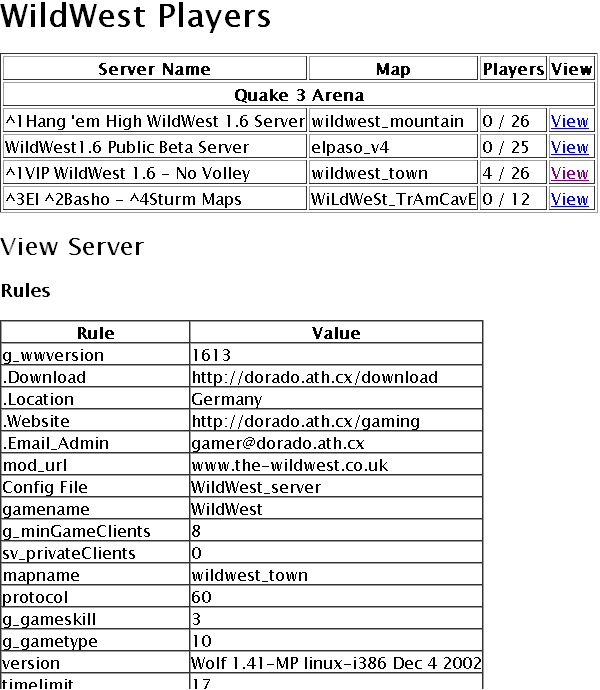
Now that I knew the terms to search for, I was able to find another package on SourceForge that does this exact same thing in a much more professionally refined fashion. The package is called PHGStats. It includes an installation script that guides you through creating a configuration file for the servers you will monitor. It produces will formatted pages with special functions for each game, such as color code support in server and player names.
With very little configuration, you get nice server lists that look like this:
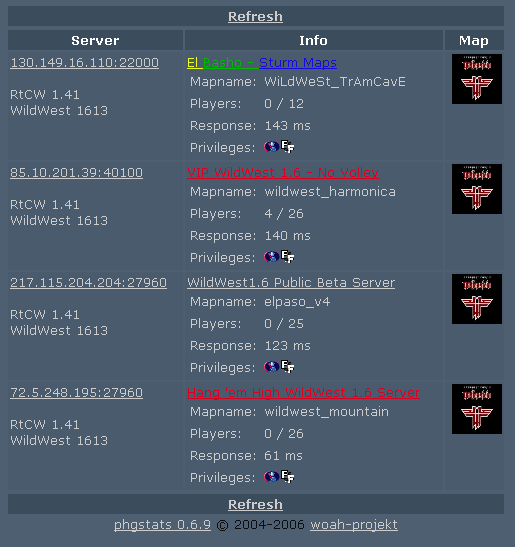
and player lists that look like this:
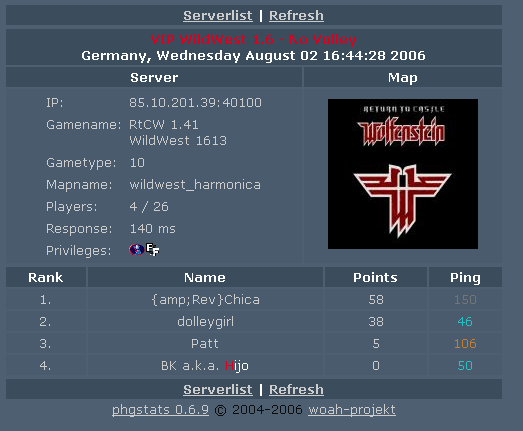
I think both tools have their place. I will probably use the QueryGameServer to create a program that monitors the servers and emails people when there is somene waiting around for a game. I’ll probably have it check the servers every 3 minutes or something like that. The second heavy weight tool will be used to generate pages every 15 minutes or so…