Building a computer case front panel audio (FPA) connector

I recently upgraded my mother board to one that included a connector for Front Panel Audio.
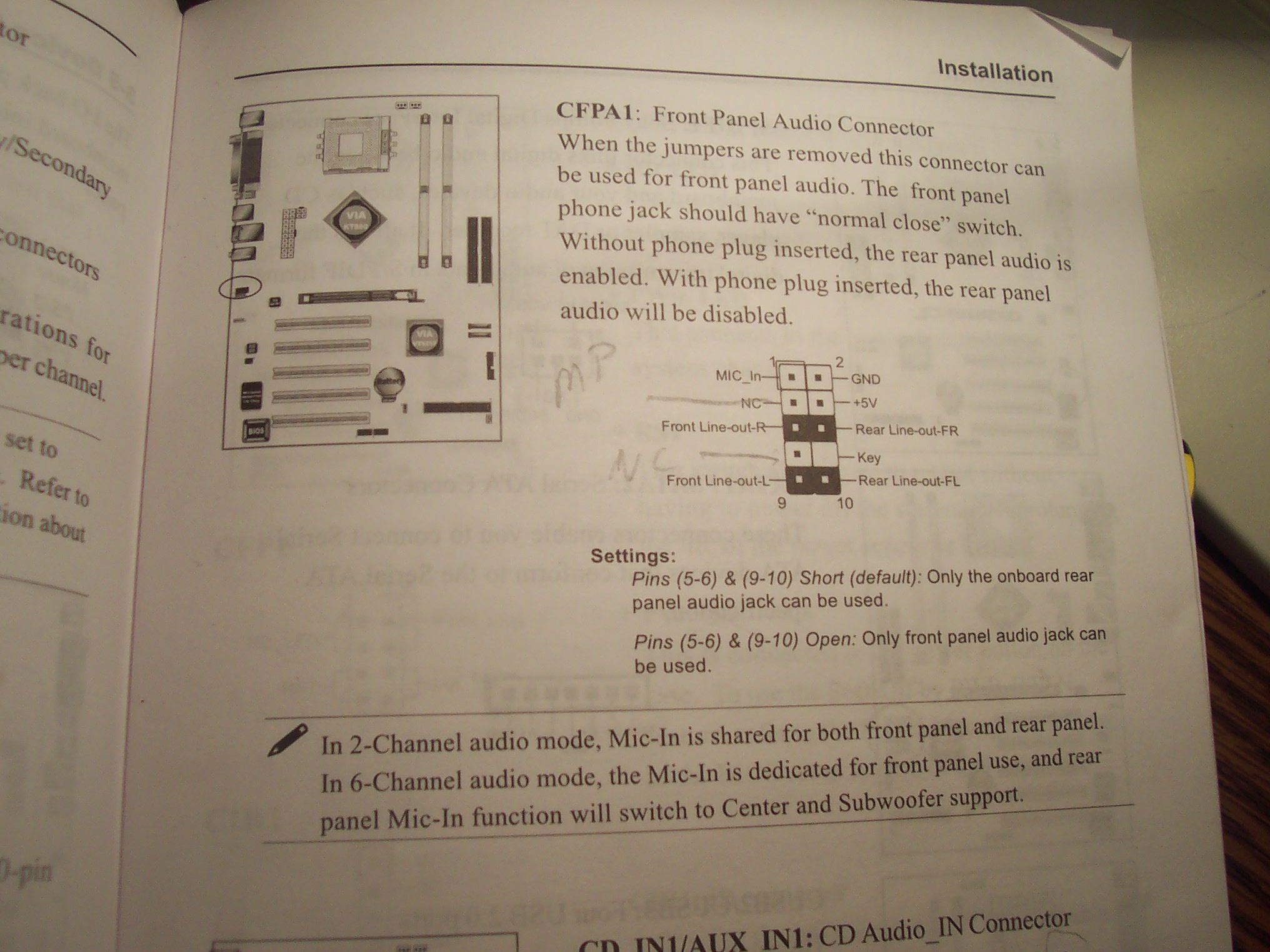
Here’s what’s shown in the manual:

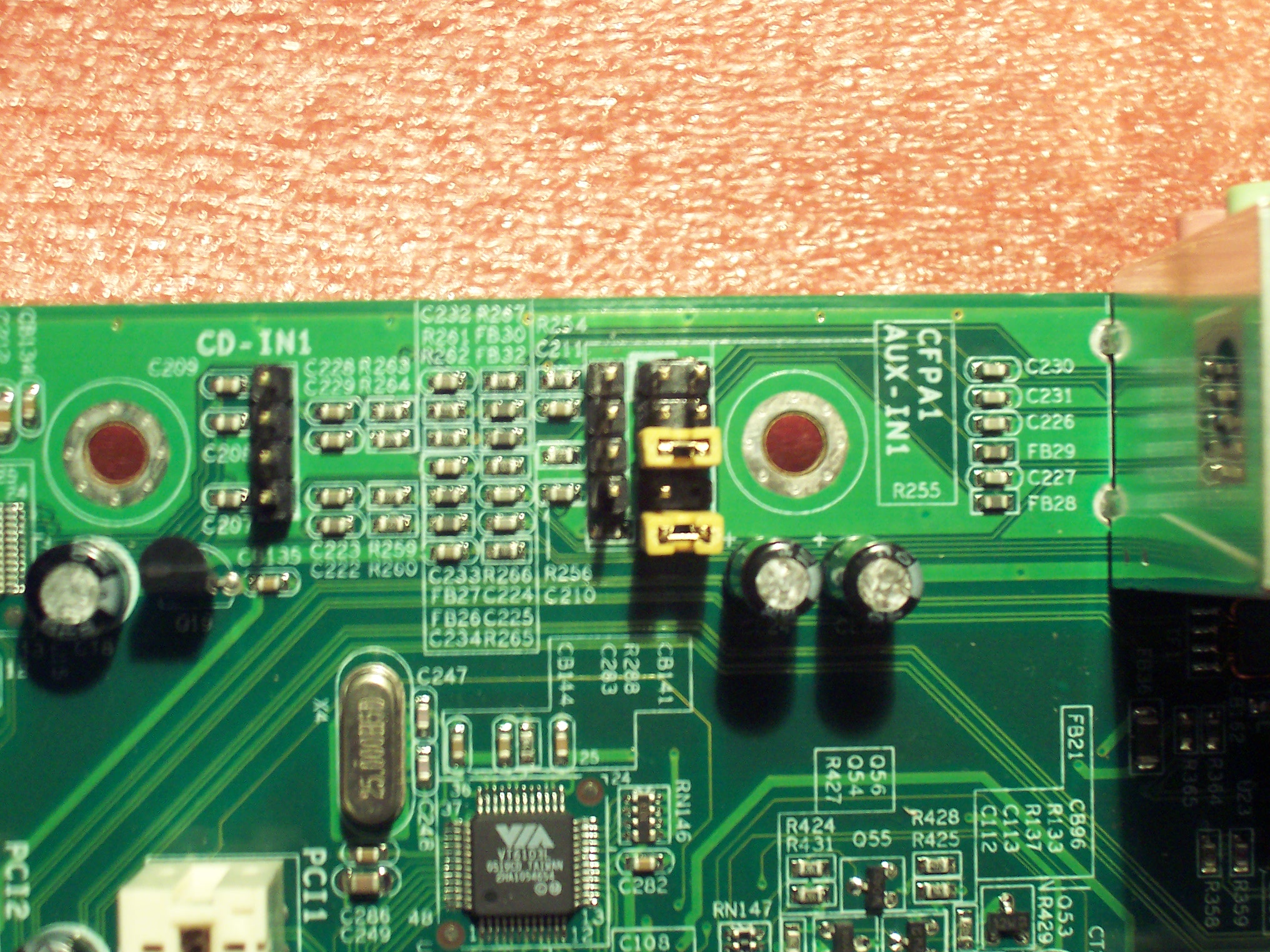
Which luckily matched up nicely with what I saw on the motherboard:

I’ve decided that these front panel audio connectors are fairly standard. AND I think my manual has the FPA jack a little mislabeled.

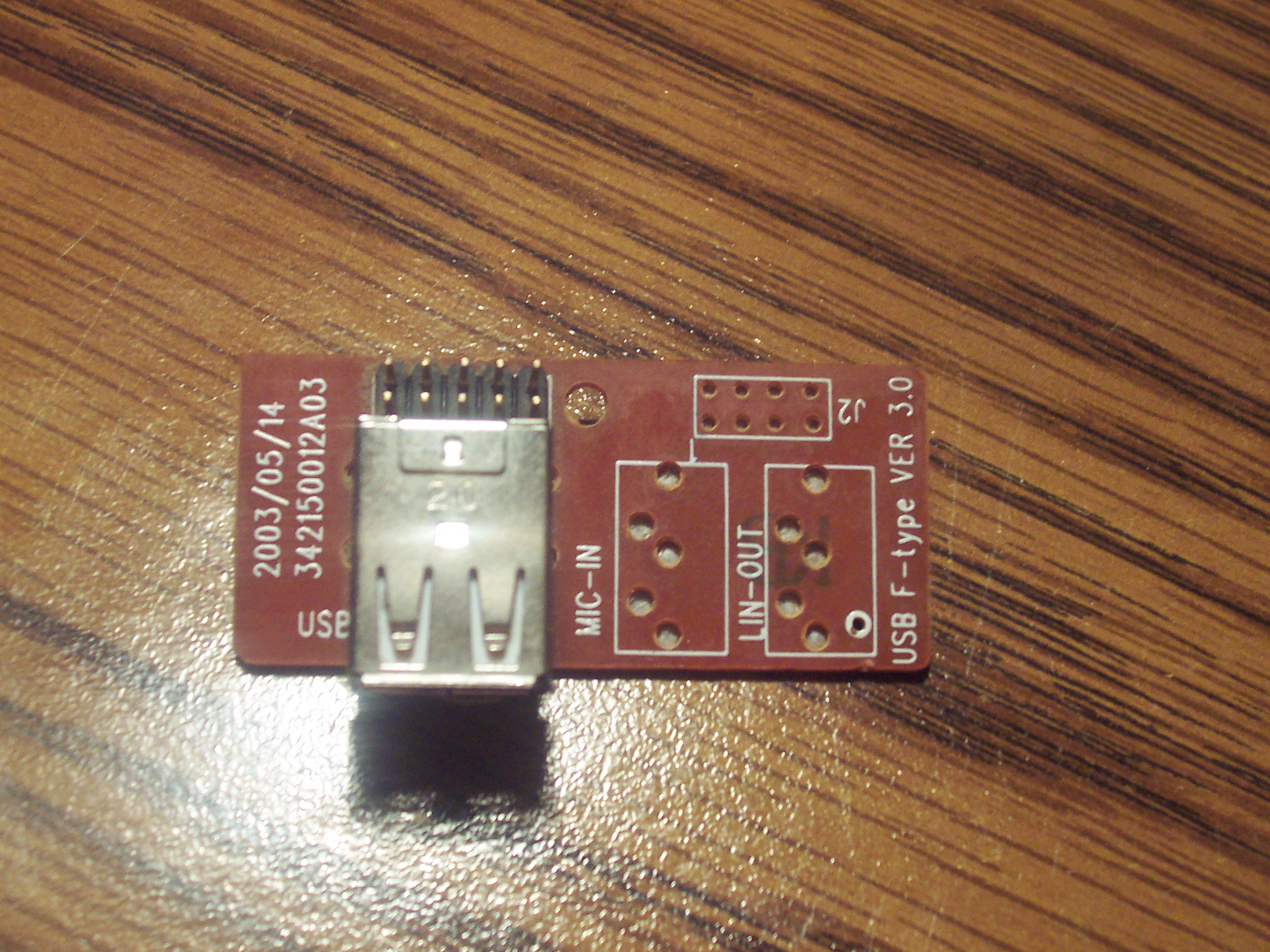
My old motherboard did not support this. And in my case (Ha!), the case didn’t either. Though the case had holes for a stereo jack, the circuitry was missing the appropriate jacks:

Continue reading Building a computer case front panel audio (FPA) connector

How to find bad JPEG files in a directory – via Delphi (Source Code)

UPDATE: Source, EXE and ZIP updated to include new corruption detected routine…

Let’s just dive right into this one…
Here is the exe:
http://www.TheCodeCave.com/downloads/delphi/BadImageFinder.exe

Here is the Zip of the exe, forms and source:
http://www.TheCodeCave.com/downloads/delphi/BadImageFinder.zip

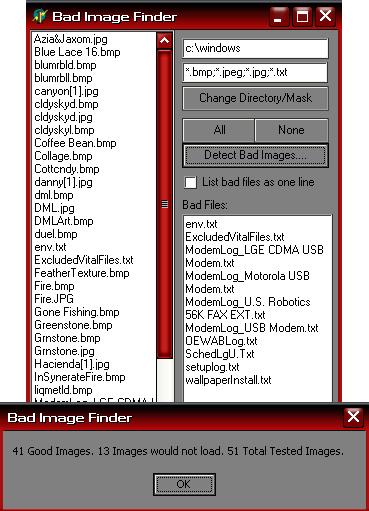
Here’s an image:The main screen

Here is the source for the main BadImageFinder_Main.pas file… (Hope this helps!)
Continue reading How to find bad JPEG files in a directory – via Delphi (Source Code)

Copy To Clipboard in HTML

or Speed blogging Exposed…
or “Copy as Text Link” and “Copy as Image Link” Blogging Tools explained.

Usually when I post something technical, I include a detailed rambling explaniation of how it does what it does. In the post “Copy as Text Link” and “Copy as Image Link” Blogging Tools” I created a batch file that did some neat stuff. But I didn’t give a full explaination of the details. Now I will.

The batch file did the following neat stuff…
1. Used Environmental variables to create HTML files in a standard Windows directory
2. Dynamically add string and DWord registry entries
3. Demonstrated adding menu items to Maxthon & Internet Explorer (Unfortunatly these do not show up in FF or Opera.)
4. Displayed different contexts based upon what was selected.
5. Launched another IE window that does not effect the output but does process information selected in the first.
6. Demonstrated how to copy HTML source to the paste buffer via HTML and javascript.:
7. Copied text to the clipboard, formatting it into HTML

Not bad for a small batch file.

So, here’s how the magic was done…

First, the easy stuff. The batch file creates two text files. That is done using the redirection symbol (aka the output to file symbol) which is > (aka the Greater Than sign). The Greater than sign appends the displayed results directly to a file. Two greater thans in a row cause the file to be recreated. I use the Echo command to echo (go figure) text to two HTML files I will be creating. Since I use >> in the first line, those files will always be recreated if the batch file is run again.

Because HTML also uses GT and LT symbols, they must be denoted as literal symbols. That is done with the carot symbol ^. Thusly
[dos]
echo ^>%windir%\web\copytextaslink.htm
echo ^
[/js]

As you can see, the bulk of the file is JavaScript. The second line clearly declares it so. However, instead of putting Language=”JavaScript” (which is the old school way of doing things and how I learned originally), I should have specified it as a MIME type like this Type=”text/javascript” The end result is the same, however eventually the old language option will be dropped.

Another option that you might not be familiar with is the defer flag. This is a browser load time optimizer. It tells the browser that the contents of the script will not effect the layout of the page and therefore the browser can continue drawing the page.

The process is also pretty easy to follow because it uses Microsoft’s DOM technology. DOM is the Document Object Module and allows IE to handle all web pages as if it were Object Oriented. You can reference the document and the various parts/divisions of any web page. And that allows you to directly access properties or methods of these objects.

So what the code above does is asks for the document in the parent window (the one in which you right clicked). It then asks for the current selection (if any). It then gets the current selection as text and then asks for the clibboard object for the current window. At that point it is a simple call to SetData and the selected text is added (with a few additions) to the clippboard. There isn’t much more than that. One thing that should be noted is that the type of data in the clibboard must be specified, in this case, as text. You can read more about the other types of data that a clib board can handle in my article about Clipboard manipulation with Delphi HERE:

The second file proceeds much the same way except that it goes further into the DOM and retreives the Height and Width of the original image so that the pasting of the tag in your blog can include that information (most specifically, the aspect ratio.

[js]


[/js]

That’s it for the HTML. The only thing left is to create a couple of triggers to activate those two files. That’s done through the registry.

Internet explorer reads through the registry each time it pops up a menu. It first decides what is clicked and then looks at the registry entries under HKey_CurrentUser\Software\Microsoft\Internet Explorer\MenuExt\ all of the menu items that match the type of selection. MSDN has a full article that explains this in detail HERE, however, the following table is probably all you’ll need:

Context Value
Default 0x1
Images 0x2
Controls 0x4
Tables 0x8
Text selection 0x10
Anchor 0x20

So, the last step of the process is to route the text to the text processing HTML and the img tag source to the image text file.

That’s done in these two lines…
[dos]
reg ADD “HKCU\Software\Microsoft\Internet Explorer\MenuExt\Copy Image as Lin&k” /ve /t REG_SZ /d “%WINDIR%\web\copyimageaslink.htm” /f
reg ADD “HKCU\Software\Microsoft\Internet Explorer\MenuExt\Copy Image as Lin&k” /v Contexts /t REG_DWORD /d 2 /f
.
[/dos]

That’s it! You’ve got your full walk through! Any questions?

NOnces have arrived in WP

WordPress 2.03 is a critical security release. It eliminates the HTTP Referrer check and replaces it with a nonce system. What is a referrer check? Well, it is an attempt to confirm that an administrative action is being taken by an administrator instead of an automated bot. It was a good first step, but it didn’t go far enough and it did not work for everyone. Many systems are stripping of the referrer check. So WP2 didn’t initially work for a lot of people. Additionally, referrers, the browser’s way of indiciating where you came from, are easily forged.

Browsers really do tell a website alot about where you came from. For instance, I can tell which search engine people used to get to my site and what their search words were. Then you can use a tool like AWStats to give you a report. For instance, these are the phrases used to reach my website this morning:

Keyphrases used on search engines  
19 different keyphrases Search Percent
hiphopcaucus 2 9 %
menuext javascript 2 9 %
code cave 2 9 %
clipboard from delphi notepad 1 4.5 %
generating nonce with php 1 4.5 %
hiphopcaucus bot 1 4.5 %
timage in delphi 1 4.5 %
test.txt notepad.exe 1 4.5 %
timage assign 1 4.5 %
php5 binary location 1and1.com 1 4.5 %
neat eye [nitaigouranga@aol.com] 1 4.5 %
isbn vs. asin 1 4.5 %
binary blue scheme 1 4.5 %
level mode super gerball 1 4.5 %
event.srcelement.tagname firefox 1 4.5 %
mark edington 1 4.5 %
paste clipboard from delphi to notepad 1 4.5 %
delphi php developer programmer washington dc 1 4.5 %
paste clipboard from delphi notepad 1 4.5 %

That’s kind of neat, but it is a little bit of an invasion of privacy. Well, at least some people would think so. So, referrers are on their way out and Nonces are on their way in.

A NOnce, a Number variable meant to be used Once, is a temporary key that is passed along with the web page and is used to prove that the action taken was initiate from an administrator page. Basicly WordPress generates a unique number for you and passes that to your browser. Then when you take a secured action, your browser must pass it back. It’s another method for the same goal. Aditionally, a NOnce expires. So, even if someone grabbed it, it would soon go bad.

Why is this important? Why should this release be applied? Well, in short, one could pretty easily erase any post on any blog with an earlier version of WP. I’ve worked at creating an attack that could dynamicaly erase all posts at once, but that was blocked due to other difficulties. So the attacks must be made a post at a time, but that is still a pretty big vulnerability.

Now don’t go all APE on WordPress. The fact is that the web is not a secure place. You should backup your DB, no matter what software you use, regularly. And if you don’t, what you lose is your gone because of your own (in)actions. Besides, how many posts have you had that have been vandalized/erased? None? Well, then calm down, install the update and all will be fine.

The latest in the stable 2.0 series, 2.0.3, is now available for download. This is a bug fix and security release, and is recommended for all WordPress users. In addition to an issue that was raised on Bugtraq a few days ago, we’ve also backported a number of security enhancements from 2.1 to further enhance and protect your blog.

If you are interested in how these enhancements to WordPress security came to pass, look into the archives of the WP Hackers email list and you can see some of the details.
This is a good place to start…
http://comox.textdrive.com/pipermail/wp-hackers/2006-April/005666.html
Look for the thread labeled “Rethinking check_admin_referer()” and you can read along php coders (myself included discuss the issue…

Here’s the link for the download: http://wordpress.org/development/2006/06/wordpress-203/
If you want to get a smaller version of it, with only the changed files, go here: http://markjaquith.wordpress.com/2006/06/01/wordpress-203-upgrade-changed-files-zip-changes-diff-changed-files-list/
I haven’t verified his file. So, you should do so on your own, or just bite the bullet and upload the whole release.

I’ll let you know over the next few days how much better this version of WP is.

LG VX5200, LG VX6000, LG VX7000, LG VX8100 stuff

This is a collection of Info I’ve gathered on LG cell phones. Much of it is probably Verizon specific, but some may work with other providers and other phones.

As with any non standard usage of software or hardware, following these instructions could mess up your stuff. If you aren’t confident in what you are doing… don’t do it. If you aren’t willing to fry your phone and have to repurchase one at full price because you’ve just voided your warranty, don’t do this stuff…

If any of this stuff violates your particular contract with Verizon, only do it if you are willing to accept the subsequent fees and consequences. I haven’t tried nor even read through all of this stuff. So there could be a lurker in there that smokes your phone. I don’t know. Use it at your own risk. ’nuff said.

FYI: This post will grow and change… Check back periodicly to see if I ‘ve added anything new…

Continue reading LG VX5200, LG VX6000, LG VX7000, LG VX8100 stuff

“Copy as Text Link” and “Copy as Image Link” Blogging Tools

Justin of JustInsomnia had a great idea for a FireFox plug in:

I want to be able to copy a quote and its URL at the same time, without having to so much as think about it. To do so, I wrote my first Firefox extension, which I opted to name the somewhat homely, Copy as HTML Link.

So he created Copy as HTML Link for Firefox and generously shared his moment with wp-hackers Subscribers .

The plugin looks good and he did a really good job documenting it (THIS IS RARE!):

Click to go to the original site.

I must say that since I’ve started using this method, it’s been a quite a time saver. This was a GREAT idea. Inspired! So, if you have FireFox, please head on over there and get that plug-in!

Ah, but here’s the fly in the ointment and the sand in my… socks: A Firefox plugin won’t work for Maxthon!!!! (Click to go to the original site.) or Internet Explorer!

You see, Firefox just doesn’t do it for me. Click to go to the original site. Opera comes darn close to being right, but I like the extra usability features in Maxthon.

So, I thought… Hey… I could do that for Maxthon and IE AND I could do it all from a BATCH file!

So, here it is…

Run this Batch file and you will have installed on your system, two new menu items. When you highlight text, you’ll have an option to “Copy as Link” and when an image is right clicked, you will get an option to “Copy Image as Link”. Hopefully I’ve chosen hotkeys that will work well for you… If not, you can change them in RegEdit at HKEY_CURRENT_USER\Software\Microsoft\Internet Explorer\MenuExt\

BTW EVERY image and link up to this point in this post was created using this tool. Man, Good idea Justin!

Also – If you find that IE is prompting you asking for permissions to open the links, please post a comment and I’ll show how to fix that. I’ve gotten that message on other things I’ve like this I’ve created and know how to get past it. I’ve disabled that workaround on this computer and I am not getting that “Are you sure” message. So these menu items should be safe. ALSO, some popup blockers may block these items. You might have to add localhost as a site that is allowed to show popups in your particular popup blocker. Let me know if you have any problems.

Here’s the download: http://www.TheCodeCave.com/downloads/batch/AddCopyAsLink.bat

Here is the source:
[DOS]
@echo Off
:: Implements “Copy * as Link” menu items in IE and Maxthon
:: Written by Brian Layman
:: Visit me at: http://www.TheCodeCave.com
:: Version 0.1
:: Update Url: http://www.thecodecave.com/?p=152
:: Inspired by Justin’s Firefox Plubin
:: Found at: http://justinsomnia.org/2006/05/copy-as-html-link-for-firefox/

:: Create file for the Copy Text as Link
echo ^>%windir%\web\copytextaslink.htm
echo ^

Delayed Posting in WordPress

Has anyone else noticed that you can publish posts and not yet have them appear on the website?

If you choose “Edit Timestamp” and set the date to a time/date in the future before you hit publish, can you make your posts appear the next morning even if you are no where near the computer. Right now, as I am writing this, I have hmmm 3 or 4 posts that will just appear some time in the future.

Let’s make this appear…. Hmmm tomorrow at 1pm.

Kinda cool!

WP-Contract-Form 0.3 released

The 0.2 had some debugging left in it and a verification didn’t work. Thus version 0.3. It can be downloaded in the same place:
http://www.thecodecave.com/downloads/plugins/wp-contract-form.zip

Changes
————————–

0.3 REQUIRED RELEASE
Removed debugging messages
When Website was blank, Email was highlighted.
When Agree was blank, an error message was not displayed.
0.2 REQUIRED RELEASE
Fixed the MD5. It now uses website instead of email too. Then the same email contact can be used for multiple websites.
Removed the CSS styles that were incompatible with my theme (and probably others). They are renamed and can be put back in easily.
Added carraige returns to the email where needed.
Made the whole thing WC3 compliant
0.1 Initial version
Automatically sends the email to the destination AND the user, reversing the From and To.
Required the website to be filled in.
Added a terms field that is customizable.
Added a customizable “I agree” line
Added a checkbox and verified it is filled out in the end.
I did not bother creating a legit POT file for language localization
Generated a unique ID for the contract.

WP-Contract-Form 0.2 released

The original version had some issues that have now been corrected. It can be downloaded here:
http://www.thecodecave.com/downloads/plugins/wp-contract-form.zip

Change Log:

0.2 REQUIRED RELEASE
Fixed the MD5. It now uses website instead of email too. Then the same email contact can be used for multiple websites.
Removed the CSS styles that were incompatible with my theme (and probably others). They are renamed and can be put back in easily.
Added carraige returns to the email where needed.
Made the whole thing WC3 compliant

0.1 Initial version
Automatically sends the email to the destination AND the user, reversing the From and To.
Required the website to be filled in.
Added a terms field that is customizable.
Added a customizable “I agree” line
Added a checkbox and verified it is filled out in the end.
I did not bother creating a legit POT file for language localization
Generated a unique ID for the contract.