Make your Verizon cell phone safe! Set the Emergency numbers!

Your cell phone can be configured with up to three emergency numbers that work for your area. 911 is now pretty common in the US but it was not always so. There still may be areas that don’t use 911 but use a different number. In anycase, you set three numbers that ALWAYS work wether the phone is locked or not. One should be your equivelent to 911. The second number in your phone is, by default, 611. 611 is the universal phone company repair service. It is also used on many colleges as the campus police number. So, some people will be used to calling it. The third number *611 will get you directly to verizon’s customer service. So, if you lock your phone you can call them and ask them how to unlock it 🙂 plus someone should always be there eventually…

Anyway, wouldn’t it be MUCH more useful for you to have the local fire department number as one that you or your kids can dial even if the phone is locked? Or maybe your spouse’s phone?

Anyway, changing these number is probably a pretty good idea and here’s how to do it:

  1. Click OK/Menu
  2. Click right twice to get to the Settings and Tools Menu
  3. Click down until you get to the System (this is 5 on a lg vx5200)
  4. Click down until you get to the Security (this is also 5 on a lg vx5200)
  5. Enter your lock code. If you have not customized it, this is the last for digits of your phone number.
  6. Click Emergency #s
  7. You’ll see a message that says “Reset Default: Preference settings will be set to factory defaults. Press OK to continue.” You know what to do here…

Resetting the resolution of a monitor from within Delphi

This is a rescue app that can help a computer that turns on and is obviously working but the customer says nothing comes up on the screen. They quite often won’t admit what was done but the monitor says Freq Out of Range or nothing at all.

Just put this in the startup folder, reboot, and your problem is solved. It also works as a good party trick…

EXE: http://www.TheCodeCave.com/downloads/delphi/ResetRes86.exe
Source and exe: http://www.TheCodeCave.com/downloads/delphi/ResetRes86.zip[delphi]

// ****************************************************************************
// ResetRes86 01/Jan/2000
//
// Written by Brian Layman (AKA Capt. Queeg AKA SilverPaladin)
// Visit him at http://www.TheCodeCave.com
//
// A rescue util for Windows machines that have been set to a resolution not
// supported by the monitor. This has made me a hero for many a customer.
//
// I also used two modified versions of this tool, each associated with a
// hot key to switch between the resolution my monitors at could use and
// the resolution my monitors at home could use back when I strapped a
// handle onto my work computer and carried it back and forth.
//
// Warning: This routine changes your Windows settings. It can be used as a
// joke or a tool. It is a good best practice to understand every line
// of new code before you run it, who knows what could be lurking. Better
// yet, do not run this example at all. You should stop right now and erase
// the files. For if it causes blue smoke to be emitted from your network
// card, if it erases all users from your computer, or if it makes your
// sister break up with her lawyer boyfriend and start dating a caver, it
// is not my fault. (Actually that last one might be an improvement, but
// it is still not my fault.) But the fact of the matter is, computers
// have a mind of their own and we programmers live on the wild side.
//
// Usage: ResetRes.exe
// Simply place this file in the folder:
// C:\Documents and Settings\All Users\Start Menu\Programs\Startup
// and reboot the computer. When the next person logs it, the monitor
// will be at a resolution and hz cycle supported by all modern CRT and
// LCDs.
//
// Suggested Usage: If you have a game that
//
// Donations – If this program & source really helps you out, feel free to
// buy me a cappacino, movie ticket, ebook, or something else small for
// my next “Dad’s Night Out”. You can Paypal to Brian@TheCodeCave.com. Or
// leave a comment on my blog with your country of origin. Or even better
// yet, add me to your blog roll.
//
// History:
// 01/Jan/2000 – BL – Created
//
// ****************************************************************************
program ResetRes86;

uses
Forms, Windows;

{$R *.RES}

var
pDMode : _DEVICEMODEA;
begin
// The only required line for a Delphi app…
Application.Initialize;

// Assign the desired device mode
// The BitsPerPel is the only non-selfexlanatory setting I think.
// It controls the color depth as follows.
// 4 = “16 Colors”
// 8 = “256 Colors”
// 16 = “High Color”
// 24, 32 = “True Color”
pDMode.dmBitsPerPel := 8;
pDMode.dmPelsWidth := 800;
pDMode.dmPelsHeight := 600;

// Some touch screen LCDs don’t display at a rate higher than 60
pDMode.dmDisplayFrequency := 60;

// Mark the items that we are changing.
PDMode.DmFields := (DM_BITSPERPEL or DM_PELSWIDTH or DM_PELSHEIGHT or DM_DISPLAYFREQUENCY);
// Pass in the size, since we could change any number of fields.
pDMode.dmSize := SizeOf(pDMode);

// Call ChangeDisplaySettings to assign the settings to the registry and make
// it take effect.
// CDS_UPDATEREGISTRY The graphics mode for the current screen will be changed
// dynamically and the graphics mode will be updated in the registry. The mode
// information is stored in the USER profile.
ChangeDisplaySettings(pDMode, CDS_UPDATEREGISTRY);
end.[/delphi]

Hidden Notepad.exe feature…

It’s JUST Notepad right?

I mean your normal every-day geek uses it all the time. There’s nothing new under the sun there?

OK, not everyone knows that hitting F5 will insert the date, but I’d bet MOST medium to high level geeks do. Heck, it’s on the menu… And sure to enable goto line you have to turn off word wrap. But I was shocked to learn a new notepad feature today.

According to John TP , it’s an Easter Egg, but I would call it the log feature.

The process is simple. If you need a step by step, go to John’s site. Otherwise save a text file with the first line consisting only of .LOG. Then EVERY time after that you safe the file, you get the date and time added to the end of the file…

Kinda nifty…

I’m not sure how I’d ever use that, but it obviously had a use for MS… Wouldn’t you have to macro this to take advantage of this feature?

I achieve the same thing by having a batch file in my All Users startup group that contains:
@date /t >>c:\Temp\boot.txt
@time /t >>c:\Temp\boot.txt

Then I have an (extra extra) record of everytime my machine is rebooted. Except that now that I’ve blogged about it, any unauthorized boots will be edited out.

But this all makes me wonder what else is in notepad.exe that I don’t know about… a hex editor doesn’t reveal .LOG in string format in the exe. So, who knows… there could be more stuff like this out there…

RamRod – BBC7 Flavour

I’m home sick today.

So here’s a quick post with a tool that I wrote to speed up my access to BBC7’s spoken word/audio books shows.

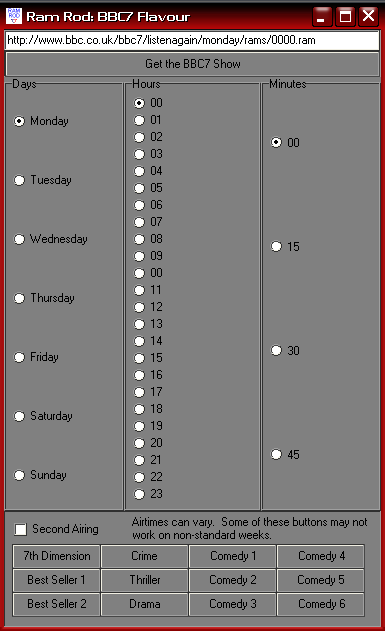
RamRod: BBC7 Flavour

RamRod has been custmized for BBC7 Links

As many of you know, I often spend hours listening to England’s BBC7 radio stream. They re-air all of the serialized Sci Fi, mystery, comedy and Drama radio shows that were broadcast in the last century in the BBC and sometimes in the US.

They have a listen again feature that allows you to listent to any of the shows you’ve missed in the last week. This program helps make that easier. So while I am home sick today, I can click on the 7th Dimension button and can listen to their Monday Sci Fi show, an unabbidged reading of Day of the Triffids. When that show is over, I just select Tuesday and click the go button and I’m on to the next show. Since, BBC7 is on a weekly rotating schedule, I can do that for all of the shows, for instance the Crime and Thriller hour is featuring a dramatization of Sara Paretsky VI Warshawski’s novel Deadlock. Since I am a week behind I can easily click through the episodes as I catch up.

In any case, maybe someone will find this useful. It’s great to be able to hear Michaela say “Saturday at 11 on BBC7” and within three clicks, be listening to it…

A working screen shot of The Code Cave's Ram Rod program, BBC7 Flavour.

This Delphi demo with source shows how to download a file from the interenet.
Downloads:
Here is the EXE: http://www.thecodecave.com/downloads/delphi/RamRod4BBC7.exe
Source:
Continue reading RamRod – BBC7 Flavour

wp_error is an excellent tool

Rob Miller wrote an excellent article on the use of wp_error in WordPress plugins…
http://robm.me.uk/2006/06/11/wp_error/
I’d suggest suggest that every WordPress hacker/plugin author, that is not familiar with this realtively unknown bit of wordpress lore, should go and read it!

If nowhere else, it will be indispensible when writing validation routines. You can call some VerifyPostVars routine and have it return a variable. If the variable causes Is_WP_Error() to return true, then you can display the results. The neat thing is that the WP_Error structure can contain multiple results. So, you can say
X is required, but was not supplied.
Y was not formatted correctly.
Z is not valid with the sellected options.
All at once, rather than having the user try to submit a form multiple times. Sure you can build other structures to handle that, but if everyone starts using WP_Error, plugins will all be consistent.

How to unlock your LG vx 5200, 6000, 8100, 9800

One of the major problems I have with my vx5200 phone is that it takes hundreds of pictures of the inside of my pocket…

Right now I only have one solution for this: Lock the keypad.
However, I was expecting it to unlock by pressing Menu * like my old (I-didn’t-know-how-good-I-had-it-when-I-had-it) Nokia phone.

Now however, with the new Verizon menu system on all of their LG phones, my lg5200 did not unlock the same way… After trying all logical four digit number combinations I could think of in 15-20 minutes, (1234, 4321, 1111, 2222, 5432, 6543, 0000) I stopped and thought “OK – if it is not a number pattern, it is a specific number. What specific number is associated with this phone…”

Well the answer is obvious… The unlock code for Verizon phones is….

Drum roll please……..dddddddddddddddddddd

The answer is The last four digits of your phone number.

Bad Image Finder Updated….

I’ve updated my earlier post about “How to find bad JPEG files in a directory – via Delphi (Source Code)“. It now includes a routine to do extra corruption checking if the image is a JPEG. The problem is that I don’t fully see/agree with the logic in this routine… but it seems to work better the person I wrote it for…. I just need some non-artificially corrupted JPEG files to test it on…

Anyway, see if you can make better sense of this…
[delphi]
while (Cardinal(pB) < pE) do begin if (pB^ < $E1) then begin Result := TRUE; Break; end else begin inc(pB); if (pB^ >= $E1)
then begin
inc(pB);
if (pB^ >= $E1)
then begin
Result := TRUE;
Break;
end;
dec(pB);
end;
dec(pB);
end;
inc(pB, 16);
end; [/delphi]

It goes backwards through the last line of the image and checks to see if the color (I believe) is less than the constant $E1. If it is, then result is changed from FALSE to TRUE and the routine exits with IsValidJPEG returning TRUE. Otherwise, if all the pixels in that line have a color greater than or equal too $E1 (labeled suspect blue),then the result remains FALSE and IsValidJPEG returns false…

So… basically it makes sure that there’s at least one valid colored pixel on the line and then it is assumed the jpeg is valid? That seems kindof sketchy to me… but if it works…

Any thoughts?

How to play MP3s on a Verizon LG vx8100

Verizon tries to force you to only play WMA files on your phone. But because they’ve left their security menu open, you can reenable mp3 files.

Here’s how:
1. First Press Menu
2. Look at the menu if you want, but we’re gonna a hidden option: 0
3. After you press 0, you get asked for the service code password. Enter 000000.

Your now in the “secret” service menu. Be careful – you CAN screw up your phone from this menu..
4. Scroll down to and select “11. Music Setting” Note that this is specific to the vx8100 service menu. On the vx5200, this is Battery test.
5. Then select mp3 enable,
6. Press OK and your phone will probably reset.

You can now play MP3 AND WMA music files…

My wife will be very happy when she sees I’ve “fixed” her phone…

Two Secret Verizon Phone Menus – LG VX5200, LG VX6000, LG VX7000, LG VX8100 etc phones

This one is pretty straight forward but is the key to doing a lot of stuff that Verizon has disabled by default for their phones…

1. First Press Menu
2. Look at the menu if you want, but we’re gonna chose an option that isn’t available there: 0
3. After you press 0, you get asked for the service code password. No problem, it is all zeros! Enter 0,0,0,0,0,0 for the service code.

Your now in the “secret” service menu. Be careful – you CAN screw up your phone from this menu..

And there is another secret menu from here!
4. Press #, another hidden option, and you will enter the TEST MODE menu and from there you can do all kinds of cool stuff!

Maybe my readers can help me out…

I posted this over on the WP-Hackers list, but maybe I can get some help from my own readers… (Thanks btw It’s nice to see that, after only three short months, I already have a number of regular readers. I hope my posts have helped!)

I think you all would be the ones to answer this, even if I posted it there.
Besides, perhaps there is something /deep/ in the WP code that is
specifically blocking this action… Though I don’t see how it would even
get into WP’s realm of influence (this should be all Apache), /something/ is
happening. I’ve provided screen shots as proof of my statements.
Continue reading Maybe my readers can help me out…