Sunday, scary Sunday

I stumbled across this one weeks ago, and saw it again yesterday. I though I would share:

Warning:
This could bother very young kids even with an explanation of what’s happened…* It certainly bothered the peole in the park that day… but my 10, 8 & 5 year olds watched it. It’s not gruesome.

I give you, The MindFreak
Continue reading Sunday, scary Sunday

WordPress Movers and Shakers

I’ve taken an idea from Lloyd D Budd‘s email to me “Well Met Cave Coder” and created a “People of WordPress” link category. Never mind the fact that during his rearrange, I seem to have dropped off the end of his list… But we won’t go there ;P (I’ll still put you on my list Lloyd…) You can find it on the right hand side of my blog.

I made this list by taking a look at my WP- email folder history back to an arbitrary date. I then grabbed the names of people with 100+ contributions and by adding a few more names that stood out to me – probably because I’ve talked with them in the past or their name is unique enough that it just stuck in my brain. This, by far, is not the list of everyone that’s made significant WordPress contributions. But, if you want to dive into the mindset of people that have an influence on the future if WordPress, this is a good place to start.

In the random order my site just chose, I give you my initial People of WordPress list:

People of WordPress

A thorough list of SED command line examples

When working toward updating my upgrade script to read the usernames and passowords from the wp-config files, I came across this helpful list:

————————————————————————-
USEFUL ONE-LINE SCRIPTS FOR SED (Unix stream editor) Dec. 29, 2005
Compiled by Eric Pement – pemente[at]northpark[dot]edu version 5.5

Latest version of this file (in English) is usually at:
http://sed.sourceforge.net/sed1line.txt
http://www.pement.org/sed/sed1line.txt

This file will also available in other languages:
Chinese – http://sed.sourceforge.net/sed1line_zh-CN.html
Czech – http://sed.sourceforge.net/sed1line_cz.html
Dutch – http://sed.sourceforge.net/sed1line_nl.html
French – http://sed.sourceforge.net/sed1line_fr.html
German – http://sed.sourceforge.net/sed1line_de.html
Italian – (pending)
Portuguese – http://sed.sourceforge.net/sed1line_pt-BR.html
Spanish – (pending)

FILE SPACING:

# double space a file
sed G

# double space a file which already has blank lines in it. Output file
# should contain no more than one blank line between lines of text.
sed ‘/^$/d;G’

# triple space a file
sed ‘G;G’

# undo double-spacing (assumes even-numbered lines are always blank)
sed ‘n;d’

# insert a blank line above every line which matches “regex”
sed ‘/regex/{x;p;x;}’

# insert a blank line below every line which matches “regex”
sed ‘/regex/G’

# insert a blank line above and below every line which matches “regex”
sed ‘/regex/{x;p;x;G;}’

NUMBERING:
Continue reading A thorough list of SED command line examples

Upgrade your WordPress sites in 5 Seconds

THIS ARTICLE IS OUT DATED. Please see: http://www.TheCodeCave.com/EasyWPUpdate for the current release.

Well I’ve upgraded the 35 Second upgrade script significantly for this release.

Here’s a summary of the new features:

  1. Customizable options at the top of the script
  2. Works for unlimited numbers of blogs with just updating the header
  3. Optionally performs Web update steps as well
  4. Optionally performs backups of all WP related files
  5. DISABLED: Performs a Database Backup
  6. Backups are to a directory of your choosing suffixed with “today’s” date
  7. Can now upgrade blogs in a WordPress directory or any other
  8. Respects the tmp directory on your server
  9. Can be modified to perform nightly refresh of all blogs from a local tarball
  10. Can be customized to retrieve beta releases
  11. Can be customized to retrieve from WP.org’s archive folder

This hasn’t had a lot of testing yet outside of my blogs, but it has worked BEAUTIFULLY for me and as you can see I am running Version 2.0.6 thanks to spending 5 seconds this morning to update all of my blogs.

Here is the text to download: (link)

Perhaps the easiest way to get the file is to telnet into your account and run this line:
wget http://www.thecodecave.com/downloads/tcc_wp_upgrade

Then give yourself execute permissions on the script, choose your own or run this:
chmod +x tcc_wp_upgrade

If you get errors, remember that you might be dealing with passing the script through Windows and may have tacked on an extra CR at then end of each line… You should be able to fix that by using an SED command something like this
tr -d ‘\r’ tcc_wp_upgrade > xx && mv -f xx tcc_wp_upgrade
(Thanks to Prec on FreeNode #SED)

Then edit the file to your specifications using VI or whatever. I use NetDrive to make my website Drive X on all of my machines and then use Notepad2.exe to edit it and enforce the Unix line endings.

Right now I REALLY would like to have only proficient people run this script. It has only been tested on my sites.
This script messes with your files. If something really horrible goes wrong, you could lose information. I’ve done my best to ensure this doesn’t happen, but literally everything I know about bash I learned in the last month writing this script. A good programmer can go from any language to any language with relative ease (and bash IS a language), but we can’t know everything about how it works on all systems. That only comes with experience.

So I’ve got a bigggg scary message at the front of the script. It’s scarier than it needs to be, or I wouldn’t have the confidence to release the script at all. But it spells out in no uncertain terms the risks of running ANY unfamiliar script (not just mine) on your active site :

# Indemnity –
# Use this file at your own risk. I’m not going to deliberately hack
# your server, but others might. This is a shell script. Very bad
# things can happen. I am relatively new to *nix scripts. So
# I’ve had others review this script. But NONE of this guarantees
# things won’t go wrong or that this script is unchanged. Only
# use this script IF you’ve gotten it from TheCodeCave.com or another
# site you trust.
#
#
THIS SCRIPT SHOULD BE USED AT YOUR OWN RISK. It can erase hours of
# hard work put into your site. Before using this script it is
# required that you review and understand every line and vouch for
# its safety. If you are not comfortable with this, don’t run this
# script. I have one host that I can test this on. Only you can say
# that this script will not do irreparable harm to your host if you
# use it.
#
# YOU are responsible for YOUR site. Learn how to protected it and
# understand what every line of code does before you call it.

When you run this script, please come back here and report your results.

Thanks!

Here’s the source for those that want to see it online:
Continue reading Upgrade your WordPress sites in 5 Seconds

WordPress 2.0.6 is released. Make sure you get this one!

WordPress 2.0.6 has been officially released (link) and you definately need to get this one. 2.0.6 was originally just a bunch of minor updates, but now includes several critical security patches. In fact, one of the core “make this information safe” filters that protects you from malicious abuse through the address used to reach your site has been replaced. More detail follows.

I’ve not yet finalized my list of 2.0.6 features, but for now you can review the 2.0.6 RC1 features listed here: (link)

Also, I’ve upgraded my “Update WP in 35 seconds” script. It was 6 lines, it’s now well over 300. And instead up upgrading in 35 seconds, I was able to upgrade 3 WP blogs in <5 seconds without a single browser seeing the site down. The script also will do a full file backup of your WP site into a dated directory (though not in 5 seconds). Pretty nifty. You can see it here: Upgrade your WordPress sites in 5 Seconds(link)

Trigger a hardware detection scan from Delphi, InstallShield, C++, script or Run prompt

In my deployment process, it had looked like I was going to need to detect some changes in hardware and then perform a reboot.
I researched how to do this but it turns ou that I don’t need this code. Into the cave it goes.

You can of course run the “Add New Hardware” wizard manually. Here’s the command line to do just that:
“C:\WINDOWS\system32\rundll32.exe” C:\WINDOWS\system32\shell32.dll,Control_RunDLL “C:\WINDOWS\system32\hdwwiz.cpl”,Detect Hardware

However, what if you want to automate the process.

The information for how to do this is relatively scarce even though there is a technet page about it. Strangely enough the first thing I found was an NSIS script for doing this through that open source instalation program. The strange thing about it is that it was on a WinAMP website (link).

Here’s that code:
[code]
Function ScanForNewHW
SetPluginUnload alwaysoff
StrCpy $1 “”

System::Call ‘setupapi::CM_Locate_DevNodeA(*i .r0, t r1, i r2) i .r3’
System::Call ‘setupapi::CM_Reenumerate_DevNode(i r0, i r4) i .r5’

SetPluginUnload manual
System::Free 0
FunctionEnd
[/code]

Armed with the DLL name, the second thing I found was an Install Shield script (link) that allowed it to be done:
[code]
function ScanForHardwareChanges()
NUMBER devInst, myreturn;
begin
if(UseDLL(WINSYSDIR ^ “cfgmgr32.dll”) != 0)then
MessageBox(“Didn’t load Dll”, SEVERE);
return FALSE;
endif;
myreturn = CM_Locate_DevNodeA(&devInst, “\0”, 0);
myreturn = CM_Reenumerate_DevNode(devInst, 0);
UnUseDLL(WINSYSDIR ^ “cfgmgr32.dll”);
return TRUE;
end;
[/code]

Armed with the DLL name and a possible procedure name, I was able to track down the Microsoft support page about it (link). That page provided a C routine for calling the code. Here it is:

[C]
BOOL ScanForHardwareChanges()
{
DEVINST devInst;
CONFIGRET status;

//
// Get the root devnode.
//

status = CM_Locate_DevNode(&devInst, NULL, CM_LOCATE_DEVNODE_NORMAL);

if (status != CR_SUCCESS) {
printf(“CM_Locate_DevNode failed: %x\n”, status);
return FALSE;

}

status = CM_Reenumerate_DevNode(devInst, 0);

if (status != CR_SUCCESS) {
printf(“CM_Reenumerate_DevNode failed: %x\n”, status));
return FALSE;
}

return TRUE;
}
[/c]

However, I wanted to do this in Delphi. With the correct constant names, I was able to find two references to this routine. The Delphi JEDI project has a provides a routine for loading the DLL that allows these calls to be made and either someone (link) translated Microsoft’s code into a routine for scanning for the hardware or there was a, now gone, JEDI demo project that included this routine. Either way, the French site was the first one I’d found that scanned for new hardware with Delphi.

Here is that code:

[delphi]
procedure SomeProcedure;
// First you need to load the module.
LoadConfigManagerApi;
// Then call a translation of the MS routine
ScanForHardwareChanges;
end;

// Here’s the translation of the ScanForHardwareChanges
function ScanForHardwareChanges: boolean;
var
dev: DEVINST;
status: CONFIGRET;
begin

status := CM_Locate_DevNode(dev, ”, CM_LOCATE_DEVNODE_NORMAL);

if (status <> CR_SUCCESS) then
begin
result := FALSE;
exit;
end;

status := CM_Reenumerate_DevNode(dev, 0);

if (status <> CR_SUCCESS) then
begin
result := FALSE;
exit;
end;
Result := TRUE;
end;
[/delphi]

That routine was picked up on a Russian site (link) and modified to be independent of the JEDI files. However, both of these routines include way more information than is needed.

The process is really simple.
1. Load the DLL
2. Get the location of the two methods you need.
3. Call them (using the appropriate constants
4. Unload everything.

I’ve written my own Delphi routine that does all that and has no extra baggage dragged (drug?) along for the ride..

My all-in-one solution:
[delphi]
{******************************************************************************
ScanForHardwareChanges
by Brian Layman at TheCodeCave.com
******************************************************************************}
function ScanForHardwareChanges: Boolean;
const
CFGMGR32_DLL = ‘cfgmgr32.dll’;
CM_LOCATE_DEVNODE_NAME = ‘CM_Locate_DevNodeA’;
CM_REENUMERATE_DEVNODE_NAME = ‘CM_Reenumerate_DevNode’;
CM_LOCATE_DEVNODE_NORMAL = $00000000;
CR_SUCCESS = $00000000;
var
DeviceNode: DWord;
HCfgMgr: THandle;
CM_Locate_DevNode: function(var dnDevInst: DWord; pDeviceID: PAnsiChar;
ulFlags: ULONG): DWord; stdcall;
CM_Reenumerate_DevNode: function(dnDevInst: DWord; ulFlags: ULong): DWord; stdcall;
begin // ScanForHardwareChanges
Result := FALSE;
HCfgMgr := LoadLibrary(CFGMGR32_DLL);
if (HCfgMgr < 32) then MessageDlg('Error: could not find Configuration Manager DLL', mtError, [mbOk], 0) else begin try CM_Locate_DevNode := GetProcAddress(HCfgMgr, CM_LOCATE_DEVNODE_NAME); CM_Reenumerate_DevNode := GetProcAddress(HCfgMgr, CM_REENUMERATE_DEVNODE_NAME); if (CM_Locate_DevNode(DeviceNode, NIL, CM_LOCATE_DEVNODE_NORMAL) = CR_SUCCESS) then Result := (CM_Reenumerate_DevNode(DeviceNode, 0) = CR_SUCCESS); finally // wrap up FreeLibrary(HCfgMgr); end; // try/finally end; end; // ScanForHardwareChanges [/delphi] As a bonus, here it is combined into a project that scans for new hardware and then reboots the computer. Continue reading Trigger a hardware detection scan from Delphi, InstallShield, C++, script or Run prompt
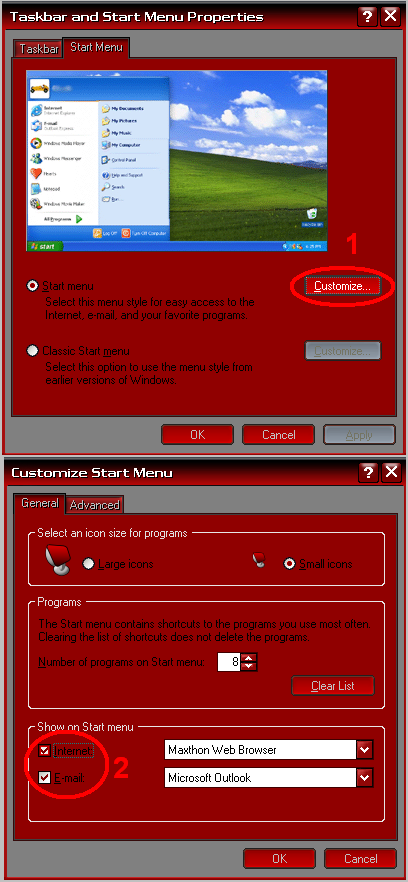
How to remove the Internet and Mail icons from the Start Menu with RegEdit

There’s always the easy way. by Right clicking and choosing properties on the start bar:
Just click away...

But here’s the quick and dirty… Create a .reg file with this content and apply it.
Windows Registry Editor Version 5.00

[HKEY_CURRENT_USER\Software\Microsoft\Windows
\CurrentVersion\Explorer\StartPage]
“Favorites”=hex:00
“FavoritesChanges”=dword:00000001
“FavoritesResolve”=hex:00,00,00,00,00,00,00,00

Scripters, here are the commands to do it from a batch file
[DOS]
:: Clear the pinned icons
REG ADD “HKCU\Software\Microsoft\Windows\CurrentVersion\Explorer\StartPage” /V “Favorites” /T REG_BINARY /D 00 /F
REG ADD “HKCU\Software\Microsoft\Windows\CurrentVersion\Explorer\StartPage” /V “FavoritesResolve” /T REG_BINARY /D 0000000000000000 /F
REG ADD “HKCU\Software\Microsoft\Windows\CurrentVersion\Explorer\StartPage” /V “FavoritesChanges” /T REG_DWORD /D 00000001 /F
[/DOS]

A brand new Doctor Who episode: “Blood of the Daleks”

If you aren’t familiar with the Eighth Doctor, the one before Christopher Eccleston, you can listen to a brand
episode that aired on BBC7 this past Sunday starring Paul McGann.

Here is a quick sample: Link

Blood of the Daleks(link)

The Time Lord has plenty to deal with as an intruder appears in the TARDIS and the Daleks prepare to blight a damaged world.

(two-parter)
Written by Steve Lyons, directed by Nicholas Briggs
With Paul McGann (the Doctor), Sheridan Smith (Lucie Miller), Katarina Olssen (Headhunter), Anita Dobson (Eileen Klint), Kenneth Cranham (Tom Cardwell), Hayley Atwell (Asha/Martez), Gerry O’Toole (Lowell), Nicholas Briggs (Daleks)
31 December 2006 and 7 January 2006

(BTW the first 5 minutes might sound a little bit familiar to the big fans…)