Not sleeping for 8 hours a night? Good for you!

I found this to be a very interesting article. It turns out that my stressing myself about not ever getting 8 hours of sleep is probably doing more harm, than just staying up and doing what I want, does….

Original Article: Sleep Deprivation: The Great American Myth

Robin Lloyd
Special to LiveScience
LiveScience.com
Thu Mar 23, 12:00 PM ET

People who get only 6 to 7 hours a night have a lower death rate than those who get 8 hours of sleep. —From a six-year study of more than a million adults

Many Americans are sleep-deprived zombies, and a quarter of us now use some form of sleeping pill or aid at night.

Wake up, says psychiatry professor Daniel Kripke of the University of California, San Diego. The pill-taking is real but the refrain that Americans are sleep deprived originates largely from people funded by the drug industry or with financial interests in sleep research clinics.

“They think that scaring people about sleep increases their income,” Kripke told LiveScience.

Thanks to the marketing of less addictive drugs directly to consumers, sleeping pills have become a hot commodity, especially in the past five years. People worldwide spent $2 billion on the most popular sleeping pill, Ambien (zolpidem), in 2004, according to the BioMarket, a biotech research company.

Earlier this month, it was reported that some Ambien users are susceptible to amnesia and walking in their sleep. Some even ate in the middle of the night without realizing it.

Global sales for all sleeping pills, called hypnotics, will top $5 billion in the next several years.

The number of adults aged 20-44 using sleeping pills doubled from 2000 to 2004, according to Medco Health Solutions, a managed care company. Sleep problems are commonly reported in the elderly, but the increase in spending on sleeping pills was highest in this period for 10-19 year olds, possibly due to an association with medication for attention deficit hyperactivity disorder (ADHD).

Sleep on this

Still, more sleep is no guarantee for overall health, and more sleeping pills might not bring on either.

A six-year study Kripke headed up of more than a million adults ages 30 to 102 showed that people who get only 6 to 7 hours a night have a lower death rate than those who get 8 hours of sleep. The risk from taking sleeping pills 30 times or more a month was not much less than the risk of smoking a pack of cigarettes a day, he says.

Those who took sleeping pills nightly had a greater risk of death than those who took them occasionally, but the latter risk was still 10 to 15 percent higher than it was among people who never took sleeping pills. Sleeping pills appear unsafe in any amount, Kripke writes in his online book, “The Dark Side of Sleeping Pills.”

“There is really no evidence that the average 8-hour sleeper functions better than the average 6- or 7-hour sleeper,” Kripke says, on the basis of his ongoing psychiatric practice with patients along with research, including the large study of a million adults (called the Cancer Prevention Study II).

And he suspects that people who sleep less than average make more money and are more successful.

The Cancer Prevention Study II even showed that people with serious insomnia or who only get 3.5 hours of sleep per night, live longer than people who get more than 7.5 hours.

And there are questions about the effectiveness of sleeping pills. A study by researchers at Beth Israel Deaconess Medical Center and Harvard Medical School found that a change in sleep habits and attitudes was more effective in treating chronic insomnia, over the short- and long-term, than sleeping pills (specifically Ambien).

Night of the living dead

Until 15 years ago, sleeping pills were mainly addictive barbiturates (such as Seconal, Halcion, Qualude) and sedatives called benzodiazepines (Valium and Dalmane). For this reason, they were less popular and less prescribed. That changed in the early 1990s when Ambien, which is less addictive, came on the market. It acts on the same neural receptors as a benzodiazepine, but is safer. It is the only hypnotic drug Kripke recommends and then, only for fewer than four weeks. Other new hypnotic drugs are safe but ineffective, he says.

Most sleeping pills are recommended for short-term use, but lots of people take them frequently and become dependent upon them to fall asleep. Most sleeping pills, especially when taken over long periods of time, stay in the bloodstream, giving a hangover the next day and beyond, impairing memory and performance on the job and at home.

A time-release version of Ambien (Ambien CR) bound for the market and designed to prevent waking after 4 hours when the drug normally would wear off, along with one of the newest pills on the market, Lunesta, or eszopiclone, (designed for longer-term use) might be even more harmful in this way, Kripke says.

Hypnotic drugs have dangerous side effects, Kripke says. For one, they reduce fear of risky behavior, such as driving fast. Ironically, that could result in the inability to see that the sleeping pills are doing more harm than good over time.

A recent study published in the British Medical Journal showed that the risks of taking sleeping pills (benzodiazepines and other sedatives, in this case) outweighed the benefits among people over 60 in a series of studies carried out between 1966 and 2003. The pills helped people fall asleep and they slept more, but they were twice as likely to slip and fall or crash a car due to dizziness from the pills than they were to get a better night’s sleep.

Even the safest hypnotic drugs have strange side effects, as the alleged Ambien sleepwalkers showed.

And one over-the-counter approach, the hormone melatonin, was found by scientists at the University of Alberta, Canada, to be ineffective in treating jet lag and sleep trouble associated with medical problems. Studies also show it is associated with skin blanching in frogs, gonadal atrophy in small animals, and obesity in some mammals.

Are you sleeping?

The real number of Americans with sleep problems is unclear because the same figure—70 million—appears on National Institutes of Health documents from 2006 and from 1994. This catch-all category reportedly includes insomnia, jetlag, sleepwalking, bed wetting, night terrors, restless legs syndrome, narcolepsy and disordered breathing during sleep (called apnea).

The National Sleep Foundation, the source of many sleep surveys and statistics, has financial and institutional ties to sleeping pill manufacturers, according to the Sacramento Bee newspaper.

Sleep problems could be increasing, Kripke says, but there is no evidence for this. If they are increasing, it could be a result of less exposure to daylight (due to cable TV, the Internet, indoor gyms) and increasing obesity, which causes apnea. But he still recommends against taking sleeping pills in nearly all cases and in favor of improved sleep habits.

“Sleeping pills usually do more harm than good,” he says.

Some Serious Shut-eye
Improved sleep behavior and attitudes do more good than sleeping pills for the treatment of insomnia, experts at a recent National Institutes of Health Consensus Conference agreed, says Daniel Kripke of the University of California, San Diego. The changes he recommends:

  • Do not take sleeping pills. This includes over-the-counter pills and melatonin.
  • Don’t go to bed until you’re sleepy. If you have trouble sleeping, try going to bed later or getting up earlier.
  • Get up at the same time every morning, even after a bad night’s sleep. The next night, you’ll be sleepy at bedtime.
  • If you wake up in the middle of the night and can’t fall back to sleep, get out of bed and return only when you are sleepy.
  • Avoid worrying, watching TV, reading scary books, and doing other things in bed besides sleeping and sex. If you worry, read thrillers or watch TV, do that in a chair that’s not in the bedroom.
  • Do not drink or eat anything caffeinated within six hours of bedtime.
  • Avoid alcohol. It’s relaxing at first but can lead to insomnia when it clears your system.
  • Spend time outdoors. People exposed to daylight or bright light therapy sleep better.
HELP!!! Retrieving the handle of the DLL’s owner -HOW?

I have written a DLL, It needs to access a control in the instance of the application that loaded it. So, I want to get the handle of the application that is currently using that DLL. Or said a different way, the handle of the application that has loaded that instance of the dll. Anyone know how to do this? Solutions in any (major) programming language are acceptible. I should be able to readily translate them to Delphi…

I am building an Maxthon plug-in that adds the missing search buttons from the Google tool bar (search site, search news groups, search images). It is easy enough to search through all windows and get the handle of the maxthon window and then find the value you’ve put in the Maxthon search box. But I want to be certain that I get the right value. I could give myself a unique GUID, search all parent windows till I find that unique GUID and then know that that parent window is my host, however, that seems a pain….

Any thoughts?

The Best Pinger/Update Services List for WordPress 2.02

After some fairly exaustive research and testing, I have come up with the following combined pinger list for WordPress. This took four or five other lists and eliminated duplicates and slow responders (from the US). Many lists contain entries that are already available through Ping-o-matic which goes out and pings the pingers. At the time of this post, this list will not produce any duplicates and will allow WordPress to complete its post before the standard browser will time out. This WILL increase the time it takes to post, however you do not need to wait for the browser to refresh itself. You can usually move on to do other things after the first second or two. At that point the post has been made to the DB and WordPress is off notifying the pingers and will continue that until it is done.

Here is the list of Update Services I use at my blogs:

http://rpc.pingomatic.com
http://1470.net/api/ping
http://bblog.com/ping.php
http://bulkfeeds.net/rpc
http://coreblog.org/ping/
http://xmlrpc.blogg.de

Put these in the “Update Services” field on the Options>Writing tab in your WordPress administrator control panel.

Loading/Unloading a registry hive programmatically in Delphi 5+

Concepts demonstrated:
Registry Use (See procedure TfrmLoadHive.btnDisplayValueClick(Sender: TObject))
Hives & The Default User hive & .Default (See below)
Executing another program from within a Delphi program (See procedure TfrmLoadHive.btnExecRegEditClick)
Use of Process Token Privileges in Delphi (See below)

RE: Hives
The WinXP registry is divided into many different sections. Each major section is called a hive. Handling complete branches of the registry as separate hives allows Microsoft to perform several neat tricks. First of all, it allows hive to appear in several places in the registry with different names. The most obvious example of this is HKey_Current_User which of course points to the hive of the user that has logged in. A lesser known example is HKEY_CLASSES_ROOT which is simply a reloaded version of KEY_LOCAL_MACHINE\SOFTWARE\Classes. Those familiar with the DOS subst command and Linux symbolic links can draw comparisons there too.

An even lesser known use of windows hives is that Windows does not keep all of its hives active. It has separate hives to use as examples for creating local users, and other for creating user accounts when someone has logged into the machine remotely through a domain. I seem to remember there being a couple more examples but they elude me at the moment. Those hives are stored as DAT files on the hard drive. For instance, in the default XP install, the registry hive stored at ‘c:\\Documents and Settings\\Default User\\NTUSER.DAT’ will be used to set all the default registry entries whenever a new user logs into the machine. Set a value in that hive, and all future users will have that value.

NOTE: Do not confuse this with HKEY_USERS\.DEFAULT. The HKEY_USERS\.DEFAULT hive stores the values used when no one is logged in. “Huh? How could that be useful?” Well, if you think about it, controlling whether or not a computer puts itself to sleep if some one has booted it but not logged in can be very important. It might also be nice to set a screensaver that works when you log out of your computer but leave it turned on. An ultra secure person could set the color scheme to be entirely black on black, then only a person that really knows what they are doing could log into the computer – LOL. In any case, .DEFAULT and the Default User hives are NOT the same thing.

RE: Token Privileges:
Windows XP/NT/2000 and newer operating systems have advanced security methods to restrict what programs can and cannot do. These restrictions also allow the logging of some restricted access functions. So, for example, while it is possible for programs to set the system time, just any old program can’t do it.

The program has to ask for and get permission to update the time, before it can be accomplished. It is a bit like what a bell hop must do to get into someone’s hotel room. If a bell hop needs to get into room 5321 (let’s pretend this hotel uses keys and not plastic cards), the bell hop will tell his manager he’s gonna need to get into a room, look up which key that room needs, ask the manager for that key, unlock the room and do his thing. Then of course he will lock the door as soon as he is done. Note that if the bell hop does a bunch of other things before locking the door, the room could be burglarized. And when a good bell hop has to access the room several times, the room will be locked between times he is accessing it.

The process for Windows is the same:
Tell Windows you will be adjusting privileges by calling: OpenProcessToken(GetCurrentProcess(),
TOKEN_ADJUST_PRIVILEGES or TOKEN_QUERY, TTokenHd);
Find the local name of the privilege you will be adjusting by calling LookupPrivilegeValue
Grant yourself access by setting TTokenPvg.Privileges[0].Attributes to SE_PRIVILEGE_ENABLED
Lock the door again by setting TTokenPvg.Privileges[0].Attributes to SE_PRIVILEGE_DISABLED

In my program, I have created three helper routines for working with the tokens: SetTokenPrivilege, GrantPrivilege and RevokePrivilege. The latter two only serve to make my calling code clear. Readability is essential for any professional grade program. At some point you will forget the details of every single program you’ve write. So, even if you are only writing a routine for your own use, you should do what you can to make it easier to read. Tasks like this may seem wasted on throw away programs, but the more you do it, the faster you will be and the more likely it will be that your habit of writing good code will pay off in the end.

Here are my Delphi privilege routines:

[Delphi]
{******************************************************************************
SetTokenPrivilege
A helper function that enables or disables specific privileges on the
specified computer. A NIL in SystemName means the privilege will be granted
for the current computer. Any other value must match the name of a computer
on your network.
******************************************************************************}
procedure SetTokenPrivilege(aSystemName: PChar; aPrivilegeName: PChar; aEnabled: Boolean);
var
TTokenHd: THandle;
TTokenPvg: TTokenPrivileges;
cbtpPrevious: DWORD;
rTTokenPvg: TTokenPrivileges;
pcbtpPreviousRequired: DWORD;
TokenOpened, ValueFound: Boolean;
begin // SetPrivilege
// The privilege system is only available on NT and beyond
if (Win32Platform = VER_PLATFORM_WIN32_NT)
then begin
// Retrieve the Token that represents this current application session
TokenOpened := OpenProcessToken(GetCurrentProcess(),
TOKEN_ADJUST_PRIVILEGES or TOKEN_QUERY,
TTokenHd);

// Check for failure
if (not TokenOpened)
then raise Exception.Create(‘The current user does not have the access required to run this program.’)
else begin
// Get the name of the privilege (since Windows is multi-lingual, this must be done)
ValueFound := LookupPrivilegeValue(aSystemName, aPrivilegeName, TTokenPvg.Privileges[0].Luid) ;
TTokenPvg.PrivilegeCount := 1;

// Enable or disable the flag according to the bool passed
if (aEnabled)
then TTokenPvg.Privileges[0].Attributes := SE_PRIVILEGE_ENABLED
else TTokenPvg.Privileges[0].Attributes := SE_PRIVILEGE_DISABLED; // See note on local constant declaration
cbtpPrevious := SizeOf(rTTokenPvg) ;
pcbtpPreviousRequired := 0;
if (not ValueFound)
then raise Exception.Create(‘This program is incompatible with the operating system installed on this computer.’)
else begin
try
// Adjust the permissions as required.
Windows.AdjustTokenPrivileges(TTokenHd, False, TTokenPvg, cbtpPrevious,
rTTokenPvg, pcbtpPreviousRequired);
except
raise Exception.Create(‘The current user does not have the required access to load a registry hive.’)
end;
end;
end
end;
end; // SetPrivilege
{******************************************************************************
GrantPrivilege
This routine grants the privilege(s) needed to access the hidden system hive
and load it into memory.
******************************************************************************}
procedure TfrmLoadHive.GrantPrivilege(aPrivilegeName: String);
begin // GrantPrivilege
SetTokenPrivilege(NIL, PChar(aPrivilegeName), TRUE);
end; // GrantPrivilege

{******************************************************************************
RevokePrivilege
This routine revokes privilege(s) given in GrantPrivilege
******************************************************************************}
procedure TfrmLoadHive.RevokePrivilege(aPrivilegeName: String);
begin // RevokePrivilege
SetTokenPrivilege(NIL, PChar(aPrivilegeName), FALSE);
end; // RevokePrivilege
[/Delphi]

In my case, I am using the SeRestorePrivilege token. This is actually one of the most powerful and lethal tokens. With it you are telling Windows that you are a Hard Drive backup program and you want to have access to all sorts of files that most programs are not allowed access to. Presumably you are doing this for good and not evil. Other tokens are:
SeCreateTokenPrivilege, SeAssignPrimaryTokenPrivilege, SeLockMemoryPrivilege, SeIncreaseQuotaPrivilege, SeUnsolicitedInputPrivilege, SeMachineAccountPrivilege, SeTcbPrivilege, SeSecurityPrivilege, SeTakeOwnershipPrivilege, SeLoadDriverPrivilege, SeSystemProfilePrivilege, SeSystemtimePrivilege, SeProfileSingleProcessPrivilege, SeIncreaseBasePriorityPrivilege, SeCreatePagefilePrivilege, SeCreatePermanentPrivilege, SeBackupPrivilege, SeRestorePrivilege, SeShutdownPrivilege, SeDebugPrivilege, SeAuditPrivilege, SeSystemEnvironmentPrivilege, SeChangeNotifyPrivilege, SeRemoteShutdownPrivilege, SeUndockPrivilege, SeSyncAgentPrivilege, SeEnableDelegationPrivilege, SeManageVolumePrivilege
So, that’s the basics. Take a look a the comments in the rest of the source code and you’ll soon see what happens and why.

Also try some different things. Run RegEdit and load the hive manually through File>Load Hive. Did you notice that you HAVE to be at a point within one of the preloaded hives before that option is enabled? What happens when you press the load hive button but you haven’t granted yourself privileges? What happens when you grant your self privileges and don’t revoke them b4 closing the program. Can you then load the hive when you rerun the program? What happens if you Grant 4 time but only unload once?

Experiment. But remember, you are playing with the registry and thar be monsters there. This app works fine on my system, I’ve used similar routine regularly for a couple years now, but I haven’t tested it with all versions of Windows and I have no idea how it will handle out-of-the-ordinary circumstances, like bad sectors in a dat file on your HD. Additionally, a Windows Service pack could totally change what this program does. So, in short, don’t come to me when you need to reinstall Windows. I’ll simply say it was a bad coincidence and anyway your system is beyond my control, you never should have run this program on it. I’m not responsible for your financial and emotional loss. You are responsible for making sure that source code you run on your computer does not have deliberate or accidental malicious behaviors.

http://www.TheCodeCave.com/downloads/delphi/LoadHiveDemo.exe
http://www.TheCodeCave.com/downloads/delphi/LoadHiveDemo.dpr
http://www.TheCodeCave.com/downloads/delphi/U_LoadHive.dfm
http://www.TheCodeCave.com/downloads/delphi/U_LoadHive.pas

Cool stuff to look at on Google Satelite view

Have you ever explored the artic regions?

There’s some incredible stuff to see up there in satellite view, like icebergs the size of SW PA breaking off and flowing down stream…
http://maps.google.com/?ll=80.319658,-86.594238&spn=0.282656,2.287903&t=k

I had been looking at Greenland then I became fascinated with this huge river up in Russia

http://maps.google.com/?ll=80.319658,-86.594238&spn=0.282656,2.287903&t=k

This thing is absolute HUGE and look at the pockmarked land structure around that bay… it is just wild
http://maps.google.com/?t=k&ll=70.768146,78.308487&spn=0.13842,0.571976&t=k

And that river flows all the way back to/from this huge lake thousands of miles away – which has a really weird streak across it. http://maps.google.com/?t=k&ll=53.13359,108.676758&spn=2.017007,4.575806&t=k

It must be something on the satellite’s lens… You can see it’s fabric….
http://maps.google.com/?t=k&ll=53.91814,108.683195&spn=0.02674,0.043516

Even so, I am considering submitting a story to Weekly World News about how the Russians have a massive program to create a band-aid to patch the hole in the ozone… I think it would fly don’t you?

A batch file to find the first matching file in the search path…

This is another small app I wrote for someone to use at the ZTree forum.

This one is a DOS batch file that finds files in your search path that match the criteria you pass to it.
For instance you could type “SearchPath WPFile.Doc” and it would return the location of that file in your search path. If you type in simply “SearchPath MyApp” it will do a search for all executible files as defined by the PATHEXT environmental variable.

I found this program extremely useful since when clicking Start>Run and entering NO (it was supposed to autocomplete to notepad) ran a program that I could not find anywhere. SearchPath found it in a network directory.

Concepts Demonstrated:
Batch file subroutines – Use a CALL to execute a jump location in the same batch file as if it was a seperate batch
GOTO :EOF – Used to return out of a batch file OR batch Subroutine.
For Loops & Accessing to Environment variables
Child Recursion – A parent calls the child and the child in turn calls the parent which could in turn
child again.

[DOS]
:: *************************************************************************
:: SearchPath.Bat 10/31/2005
:: Written by Brian Layman (AKA Capt. Queeg)
:: Visit him at http://www.TheCodeCave.com
::
:: A batch written to display the program that would be run when
:: a filename is typed at the command prompt. Just a demo for
:: Hartmut at http://www.ztw3.com/forum/forum.cgi
::
:: Usage: SearchPath ProgramName[.EXT]
::
:: History:
:: 10/31/2005 – BL – Created
:: 11/01/2005 – BL – Removed Temp File Usage
::
:: *************************************************************************
@echo Off
:: All this is boiled down to one subroutine that sets a variable of the
:: same name.
call :SearchedFilePath %1

:: If no program is found, say so.
if “%SearchedFilePath%”==”” echo There is no matching program in the search path

:: If a program was found, echo its name.
if NOT “%SearchedFilePath%”==”” echo %SearchedFilePath%

:: Clear out our temp variable
set SearchedFilePath=

:: Quit
GOTO :EOF
:: *************************************************************************

:: *************************************************************************
:: Support procedures
::
:: These routines are called with a CALL directive and the GOTO :EOF
:: terminates that CALL but does not terminate the entire running of the
:: batch file.
:: *************************************************************************

:: *************************************************************************
:SearchedFilePath
:: Returns the full path to a passed file in the searchpath
::
:: Returns blank if not found.
::
:: *************************************************************************
: set SearchedFilePath=
:: Set the default value to blank.
set SearchedFilePath=

:: If there is no extension handle it
if “%~x1″==”” Call :SearchWithExtensions %1&GOTO :EOF

:: There is no extension, is it blank?
if “%1″==”” GOTO :EOF

:: So, we have an extension. That means we can do a simple search.
:: %~dp$PATH:1 automatically searches the path for us. It is a
:: variable set by the Call command.
set SearchedFilePath=%~dp$PATH:1%1
if “%SearchedFilePath%”==”%1” set SearchedFilePath=&GOTO :EOF
GOTO :EOF
:: *************************************************************************

:: *************************************************************************
:SearchWithExtensions
:: Iterates the extensions gathered from the PATHEXT environment
:: and searches until the file is found.
::
:: Returns blank if not found.
::
:: *************************************************************************
:: Initialize a counter for looking at multiple search results in one line
set cnt=0

:SearchLoop
:: Break out after 20 checks.
:: If you might have more than 20 extensions, increase this value.
:: If you could find out how many periods there are in the temp file,
:: you could optimize this.
if “%cnt%”==”20” GOTO :SearchLoopCleanup
set /A cnt=%cnt%+1
:: Continually search the single line file returning each sequential
:: search result and recursively pass it to the SearchedFilePath routine.
:: When we ask for a token # that doesn’t exist and blank is returned,
:: abort out.
for /F “tokens=%cnt% delims=.;” %%C in (“%PATHEXT%”) do call :SearchedFilePath %1.%%C
if “%SearchedFilePath%”== “” GOTO :SearchLoop

:SearchLoopCleanup
:: Clear our Temp variable
set cnt=
GOTO :EOF
:: *************************************************************************[/DOS]

A small app to gather specific lines from files

Here’s a small app that I wrote to help out Pat Gilbert over on the ZTree support forums.

And I quote: http://www.ztw3.com/archive/020/archive.cgi?read=72807

> What I need to do is to “gather” the 3rd & 4th lines of text
> from a set of files and write them to a temporary file for further
> processing. Ideally I would like them appended to the temp file without
> additional LFCR at the end of each gather.

I sometimes give myself a 15 minute project to write on Monday mornings to clear my brain and get my mind into the right mode. I REALLY needed that this morning, so I threw this together. With testing, I exeeded my 15 minute time limit by 5 minutes, so you’ll need to figure out how to use it yourself, but here:
http://the-wildwest.com/Queeg/Batches/GatherLines.exe

Click the ChangeDirectory button to populate that edit box with the currend path.

Save to file will save a file called Gathered.txt to the current directory (which is probably where you are gathering lines from.).

It could be MUCH more efficient and if you are working with Largish files, it will be slow (for convenience I load the whole file), but like I said, I had 15 minutes.

Maybe it will help…

Goodbye Google Image Search as we know it

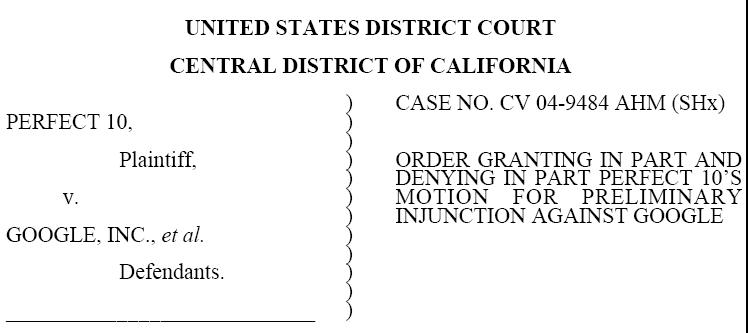
The actual court injunction against Google

Well, there you have it… a preliminary injunction by a California judge against Google Inc., Amazon et. al. See the whole thing here.

You see there’s this soft porn company called Perfect 10. They even publish a magazine with the most perfect “natural” women in the world (no additives but plenty of preservatives). This magazine is, from what I hear, like getting the Sports Illustrated Swimsuit Edition, 12 months out of the year.

Well, really, it is just a tie-in to Perfect 10’s big business – their Pay-for-Porn services at Perfect10.com. They want you to goto their website for the full nude shots of their models. Plus they want to put naked girls on your cell phone. And that’s where the problem lies. While there are many more famous body parts, for Perfect 10 the most important it all comes down to the girl’s thumbs.

Google’s image search goes out and grabs pictures from all over the Internet UNLESS a website tells them not to. And some guys like to share pornographic pictures of “hot women” on their websites. When Google displays those pictures, they are displayed as small thumbnail size images – the perfect size for a cell phone screen. You can see where this is going… So, Perfect 10 is saying that Google is distributing copyrighted material in a form that will directly affect their market. And the judge agrees. I’m sorry to say that I agree too.

The facts in the case are not disputed.

  • Google does display copyrighted images – this is strictly speaking illegal.
  • Google does display versions of them modified to a thumbnail size – this is strictly speaking illegal.
  • This one is almost as important – Google is aiding in theft of services by discovering and propogating passwordz to porn sites.  So this is not JUST about images but Perfect 10 is also saying that google cannot display text results that might contain information that allows people into their site without paying for it. 

How do you fix that? How do you restrict text searches?  How do you tell if an image was once associated with a copyrighted site.  It’s a bit of a sticky wicket. Google indexes what’s on the web. That’s all it does. The funny thing is that the Judge didn’t know what to do about. He asked Google to come up with a solution to get him out of this hairy mess.

Eliminating all possible copyrighted material this goes fundamentally against the very nature of the search engine. Google was already pressing the boundary by indexing all copyrighted works in public libraries. This particular case strikes not at that blatent infringement, but at the core search that no one (few) had a problem with.

So, in the ever more dicey battle over intellectual property, where do search engines fall? Could this be the end of an all inclusive Google? I think the answer is: yes. Google – as we know it – is gone. There will be restrictions enforced on copyrighted material. Personally, I think Google will propose a standard involving placing copyright notices in the page, the .htaccess or more specifically the media itself. The latter is the only solution that works for images copied off site. Then any media that contains that copyright notice (which will become a standard addition to images produced on professional grade cameras) will not be indexed on Google. However, I think Perfect 10 will fight against that since it is more work for them and it is easily bypassed.

We’ll have to see. Will Girls, Girls, Girls be the downfall of that brief 21st century fluke: “The Search Engine”.