The Code Cave’s 1 year Blogaversary: Confessions of a Code Monkey

     (#)
    (oo)
   (—–)
    >0<

It was one year ago, Feb 28, 2006 to completely precise, that TheCodeCave.com first came on line.  A week later I had a fairly functional website, running WordPress with a theme I was satisfied with and a bunch of great ideas. 

This site was mostly meant for my own convenience as a place where I could put Delphi and PHP code fragments  that I knew I could find later.  I have used it for that again and again and again.  It is a MUCH better resource than Microsoft Outlook’s sent folder.  Plus, now that someone named Meagan works at the office, every time I simply type ME in the To: address of an email, I send stuff to her instead of my home account.  (Sorry, Meagan, for all of those meaningless code fragments in your email account.)

Anyway,  my wife first suggested the name The Code Cave.  Since I liked caving and coding, it made sense to her.  Since it had multiple meanings, I, of course loved, it.  (A code cave, you know, is empty space in an executiple where all sorts of neat treasures can be hidden.)  So it worked.  

A year later, the site has a google rank of 357,000, which is not to shabby in my book.  Especially since I had a couple dry spells of 1 post per month.  I’ve just gotten my first Adsense check deposited and that pays for next year of hosting in full.  So, the site is self sufficient.   I’ve also been told that I’ve helped loads of people (Sweet).  And my life is enriched by coming to know loads of new people I’ve met through the site.

Not a bad year…   Her sites have done well too.  She hosts KnitChat.com of course (where I’d been doing php and WordPress for a whole year before TheCodeCave. came around), and Loom Out Loud, and now  a new knitting magazine site: Loom Knitter’s Circle.

 I plan to do a number of “Posts that never made it” posts, the first one of which was the Delphi source code for turning any 1and1 account into a Dyn DNS server posted yesterday.  I had a whole series of web automation posts planned, but I never put them up.  I hope to get a number of them up. I’ve found that when I stop using this site a repository, and start using it as a blog, I get less code up here and less posts up here. So, the posts will get up here when they get up here.

So, for an old Borland Turbo Prolog/Turbo C/Turbo Pascal coder, my venture into the web has been a good experience…  And I can’t wait to tell you all some of the good stuff that I’ve got going on right now…  I’m juggling a few nifty things right now and hopefully I’ll have some good news to share as a result. I’m smilin’ just thinkin’ about it.

code monkey – noun –

Download link

1. A person only capable of grinding out code, but unable to perform the higher-primate tasks of software architecture, analysis, and design. Mildly insulting. Often applied to the most junior people on a programming team. 2. Anyone who writes code for a living; a programmer. 3. A self-deprecating way of denying responsibility for a management decision, or of complaining about having to live with such decisions. As in “Don’t ask me why we need to write a compiler in COBOL, I’m just a code monkey.”      — The Jargon File
Delphi Demo: DynDNS through your WebHost’s CPanel (e.g. 1and1.com)

aka Dynaminc DNS with 1and1.com

aka How to automate a Web Session with Delphi

 Here’s a program I’ve been beta testing for a few months.  I use it on a subdomain of TheCodeCave.com to allow me to always reach my home.  I use Road Runner Cable from Time Warner and have a dynamic IP address.  That means that my IP can change at any point in time.  And it does!

I used to use the site Dyn.EE to provide a link to my house.   I always liked them because their client is written in Delphi.  However, now that I have TheCodeCave.com and a gazillion subdomains hanging off of it (MyIP.TheCodeCave.com, Webmail.TheCodeCave.com, Rot13.TheCodeCave.com and the list goes on) I thought I would also make an url that connected to my house.

 This was tedious but quite duable to do once.  You just go into the 1and1.com control panel, create the domain, wait for it to become functional, and then modify the DNS settings and override the A record.  Simple right? Well mostly, it is just point and click at what seems logical.

 However, that’s a pain to do on a regular basis because well…

  1. The UI is slow.  The control panel takes for ever to get through.
  2. You have to first look up your own IP address first.  I usually would call my wife and have her send me an email and I’d grab it from the email header and then fix the DNS.  What a pain.
  3. Why suffer through minutes of clicking a few times a year when several hours of programming can get your around it?

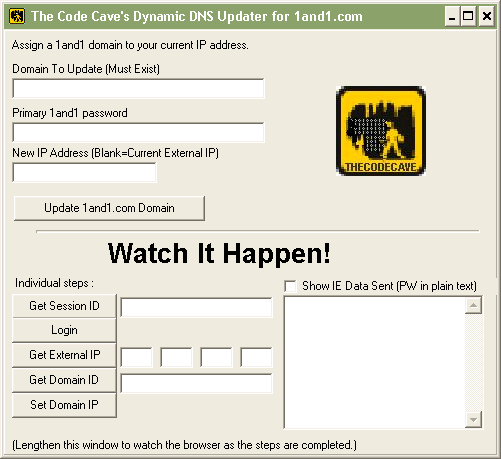
So, I give you : The Code Cave’s Dynamic DNS Updater.

The Code Cave's DDNS Updater!

 The usage is simple. 

  1. Create a subdomain on your site and twiddle your thumbs til it becomes active sometime in the next hour or two.
  2. Enter that domain in the first field.  NOTE: If you put your main URL, your main URL will no longer point at your website.  Be careful!  You want this to be something like:  subdomain.example.com
  3. Enter the main password for your account.  This is sent over HTTPS to 1and1.com and not to me.  Have no fear. 😉  But it will appear in the debugging section if you check that “Show IE Data Sent” box.
  4. Click the Update 1and1.com Domain button and watch it work.

Your change should be available almost immediately, however, when debugging this program I sent the change a few (dozen) times and it eventually refused to allow any more updates to go through for another 24 hours.  It’s been fine ever since.  I’ve since changed the program so that does not try to update the DNS if the URL is already correctly set. 

I’ve additionally made the program so that it takes the three fields mentioned above as  parameters.  You can put this into Windows XP’s scheduler and every 15 minutes, it will check the current IP and update as needed.  Or just put it in your startup folder.  This of course means your password will be put into your scheduler, but you have the source code, you can add encryption if that is a concern on your PC.

So, an easy way to do it would be to create a short cut in the startup folder to the program with the parameters like this:

tcc_DDNSUpdater URL PASSWORD DOMAINID

That will look something like this:

tcc_DDNSUpdater dyn.sample.com My1PaSsWoRd  12323213

 The quickest way to get your domain ID is to run the program manually once and just click the Update 1and1.com Domain button.  Then you can see the domain ID below.

 The program follows this procedure recreating the required browsing session (so it is only as fast as your connection to 1and1.com).

  1. Go to MyIP.TheCodeCave.com and get the current IP address (This is a constant in the code and you can change it easily).
  2. Use a socket to retrieve the IP address for the URL you are looking up.
  3. If the two match, terminate the application.
  4. Navigate to Admin.1and1.com and get a session ID needed to establish the secure login.
  5. Login using HTTPS, the domain to update as the user name, and the provided password.
  6. If a Domain ID has not been provided, navigate to the list of domains and retrieve the ID of the domain (The subdomain HAS to be amoung the first 50 domains, alphabetically, on your account.)
  7. Navigate to the DNS update page for that domain (a requirement of the 1and1 Control Panel software)
  8. Submit the DNS record change.

Simple as that!

The full delphi source is available in the Zip file.  The usual “If this crashes your site and costs you $30,000 dollars, why the heck did you run non-standard like this and risk a business site on it!  I’m not responsible for your site’s safety you are.  So consider the very real risk that things can go wrong with demo stuff downloaded off the Internet and err on the side of safety.” warning message applies.

You can download the file here: TCC_DDNSUpdater_Main.zip (link)

 I’ll post details of the code later.

I created this app using a Websession logger that might be of use to you.  I use it in my automation processes at work and also us it to create forum submission links that I could not have book marked on the web in any other fashion.

Enjoy!

TheCodeCave.com Joins Delph Feeds

There’s been a lot happening in Borland lately, specificaly in CodeGear territory.  These are exciting times.  I’ve got a whole lot of stuff that I want to tell you about.  However, first I’d like to introduce you to a site that you may not have heard of: Delphi Feeds.

Delphi feeds is a sort of one-stop-shop for Delphi related projects.  With some new and exciting projects coming out, your gonna be able to keep up to date there.  TheCodeCave ‘s Delphi category has now been added as of the feeds available on that site. 

 So, what that means is we might be getting a little more traffic here.  Also you’ll probably see some re-posts of my favorite Delphi projects I’ve shown here.  Perhaps I’ll update them to run in BDS 2006, Spacely or Highlander. 

What in the world is Spacely and Highlander?  Well, I can’t divulge too many details, but those familiar with the Codegear road maps know that Spacely is the version of Delphi due out at the end of March.  Spacely is the name used while it is in the testing phase. Spacely is an ONLY Delphi 2007 release.  Highlander on the other hand is a the BDS 2006 successor with the full trimmings.  You can find all these details and more by doing a little Googling and by visiting Delphi feeds.

I’ll have a detailed post about the Delphi for PHP release coming up shortly… This product has me the most excited.  It will revolutionize php development.  Please stay tuned…

How do you switch from XP to a Vista computer?

Here’s an interesting tool I found:  the Windows Easy Transfer Companion.

 Apparently “Windows Easy Transfer Companion enables you to automatically transfer your most important programs from your Windows XP-based PC to your new Windows Vista-based PC. This way you can become productive on your new PC as soon as possible. Easy Transfer Companion is designed to be used in addition to Windows Easy Transfer—which transfers your data and settings.”

Basicaly it will use the network to transfer a good portion of your registry from one machine to another.  The really funny thing is that it doesn’t seem to care one jot about whether you have the rights to transfer that software…  That kind-of flies in the face of Microsofts rigid activation policy. 

Anyway, here’s the official word: 

Windows Easy Transfer Companion enables you to automatically transfer your most important programs from your Windows XP-based PC to your new Windows Vista-based PC. The software will move more than 100 of the most popular programs, as well as many others that you may have installed. You have complete control over selecting which programs to transfer, so only the programs you care about will move. The software will alert you if some programs may not be able to transfer, or may not transfer with high confidence. Most security software is not able to transfer due to technical reasons.

Easy Transfer Companion is designed to be used in addition to Windows Easy Transfer—which is part of Windows Vista and automatically transfers your data and settings. Connecting your two computers can be done with either an Easy Transfer Cable (available online, from retailers, and from PC manufacturers), or a home or small business network. If using an Easy Transfer Cable, you must first install Windows Easy Transfer on your Windows XP-based PC. By using Easy Transfer and Easy Transfer Companion you will be able to quickly and easily setup your new PC with all the data, settings, and programs that matter to you, so you can be productive on your new PC right away.

Easy Transfer Companion only transfers programs from a Windows XP-based PC to a Windows Vista-based PC. Easy Transfer Companion is currently in Beta, and only available for the US market.

What is wrong with this bash script?

It should say that test.zip is a zip file, but the if statments, which check for TAR in the file name, all return true… If I do this outside of an if statement, say at the shell prompt, it works correctly.

What is wrong with this statement:

[dos]
#$bash

ArchiveName=”test.zip”
cur_file=”test.zip”
echo “ArchiveName: $ArchiveName”

if [ $(echo $ArchiveName | grep “tar$” -i)=$ArchiveName ]
then
echo Test1: It is a tar file
else
echo Test1: It is a zip file
fi

if [ $(echo $ArchiveName | grep “tar.gz$” -i)=$ArchiveName ]
then
echo Test2: It is a tar file
else
echo Test2: It is a zip file
fi

if [ $(echo $ArchiveName | grep “tar$” -i)=$ArchiveName ] || [ $(echo “$ArchiveName” | grep “tar.gz$” -i)=$ArchiveName ]
then
echo Test3: It is a tar file
else
echo Test3: It is a zip file
fi

[/dos]

Is there a better way to do this?

Moral Combat: Video Games in our Culture vs. Anarchy Media’s WP Plugin

IE six has an incompatiblity with this post. If you get an error, go to the next page or try Maxthon2 or FireFox.

Doug Stewart had a good post about an upcoming video game documentary about the affect of video games in our culture. In this post, I show you that movie while demonstrating the use of a WordPress Multimedia plug in. You can also read about “Moral Combat” on the Apple Pro Video site (link).

WordPres 2.0.7 is Out the Door! Now you can use the upgrade tool!

This is when it pays off. All those who downloaded and tested the EasyWPUpgrade tool can now get their monies worth! All you need to do to upgrade is log in via tellnet and type the name of the upgrade script, and in seconds you’ll have your site upgraded. Of course, you can read all about the release on the Development site: here: http://wordpress.org/development/2007/01/wordpress-207/

I was successfully able top update my five active sites, without a fuss.

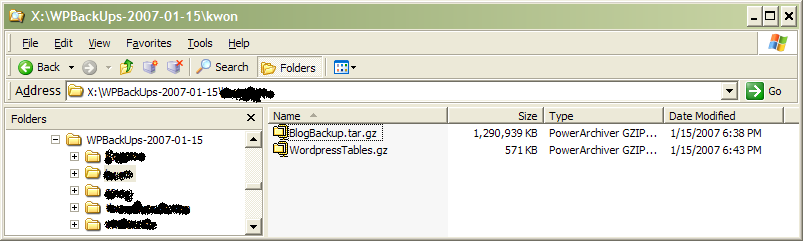
Here’s a picture of the backup files it created (And yes, that file is 1.2gb in size. I do trust this for my live sites.)

Ooooo Ain

You can try EasyWPUpgrade for yourself and tell me all about your experience on the The Code Cave’s forum: Did you use the The Code Cave’s EasyWPUpgrade for WP 2.0.7?

I’ve updated to 2.0.7rc2. More testers are needed

Mark Jarquith has asked for help with testing RC2. He’s looking for specific testers.

To see if you are one of the ones he is looking for, save this text as something.php:

[php]

[/php]

then open it up.

If the header shows “PHP Version 4.3” or anything less, and Server API shows CGI or FastCGI, PLEASE TEST!

If you find a variable called SERVER_SOFTWARE that shows you are running IIS, PLEASE TEST!

You can download the full package here:
http://wordpress.org/beta/wordpress-2.0.7-RC2.zip

If you are running 2.0.6 and would like only the changed files, you can download this file:
http://www.thecodecave.com/downloads/wp206to207rc2.zip
(Note that this file is relative to your blog directory and not to the root with a wordpress directory underneath it. It contains just three files. So just extract it, with paths to where your blog is installed.)

Here’s how to test:

From http://comox.textdrive.com/pipermail/wp-testers/2007-January/003644.html

To test feeds’ 304 Not Modified headers, I recommend getting the Live
HTTP Headers extension for Firefox:

http://livehttpheaders.mozdev.org/

A. Warming up:

1. Make sure that Firefox will display feeds (and not pipe them to
an external RSS viewer)
2. Disable any caching plugins on your site like WP-Cache
3. Upload the 2.0.7 files (no need to run an upgrade)
4. Clear your Firefox cache

B. Testing procedure:

1. Open up Live HTTP Headers (Tools > Live HTTP Headers)
2. Visit http://yoursite.com/wp-rss2.php?test=123
3. Verify that the response header for /wp-rss2.php?test=123 is 200 OK
4. Clear the Live HTTP Headers output
5. Reload the feed
6. Verify that the response header for /wp-rss2.php?test=123 is 304
Not Modified

There should be no conflicting Status: header (that is, any Status
header should match the response code of the main HTTP response header).

NOTE: The ?test=123 part is just to make sure that your first request
isn’t already cached.

Next, try basic WordPress functions like logging in, writing an
entry, writing a page, and deleting a page.

Let me know how it goes. Please include PHP version, server, and
server API (e.g. PHP 5.2/Apache/FastCGI) If you’re unsure about your
headers, paste the Live HTTP Headers output in your response, or send
me your feed’s URL to check out.

(BE SURE TO REMOVE ANY COOKIE-RELATED HEADERS! IF YOU ARE UNSURE,
SEND YOUR RESPONSE DIRECTLY TO ME)

Then report here, or on wp-testers if your feeds seem to be working correctly.

Thanks!

How to answer: I upgraded to 2.1 and my plugins don’t work…

I’m in the process of gathering a list of things to check in your plugins directory to see if your site will survive the 2.1 upgrade without blowing up. I might turn this into a “Ready to Upgrade Plugin” I’m sure it won’t ever be able to catch everything, but it just might make things go more smoothly for some. With 2.1 possibily coming out on Jan. 22, I don’t know how complete this will be, but it might be worth a shot…

The replacement of the Table* variables is a good place to start. Here’s an email I sent two days ago on the subject. A person had written for help to the hacker list. He had just upraded from WordPress 2.0.5 to 2.1 and suddenly was getting an error in an sql statement.

The SQL statement looked something like this: “select blah, blah, blah from , where

After a from statement, there is normally a table name. In this case the comma indicated there were two table names. He wanted to know if this could have been caused by the upgrade.

Here is how I responded:

Yes, there were separate variables that held the table names. They were depreciated in version 1.5 and the developers tried to get the word out for this. In the comments, the 1.5 code said that the variables would be around for a few more months:

[php]
// We’re going to need to keep this around for a few months
// even though we’re not using it internally

$tableposts = $wpdb->posts;
$tableusers = $wpdb->users;
$tablecategories = $wpdb->categories;
$tablepost2cat = $wpdb->post2cat;
$tablecomments = $wpdb->comments;
$tablelinks = $wpdb->links;
$tablelinkcategories = $wpdb->linkcategories;
$tableoptions = $wpdb->options;
$tablepostmeta = $wpdb->postmeta;
[/php]

As you can see the preferred way to access this information is through the $wpdb->tablename method that was added to the (then) version 1.3 source code in the summer of 2004.

As it is now 2007, the 2.1 release is FINALLY removing these variables as the comments indicated would be done two years ago.

Please contact the author of those plugins and send them to this link: http://wordpress.org/development/2006/12/naughty-or-nice/

That will help get them back on trac with the WordPress code.

And btw, the pun in the last line was intended, but no on seemed to catch it!

[edit]
Hilarious – Because I put “Summer of 2004” and “release” in the post, adsense thinks I’m writing all about movies and is recommending DVDs when you view only this post…
[/edit]